

Quick answer. Practice management software for attorneys is the system a law firm runs on: clients and matters, calendars, documents, time, billing, payments and trust accounting in one place. For most solo and small firms, a sensible first shortlist is Clio, MyCase and PracticePanther, with CosmoLex for built-in accounting and Smokeball for automatic time capture. Personal injury and mass tort firms should also demo plaintiff platforms such as Filevine, Litify or CasePeer. Published entry tiers run from $39 to $60 per user per month as of October 2026, and many plans are quote-only.
Key takeaways
- The ABA's 2024 survey found 53% of respondents had case/practice management software available at their firms, down from 63% in 2022, according to the ABA 2024 Practice Management TechReport.
- Practice management runs the firm, case management runs the matter, a legal CRM runs intake and a DMS stores documents. The ABA surveys case and practice management as one category.
- Trust accounting carries the most rule weight: ABA Model Rule 1.15 plus the model trust-records rule, whose comment calls monthly reconciliation the preferred practice.
- Read the billing basis, add-ons, implementation fees and minimums before comparing headline prices. Clio, Smokeball, Filevine, Litify and LEAP quote some or all plans.
- Ask every vendor for its SOC 2 Type II report and data-export terms. Rule 1.6(c) and Rule 5.3 make vendor diligence the lawyer's job.
- ABA Formal Opinion 512 requires a client's informed consent before client information goes into a self-learning generative AI tool, so check how a platform's AI handles firm data.
- Plaintiff firms should judge a platform on the intake handoff, consent records, lead-source attribution and settlement disbursement through trust.
Most firms shop for practice management software at a breaking point. The trust balances live in a spreadsheet, deadlines sit in three personal calendars, intake notes get re-typed into the billing system, or the desktop program the firm bought fifteen years ago no longer runs well on the laptops people actually use. Meanwhile every vendor describes itself as the operating system for law firms, and most comparison pages list ten logos with prices that were copied from somewhere else years ago.
This guide is written for four readers: solo and small-firm owners who run the business side themselves, administrators and COOs at firms of 10 to 99 lawyers, operators at personal injury and mass tort firms, and the legal-ops, IT or compliance lead doing vendor diligence. It runs in buying order: quick picks, definitions, cloud vs on-premises, features, a 20-platform comparison, fit by size and practice area, security and ethics, cost, a 6-step selection process, migration, a chapter for plaintiff firms, and an FAQ. Every price comes from the vendor's own page, read on 22 October 2026, and the "best for" labels are editorial judgment, not hands-on testing.
A disclosure: Mass Tort Marketing Agency is a personal injury lawyer marketing and mass tort intake agency, not a software vendor. Our practical angle is the point where marketing turns into casework. Leads and intake records have to land in these systems with their source and consent data intact, or nobody can tell which spend produced which signed case.
Quick picks: best practice management software by firm type
There is no single best practice management platform; the right pick depends on firm size, fee model and how you keep the books. General cloud suites fit most small firms, accounting-first options suit firms that want one ledger, and plaintiff platforms suit contingency practices. Prices below come from vendor pages as of October 2026.
| Firm type | Shortlist to demo | Why it fits | Public entry price (as of Oct 2026) |
|---|---|---|---|
| Solo, general practice | Lawcus, PracticePanther, MyCase, Clio | Low entry prices; trust accounting on MyCase Basic and Clio Starter | Lawcus $39/user/mo annual; PracticePanther $49 annual; MyCase $50 annual; Clio from $49/user |
| Small firm, accounting built in | CosmoLex, Clio, PracticePanther Business Pro | Built-in ledger or trust and operating accounting | CosmoLex $49 yearly / $59 monthly |
| Small firm losing billable time | Smokeball | AutoTime automatic time tracking | Quote only |
| Clients that require LEDES e-billing | CARET Legal, PracticePanther Business, CosmoLex Core, MerusCase | LEDES invoicing on the plan | CARET $79 billed annually + implementation |
| Mid-sized firm (10 to 99 lawyers) | CARET Legal, Actionstep, Centerbase | Midsize positioning and implementation programs | Actionstep and Centerbase quote only |
| Firm that must stay on-premises | Tabs3 with PracticeMaster | OnSite option still sold | OnSite from $69/user/mo + $35 PracticeMaster |
| Personal injury, contingency fee | CasePeer, Neos, Filevine, Litify, SmartAdvocate, Jove | Built around treatment, statutes and settlements | CasePeer $90; Neos $109 billed yearly; others quote |
| Mass tort and high-volume plaintiff | Filevine with Lead Docket, Litify, SmartAdvocate | Intake-to-case sync; mass tort practice area listed | Quote only |
| Workers' compensation | MerusCase, SmartAdvocate | Workers' comp listed as a practice area | Custom quote |
| Litigation fact management | CaseFleet | Litigation-specific case analysis | $30/user/mo (Starter) |
Pricing verified on 22 October 2026. Confirm current prices with each vendor.
The sources behind each row, all read on the vendor's own pricing or product page as of October 2026: Lawcus lists Essential at $39 billed annually or $49 monthly; PracticePanther lists Solo at $59 monthly or $49 annually; MyCase lists Basic at $50 billed annually or $60 monthly; Clio prices only its Starter plan, "Starting at $49/user", and the page does not say whether that is the monthly or annual rate. CosmoLex lists Launch at $49 billed yearly or $59 monthly. Smokeball shows "Get pricing" on all four plans and places AutoTime in Prosper+ and as an add-on for Grow.
For the remaining rows: CARET Legal lists Enterprise at $79 per user per month billed annually plus "one-time implementation fees", with LEDES invoicing and accounting included. Actionstep says it is "Priced per user plus implementation fees", and Centerbase quotes every plan and says it is built "for midsize law firms". Tabs3 lists OnSite from $69 per user per month and the PracticeMaster add-on at $35. CasePeer lists Basic at $90 per user per month and Neos lists Essentials at $109 billed yearly. Filevine and Litify publish no prices. SmartAdvocate lists Mass Torts and Worker's Compensation among its practice areas, MerusCase uses custom pricing with a workers' compensation page, and CaseFleet lists Starter at $30.
How these picks were chosen
On 22 October 2026 I read each vendor's own pricing page and the product pages it links to, and recorded only what the vendor publishes: plan names, the price shown, the billing basis, and which features sit on which tier. ABA survey data supplies context on adoption, spending and fee models. As a cross-check on which products practitioners review, I compared the list with Lawyerist's practice management directory, which lists 21 products and filters them by 17 features such as trust accounting, conflict checking and open API.
There was no hands-on testing, no vendor interviews and no demos, which is why the table has no rank order. Ranking would imply the products were measured on the same tasks, and they were not. Features also sit on different tiers at different vendors, many prices are quote-only, and fit depends more on how a firm charges than on any single feature.
So each row is an editorial "best for" judgment. If I ran a firm of that type, these are the platforms I would demo first. The full 20-platform comparison table and individual profiles come later in the guide, with the tier details and what to check in each demo.
Three questions that narrow the list
Google's AI Overview qualifies its answer for this search by firm size, practice area and accounting approach. Those are the right three filters, and answering them before any demo removes most of the field.
- How many lawyers and staff will use it, and will that double in three years? Spending scales sharply with size. In the ABA's 2024 survey, 41% of solos had a technology budget against 90% of firms with 100 or more lawyers, and average annual technology spend was $13,991. Solos reported spending less than $3,000 a year on practice management software, while firms of 2 to 9 lawyers reported $10,000 to $20,000. Per-user pricing means a platform that is cheap at three seats can become a large line item at thirty.
- How do you charge? The same survey found hourly billing most common at firms of 100 or more lawyers (84%), solos with the highest share of fixed fees (25%), and firms of 2 to 9 lawyers with the highest share of contingent-fee practice (23%). A contingency practice needs settlement tracking, cost ledgers and trust disbursement far more than it needs LEDES e-billing, and a corporate defense firm needs the reverse.
- Do you want accounting inside the platform, or in QuickBooks or another ledger? Clio says accounting is included "on every Clio plan, from Starter up", covering bank sync, receivables, trust and operating reconciliation and financial reports. CosmoLex builds the general ledger in. Lawcus adds a "QB & Xero Integration" on its Growth plan. Pick the model your bookkeeper or CPA will actually support.
A decision tree that combines these three questions appears with the comparison table later in the guide.
What is law practice management software?
Law practice management software (LPMS) is a single system that runs the business side of a law firm: clients and matters, calendars and deadlines, tasks, documents, time and billing, payments, trust accounting and reporting. Most products are cloud-based and priced per user per month. The ABA's survey calls the category "case/practice management software."
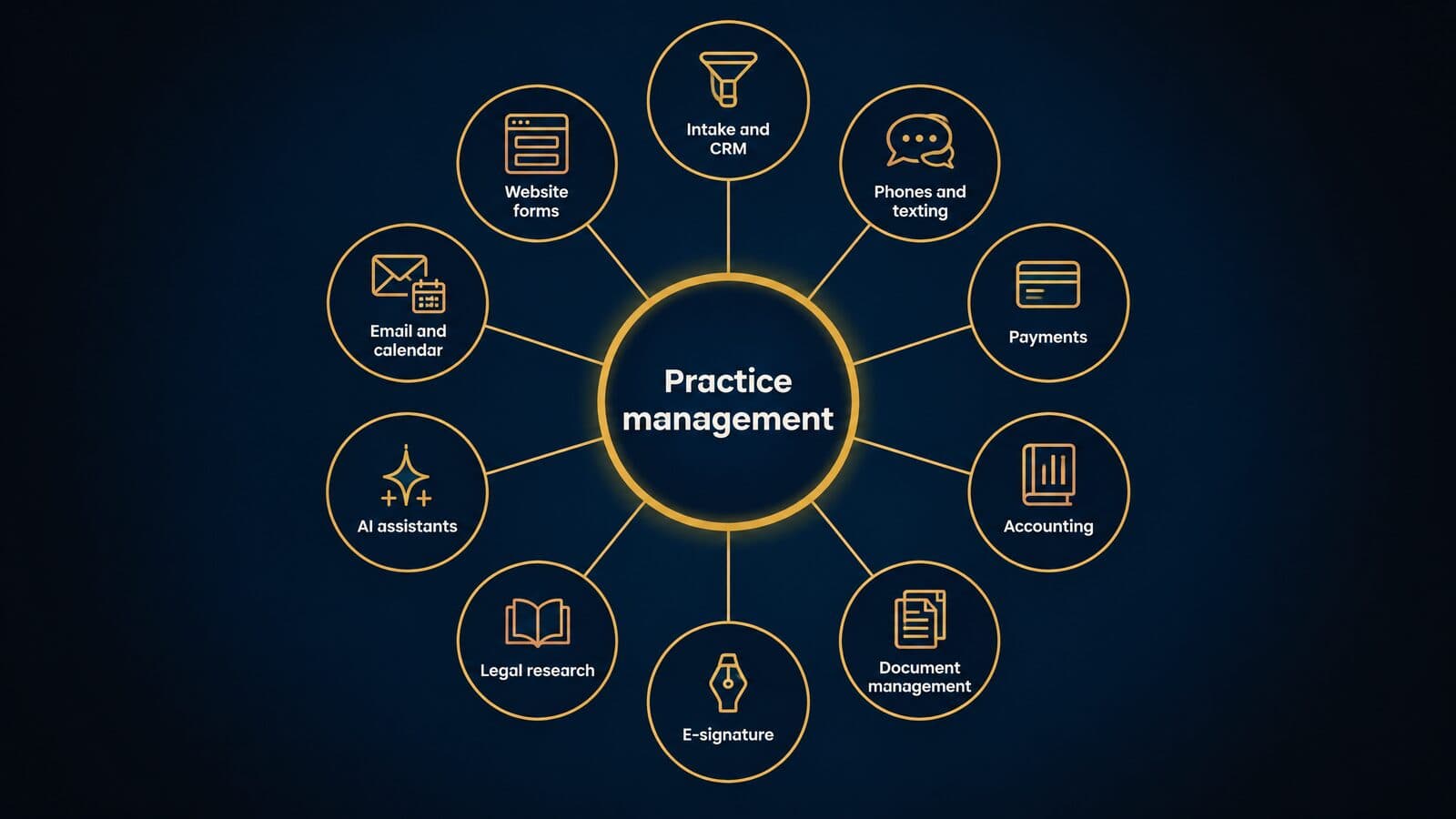
The phrase "legal management software" is used more loosely, for everything from a solo billing app to a corporate legal department's matter system. In this guide it is the umbrella term, and "practice management" means the platform a private law firm runs its operations on.
What practice management software does day to day
The ABA's 2024 Practice Management TechReport, written by Alan Klevan, opens with the statement that "It is widely accepted that there are four pillars of law practice management – technology, finance, marketing, and management." A practice management platform touches all four: it is technology, it holds the firm's billing and trust money records, it receives new business from marketing, and it is how managers see who is doing what. The clearest way to understand it is to follow one matter through the system.
- An intake record is created from a web form, a phone call or a legal CRM.
- A conflict check runs against existing clients, adverse parties and related names.
- An engagement letter is generated from a template and sent for e-signature.
- The matter is opened from a template, with custom fields for the practice area.
- Deadlines and statute of limitations dates are calendared, often from court rules.
- Tasks are assigned to lawyers and staff by a workflow that fires as the matter moves.
- Documents are drafted, stored and versioned inside the matter file.
- Time and expenses are captured against the matter, by timer, manual entry or automatic tracking.
- Invoices go out and payments come in, with advance fees and settlement funds held in trust.
- Reports show utilization, collections, aged receivables and matter profitability.
The ABA's own survey volume on law office technology treats document assembly, PDF creation, accounting and billing, calendaring, redlining, contact management and remote access as separate software categories. That list is a good measure of what a practice platform either replaces or has to connect to.
Adoption: what the ABA surveys show
The newest ABA figures available as of October 2026 come from the 2024 Legal Technology Survey, published in 2025 TechReports. The survey is described by the ABA as one the Law Practice Division launched more than two decades ago, based on answers from practicing lawyers rather than consultants, vendors or IT staff.
The headline is a decline. Fifty-three percent of respondents reported that case/practice management software was available at their firms in 2024, down from 63% in 2022. Use moved in opposite directions by firm size: among solos, actual use fell from 45% in 2022 to 37% in 2024, while at firms of 100 or more attorneys it rose from 19% to 27%. The TechReport's author attributes part of the drop to price and to "a la carte" add-on pricing, where features that used to come with the base plan are sold separately. That is his interpretation, but it fits what the pricing pages show today.
Budgets tell the same story. In 2024, 65% of firms budgeted for technology, from 41% of solos to 90% of firms with 100 or more lawyers, and average annual technology spend slipped to $13,991 from $14,106 in 2022.
Cloud tools are now the norm. The ABA's news release on the survey says "73% of firms utilize cloud-based legal tools, with document management and practice management software seeing the highest adoption rates." The smallest firms are the most price-sensitive and the most likely to drop a platform.
The benefits small firms are promised, checked
Most guides list seven benefits for small firms and stop there. The table sets each promise against the evidence and names what to verify in a demo.
| Promised benefit | What the evidence shows | What to verify in a demo |
|---|---|---|
| Time-saving automation | Only vendor claims; 8am claims "2.4 hr" saved per attorney per day; no independent study | Build one real workflow live and time it |
| Better organization and documents | One matter file replaces scattered folders; MyCase Basic lists unlimited document storage | Search across matters, versions and email filing |
| Faster billing and collections | Clio's 2025 averages: 38% utilization, 88% realization, 93% collection | Aged receivables and realization reports by lawyer |
| Better client communication | Portals and two-way texting sit on specific tiers | Which tier includes portal, texting and e-signature |
| Compliance and security | Depends on configuration and the vendor's SOC 2 report; under 30% of lawyers review vendor terms | The SOC 2 Type II report, MFA and export terms |
| Data-driven insights | Lockup and realization reports exist on several platforms | Whether reports export and filter by matter type |
| Scalability | Per-user pricing and a la carte add-ons raise cost as you grow | Price at today's headcount and at double it |
The time-saving row deserves the most skepticism. 8am, the parent of MyCase, claims a "2.4 hr average time saved per attorney every working day", and other vendors publish their own percentages, but no independent study backs any of them. The billing row is better grounded. Clio's Legal Trends benchmarks report 2025 averages of 38% utilization, 88% realization and 93% collection, and define "lockup" as the days of annual revenue tied up in unbilled work and unpaid invoices. A platform helps those numbers only if the firm captures time daily and invoices on a schedule. On communication, MyCase places two-way texting and intake forms on Pro, and PracticePanther adds native two-way texting on Business.
On security, the ABA's 2024 Cloud Computing TechReport found that "less than 30%" of respondents review ethics rules, privacy policies or vendor terms of service before using a cloud tool. Buying a platform does not make a firm compliant; configuring it and checking the vendor does.
When do spreadsheets stop being enough? The signals are concrete. Client trust balances are kept in a spreadsheet that someone reconciles from memory. Deadlines live in individual lawyers' calendars, so a sick day can mean a missed date. There is no searchable conflict history, so conflict checks depend on who remembers what. Intake details are typed once into an email and again into billing.
Practice management vs case management, CRM and DMS
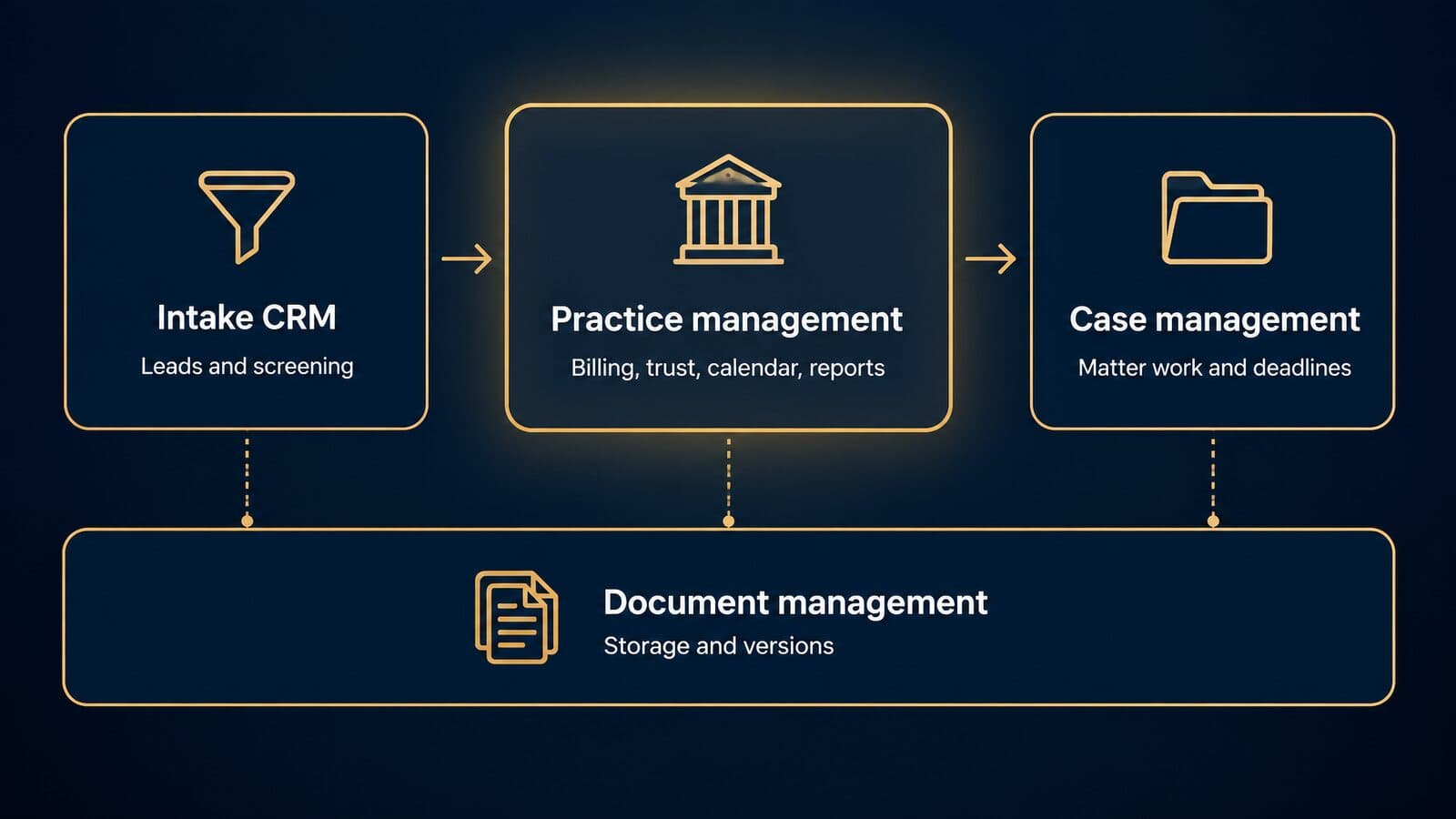
Practice management runs the firm (billing, trust, calendars, reporting); case management runs the work inside each matter; a legal CRM runs intake before a client signs; a document management system (DMS) stores, versions and governs documents. Products overlap, and many vendors sell more than one of these layers.
Practice management vs case management software
For many small firms the two terms describe the same product. The ABA's survey reports "case/practice management software" as a single category, and Lawyerist's practice management review page says that "not all case management software products are created equal" while reviewing the same products. A general-practice firm with a few dozen open matters usually needs one system that does both, and every mainstream suite markets itself under both names.
The terms diverge for plaintiff and litigation firms, where platforms are built around the matter itself. CasePeer's entry Basic tier, for example, lists automated statute alerts, settlement negotiations, medical treatment tracking, case expense and client trust tracking. Those are matter-workflow features. A firm-operations suite would lead with invoicing, trust ledgers and firm-wide reporting instead.
The practical test is the product's center of gravity. If the invoice and the trust ledger are at the center, and the matter is mostly a container for time entries and documents, it is practice management. If the matter's phases, evidence, treatment, deadlines and negotiation history are at the center, and billing is secondary or handled elsewhere, it is case management. Many plaintiff firms run a case-centered platform and accept lighter billing, because contingency matters are invoiced rarely. Our companion guide to legal case management software covers matter-level and plaintiff workflow in depth; this guide stays on the whole-firm platform.
Practice management vs legal CRM and intake software
A legal CRM owns the prospect from first contact to signed engagement; the practice platform owns the client after that. The CRM's job is speed and follow-up: capturing the inquiry, qualifying it, scheduling the consultation, sending the engagement agreement and reporting on which marketing sources produce signed clients.
Several standalone tools do this job. Lawmatics groups its product into "Lead & Client Intake", "Legal CRM", "Marketing Automation", "Time & Billing" and "Data Reporting", and its pricing page lists CRM contacts, pipelines, conflict checking and appointment booking; prices are by custom quote. Lead Docket calls itself "AI Legal Intake Software", and its "Filevine Sync" "natively transfers to Filevine, creating a unified client record and eliminating double entry"; its footer reads "©2026 Filevine, Inc." Law Ruler is a legal CRM whose subscription is "billed monthly on an annual term", with a Pro plan that "Includes up to 3 users". Clio sells Clio Grow and bundles it with Clio Manage in its Elite plan.
Other platforms build intake in. MyCase Pro includes intake forms and legal CRM, PracticePanther Business adds intake forms, CasePeer Pro adds client intake management, and Lawyerist describes Lawcus as "workflow-focused" with "a built-in CRM". Built-in intake is usually enough for a firm signing a handful of clients a week. High-volume plaintiff intake, with its field mapping, consent records and lead-source attribution, gets its own section near the end of this guide.
Practice management vs billing and accounting tools
Billing-only and payments tools do one job well. LawPay sells a standalone plan at $19 a month as of October 2026, and general ledgers such as QuickBooks and Xero keep the firm's books; Lawcus integrates both on its Growth plan. Accounting-first platforms combine practice management with a full ledger: CosmoLex places general ledger and payables features above its Launch tier, and Lawyerist says it "includes full law-firm accounting".
Lawyerist's filters capture the three levels that matter when you compare: basic bookkeeping, trust accounting and full accounting. A platform with trust accounting but no general ledger still needs a separate accounting system for operating expenses and tax reporting. A platform with full accounting replaces it. The trust accounting chapter below explains what the trust records must contain and how three-way reconciliation works.
Practice management vs document management systems
A document management system governs documents and email at scale: filing, versioning, permissions, retention and search across the whole firm. iManage describes a "Document and Email Management" product area and claims "81% of the AmLaw 200" as customers. NetDocuments brands itself "Document and Email Management for Legal Firms and Departments." In the ABA's 2024 cloud survey, about 17% of respondents named NetDocuments among their cloud tools, against almost 72% for Microsoft 365/OneDrive and about 54% for Dropbox.
Larger firms run a DMS alongside a practice platform because their document problems are different: thousands of emails a day that must be filed to the right matter, ethical walls that restrict who can open a file, and records retention rules applied firm-wide. Small firms usually rely on the platform's own storage, which is now generous; MyCase Basic, for example, lists unlimited document storage as of October 2026.
Enterprise legal management and public-sector systems
Enterprise legal management (ELM) and matter management tools serve corporate legal departments. They track matters handled by outside counsel, manage budgets and receive law firm invoices, which is why the LEDES standards exist to exchange billing information "between corporations and law firms". Vendors that began with law firms are moving into this market: Clio says ShareDo, acquired in March 2025, "has evolved into Clio Operate" for large firms and corporate legal departments under a "Clio for Enterprise" division, according to Clio's press release.
Courts, agencies, prosecutors and public defenders buy case management through public procurement with its own security requirements. NetDocuments lists "Public Sector" as a use case, and Filevine says its compliance audits "include HIPAA, CJIS, and ISO 27001 security controls", according to its security page. "Legal management software" covers all of these. This guide focuses on the law-firm platform.
The full legal software stack, layer by layer
A firm's software is a stack, with the practice platform as the hub and other tools as spokes. Each layer below has its own job, and the question for each is how cleanly it connects to the platform.
| Layer | Job | Examples (as of Oct 2026) | How it should connect to the platform |
|---|---|---|---|
| Intake and CRM | Capture and qualify prospects | Lawmatics, Lead Docket, Law Ruler, Clio Grow | Native sync or API, no re-keying |
| Phones and texting | Calls and client messages | Built-in two-way texting on some tiers | Calls and texts logged to the matter |
| Payments | Card and ACH collection | LawPay; Centerbase Payments | Deposits land in the right trust or operating account |
| Accounting | General ledger and payables | Built-in ledger, QuickBooks, Xero | One source of truth, no double entry |
| Document management | Store and govern files and email | iManage, NetDocuments, Microsoft 365 | Matter-level folders and permissions |
| E-signature | Sign engagement letters and forms | Built in on MyCase Pro and PracticePanther Business | Signed files saved to the matter |
| Legal research | Find and cite law | Clio Work, vLex Vincent AI | Matter-aware, permission-aware |
| AI assistants | Draft, summarize, analyze | 8am IQ, Filevine LOIS, Clio Work | Follows matter permissions |
| Court e-filing | File and receive court documents | 85% of litigators e-file | Filed dates feed deadlines |
| Website forms | Capture inquiries on the site | Form builders and intake pages | Submissions create intake records |
Centerbase says its Stripe-based Centerbase Payments has "no monthly or annual platform fees", only transaction fees. The e-filing figure comes from the ABA's 2024 survey release, and the AI products are the names each vendor uses as of October 2026. Research and AI tools are the fastest-changing layer; our guide to legal research tools covers them separately. The first layer is often the weakest link: a law firm website and intake forms that write submissions straight into the CRM or platform remove the first round of re-keying, which is where most intake data errors start.
Cloud-based vs on-premises legal practice management
Cloud-based practice management runs in the vendor's data centers and is used through a browser or app for a per-user subscription; on-premises software runs on servers the firm owns, patches and backs up. About 75% of attorneys used cloud computing for work in the ABA's 2024 survey, and nearly every new platform is cloud-only.
What the ABA cloud data shows
The 2024 Practice Management TechReport found that 74.7% of respondents had used cloud computing for work, 14.8% had not and 10.5% did not know. The companion Cloud Computing TechReport, by Darla Wynon Kite-Jackson, puts the trend in context: about 75% in 2024, up from 69% in 2023, 70% in 2022 and 60% in 2021. Size makes a large difference. About 65% of solos use cloud computing, against more than 94% of firms with 50 to 99 lawyers.
Lawyers who use the cloud value access: almost 66% cited browser access from anywhere, just over 60% valued 24/7 availability, and about 43% highlighted backup and recovery. Their worries are consistent too. Confidentiality and security top the list at about 55%, followed by control of data at about 38%. Among the roughly 25% of respondents who do not use the cloud, the reasons were confidentiality and security (about 53%), lack of control over data (about 41%) and unfamiliarity with the technology (31%). Over 93% rated vendor reputation as somewhat or very important.
The gap is in diligence. Only 34% use software that guarantees SSL encryption, "less than 30%" review ethics rules, privacy policies or terms of service, 23% evaluated the vendor's history, 20% make regular local backups, and "almost 20%" take no precautions at all. Only 48% changed internal policies after moving to the cloud. Most firms already use the cloud and few check it carefully. The security chapter below ends with a vendor checklist.
Who still sells desktop, on-premises and hybrid
Tabs3 still prices an on-premises option as of October 2026: OnSite starts at $69 per user per month, against $89 for its Cloud subscription, and the PracticeMaster practice management add-on is $35 per user per month on top. Smokeball sells a hybrid range. Its Grow plan "includes Smokeball's native desktop application" and is designed for firms with three or more staff, while its Boost plan is "Fully browser based".
Older desktop products are still in use at many firms. Lawyerist describes PCLaw as "a Windows-based desktop law practice management system from Lexis Nexis", Time Matters as "a good fit for firms looking for hefty desktop-only software", AbacusLaw as suited to firms that want "a private cloud server and desktop software", and Smokeball as "hybrid desktop and cloud-based". LEAP, which publishes no prices, says on its pricing page that it migrates data from Clio, MyCase, PracticePanther, PCLaw, Time Matters, Actionstep, Rocket Matter, Filevine, CosmoLex and Firm Central. Before you plan around any desktop product, confirm its current owner, support status and upgrade path directly with the vendor.
How to decide between cloud and on-premises
The decision comes down to six factors. The table compares the three deployment models on each.
| Factor | Cloud | On-premises | Hybrid |
|---|---|---|---|
| Upfront cost | Subscription, low upfront | Servers, licenses, setup | Desktop app plus cloud sync |
| Ongoing cost example | Tabs3 Cloud from $89/user/mo | Tabs3 OnSite from $69/user/mo plus your IT | Varies |
| Patching and backups | Vendor | Your firm or IT provider | Split |
| Remote access | Browser and apps | VPN or remote desktop | Desktop in office, cloud on the road |
| Ethics duties | Rules 1.6(c) and 5.3 apply | Same rules apply | Same rules apply |
| Exit | Export terms in the contract | Data already on your servers | Check both |
Pricing verified on 22 October 2026. Confirm current prices with each vendor.
The ethics question is settled at the ABA level. ABA Formal Opinion 498, issued March 10, 2021, says the Model Rules "permit virtual practice" and, for files kept in the cloud, expects lawyers to choose "a reputable company" and make sure data "is regularly backed up." States adopt and vary the Model Rules, so check your own jurisdiction; this is general information, not legal advice. In my view, on-premises makes sense only for a specific reason: a client or insurer mandate, an existing server investment with years of life left, or unreliable connectivity. If you choose it, price your own IT time honestly, because the lower OnSite subscription does not include the person who patches the server at 7 p.m.
Whichever deployment you choose, the features decide whether the platform earns its fee.
Core features every practice management system needs
Every platform claims the same feature list, so the real differences are depth, which plan tier includes each feature, and whether it connects cleanly to the rest of your stack. This section covers eight areas: matters and contacts, conflicts, calendaring, workflows, documents, client communication, integrations and mobile access. A tier map closes it.
Matter and contact management
The core of any practice platform is one record per client and one record per matter, with every other item (time, documents, deadlines, invoices, trust activity) hanging off the matter. Contacts should be shared across matters, so an adjuster, expert, opposing counsel or medical provider is entered once and linked many times with a role on each matter.
Look for custom fields and matter templates by practice area. A family law matter and a personal injury matter need different intake fields, stages and default tasks. As of October 2026, MyCase's pricing page lists case and contact management on its Basic plan, and PracticePanther's pricing page says every plan includes contact and matter management.
Demo test: ask the vendor to create a matter from a template while you watch. Note which fields are required, whether related contacts can be added with roles, and whether the template sets stages and tasks automatically.
Conflict checking
Conflict checking is the feature with the clearest ethics hook. ABA Model Rule 1.7, [Comment [3]](https://www.americanbar.org/groups/professional_responsibility/publications/model_rules_of_professional_conduct/rule_1_7_conflict_of_interest_current_clients/comment_on_rule_1_7/), says a lawyer "should adopt reasonable procedures, appropriate for the size and type of firm and practice," to identify the persons and issues involved, and that "Ignorance caused by a failure to institute such procedures will not excuse a lawyer's violation of this Rule."
A usable conflict search covers every party and related party on every open and closed matter, former clients, adverse parties, name variants and misspellings, business names and aliases, and the prior matters of lateral hires. The result should be saved to the new matter as a dated record of what was searched and who cleared it.
Vendors package this differently. MyCase lists "conflict check tracking" on its Advanced tier, Lawmatics' pricing page lists conflict checking among its CRM features, and Lawyerist's software directory treats conflict checking as its own filter. For plaintiff firms with thousands of claimants against the same few defendants, name-variant search and bulk checks matter more than a single search box.
States adopt and modify the Model Rules, so confirm your state's version. This is general information, not legal advice.
Calendaring and court-rules deadlines
Calendaring in a practice platform should go beyond shared calendars and reminders. Rules-based calendaring calculates a chain of deadlines from a trigger date (service, a filing, a scheduling order), and statute-of-limitations tracking flags matters before the limitation period runs. Both should create entries on the right people's calendars, not only on the matter.
Plaintiff-focused platforms tend to publish this on their plan cards. As of October 2026, CasePeer's pricing page lists "automated statute alerts" on Basic and "litigation event plans" on Pro. Because 85% of litigators use electronic court filing, according to the ABA, filed and served dates should feed deadline calculations rather than being retyped.
Demo test: enter a trigger date in a sample matter and watch which deadlines appear. Then ask who maintains the court rules behind the calculation, which jurisdictions are covered and how quickly rule changes reach your account.
Tasks and workflow automation
Workflow automation means task lists that fire when a matter changes stage, assignment rules that route work to the right role, and due dates set relative to events (seven days after intake, thirty days before trial). It is where most small firms recover time, and where many over-build.
As of October 2026, MyCase Pro lists "automated workflows", and CARET Legal's pricing page adds automated workflows on its Enterprise Plus plan. Lawyerist describes Centerbase as offering "customizable workflows."
My advice: automate the five sequences your staff repeat most (new-matter opening, records requests, discovery responses, settlement closing, file closing) before go-live, and add more only after people use the first five.
Documents, assembly and e-signature
Three different features hide under "document management": storage and versioning of files on the matter, document assembly that fills templates from matter fields (names, dates, case numbers, fee terms), and e-signature for engagement letters, authorizations and settlement documents. A platform can be strong on one and thin on the others.
As of October 2026, MyCase Pro includes unlimited eSignature and document generation, PracticePanther's Business plan includes native eSignature with unlimited sends, and Rocket Matter's pricing page charges $2 per envelope over its e-signature allowance. Those overage terms matter for high-volume plaintiff firms that send retainers and medical authorizations by the hundred.
If your firm needs heavy versioning, email filing and enterprise search across millions of documents, that is the job of a dedicated document management system, covered in the comparison of practice management and DMS earlier in this guide.
Client portals, texting and email
Client communication features fall into three groups: a portal where clients see documents, invoices and messages; two-way texting tied to the matter; and email, either built into the platform or captured through an Outlook or Gmail plugin.
Tier placement varies widely as of October 2026. MyCase Basic includes a "limited" client portal and Pro adds 2-way texting. PracticePanther includes a secure client portal on every plan and native 2-way texting on Business. CasePeer Pro includes unlimited 2-way texting and Advanced adds scheduled texts. Lawcus lists texting as an add-on at $10 per attorney per month plus a one-time $50 (local number) or $150 (toll-free) registration; confirm those fees with Lawcus, since one rendering of the page omits them. CARET Legal's Enterprise plan includes built-in email and a client portal.
Texting a client about their own matter is different from marketing texts and calls, where the TCPA's prior express consent requirements apply. Keep the two channels separate, and see our guide to TCPA rules for marketing texts.
Integrations, APIs and webhooks
Integration counts are a rough proxy at best. As of October 2026, Clio's homepage claims "300+ app integrations", 8am says it offers "60+ native integrations", MyCase Pro lists "70+ Integrations" and Advanced an "Open API", and CasePeer Pro lists "20+ Key Integrations" while Advanced adds "NEW API Access."
What to verify instead:
- Read and write API endpoints for matters, contacts, time entries and documents, not read-only exports.
- Webhooks that fire on new records and status changes, so other systems hear about events without polling.
- Rate limits and bulk endpoints, which decide whether a nightly sync of thousands of records finishes.
- A sandbox account you can test against before signing.
- Who builds and maintains each connector: the vendor, the other vendor or a third party.
For billing data specifically, the LEDES Oversight Committee publishes an API standard (version 1, 2020) alongside its file formats. For plaintiff firms, the most important connection is usually intake; see how intake data should flow into your case system.
Mobile apps and remote access
Mobile access is table stakes, but quality varies. PracticePanther says every plan includes mobile apps, and in the ABA's 2024 cloud survey almost 66% of respondents said they value browser access from anywhere.
Check what works offline, whether timers and notes sync when the phone reconnects, and whether multi-factor authentication applies on mobile. Clio's pricing page says multi-factor authentication comes with every plan. Ask about remote wipe. The security section later in this guide covers device rules in more detail.
Which tier includes which feature
The table below maps ten features to the rule or standard behind them and to the published plans that include them. It is built only from vendor pricing pages read on 22 October 2026.
| Feature | Rule or standard behind it | Where it appears on published plans (as of Oct 2026) |
|---|---|---|
| Trust accounting | ABA Model Rule 1.15 | MyCase Basic; Clio every plan; Smokeball Bill; PracticePanther Business Pro |
| Conflict check tracking | Rule 1.7 cmt [3] | MyCase Advanced |
| LEDES invoicing | LEDES 98B | PracticePanther Business; CARET Enterprise; CosmoLex above Launch |
| E-signature | none | MyCase Pro; PracticePanther Business |
| Two-way texting | TCPA for marketing messages | MyCase Pro; PracticePanther Business; CasePeer Pro; Lawcus add-on |
| Automated workflows | none | MyCase Pro; CARET Enterprise Plus |
| Open API | none | MyCase Advanced; CasePeer Advanced |
| Automatic time capture | none | Smokeball Prosper+ (add-on on Grow) |
| AI assistant | ABA Formal Opinion 512 | Clio Core and up; MyCase Pro; Lawcus Growth; CARET Enterprise Plus |
| Built-in accounting | Rule 1.15 cmt [1] | Clio every plan; PracticePanther Business Pro (GL, AR); CosmoLex general ledger above Launch; MyCase Accounting add-on |
Pricing verified on 22 October 2026. Confirm current plans with each vendor.
The pattern is consistent: features drift up tiers. Price the tier that contains every must-have on your list, not the entry tier on the headline. A blank in the table does not mean a vendor lacks the feature; it means the feature was not on that vendor's pricing page when we read it.
Time tracking, billing and payment features
Billing features decide how much of the work a firm does turns into cash. Clio's 2025 benchmarks show the average lawyer put 3.0 hours of an 8-hour day toward billable work, invoiced 2.6 of them and collected 2.4.
Time capture: timers, manual entry and automatic tracking
There are three ways to capture time. Manual entry relies on the lawyer reconstructing the day, usually at its end. Running timers start and stop on a matter as work happens. Passive or automatic capture records activity in documents, email and calls, then suggests entries for review.
Automatic capture is still a plan-level feature. As of October 2026, Smokeball's pricing page says its AutoTime automatic time tracking is included in Prosper+ and sold as an add-on for Grow.
Clio defines utilization as the "% of an eight-hour day that gets put towards billable work," and its 2025 average was 38%, or 3.0 billable hours.
When software or AI makes the work faster, the billing rule does not change. ABA Formal Opinion 512 says lawyers who bill hourly "must bill for their actual time." Captured suggestions should be reviewed and edited, not accepted in bulk.
Demo test: ask how suggested entries are generated, how a lawyer edits and approves them, and whether a supervisor can review entries before they reach an invoice.
Hourly, flat, contingency and hybrid billing
Billing models track firm size. The ABA's 2024 practice management survey found hourly billing most common at firms of 100 or more lawyers (84%), the highest share of fixed fees among solos (25%) and the highest share of contingent fees at firms of 2 to 9 lawyers (23%). A platform should handle whichever mix you use without workarounds.
Flat fees and advance retainers raise a trust question. Under ABA Model Rule 1.15(c), advance fees and expenses go into trust, "to be withdrawn by the lawyer only as fees are earned or expenses incurred." The software should link each transfer out of trust to an invoice or earned-fee record.
Contingency matters need different outputs. Model Rule 1.5(c) requires a contingent fee agreement "in a writing signed by the client," stating the percentages and expense treatment, and at the end a "written statement stating the outcome of the matter and, if there is a recovery, showing the remittance to the client and the method of its determination." The platform should build that settlement statement from the matter's fee agreement, case expenses and liens.
Split billing, where one invoice is divided among payers, appears on MyCase Advanced and on CosmoLex plans above Launch as of October 2026. Hybrid arrangements, such as a flat intake fee plus hourly, or contingency with an hourly fallback, need per-matter rate rules rather than a single firm-wide setting.
States adopt their own versions of Rules 1.5 and 1.15, so check yours. This is general information, not legal advice.
LEDES and UTBMS e-billing
LEDES is the set of open file formats corporate clients and insurers use to receive law firm invoices electronically, and UTBMS is the code set that classifies the work on each invoice line. If any of your clients pay through an e-billing portal, your platform has to produce both correctly.
The LEDES Oversight Committee describes itself as "an international, voluntary, not-for-profit organization comprised of legal industry representatives," formed "in 1995 as an informal group." Its current formats include LEDES 98B, 98BI, 2000 and XML Ebilling 2.0, 2.1 and 2.2, plus XML Budgeting, Timekeeper Attributes and the LEDES API. The committee says LEDES 1998B "is an ASCII, pipe delimited format containing 24 fields" and is "currently the most-widely used ebilling standard in the legal industry in the US."
UTBMS "is a series of codes used to classify legal services performed by a legal vendor in an electronic invoice submission." It came from a mid-1990s group of the ABA, the Association of Corporate Counsel and PricewaterhouseCoopers. The 1997 Litigation Code Set "includes 5 phases and 29 more granular task codes," and the 1997 Activity Code Set "includes 11 activity codes."
Who needs it: insurance defense firms and any firm with corporate clients on e-billing portals. Most plaintiff and consumer firms do not. As of October 2026, LEDES appears on PracticePanther's Business plan, CARET Legal's Enterprise plan and CosmoLex plans above Launch, and MerusCase markets "Ledes, and UTBMS" billing.
Demo test: have the vendor export a sample invoice in the exact format your client requires, then upload it to the client's portal for validation.
Online payments and processing fees
Online payments shorten the time from invoice to cash, but processing fees and how they hit trust accounts deserve as much attention as the payment button.
LawPay's standalone pricing is a useful reference point. As of October 2026, LawPay's pricing page lists $19 a month with "No Contract - Monthly Billing"; 2.99% + $0.30 per transaction for Visa, Mastercard and Discover; 3.90% + $0.30 for American Express; 1% for eCheck; and 5.95% for Pay Later legal fee lending, adding that "Card Brand Pass-Through fees may apply." MyCase advertises LawPay Payments inside its platform with "$0 No monthly fee, competitive processing rates." Centerbase says its Stripe-based payments carry "no monthly or annual platform fees," only transaction fees. 8am, the parent company of MyCase, claims "$48B client funds processed through 8am annually."
The trust question is the one to ask. Rule 1.15(b) lets a lawyer put personal funds in a trust account only to pay bank service charges, "but only in an amount necessary for that purpose." If a client pays a retainer by card into trust, ask the vendor how the card fee is charged: it should come from the operating account so the client's trust balance is not reduced. Confirm all rates with the processor before signing.
Reports that show where revenue leaks
Four numbers show where billable work fails to become revenue: utilization, realization, collection and lockup. Clio has published its Legal Trends Report every year since 2016, which it says is "based on aggregated and anonymized data from tens of thousands of law firms," and its benchmarks page defines each metric.
| Metric | Clio's definition | 2025 benchmark | Formula |
|---|---|---|---|
| Utilization | % of an eight-hour day put toward billable work | 38% average | billable hours ÷ available hours |
| Realization | % of billable work invoiced | 88% average | billed value ÷ worked value |
| Collection | % of invoiced work paid | 93% average | collected ÷ billed |
| Realization lockup | days of revenue tied up as unbilled work | 43-day median | (unbilled work ÷ annual revenue) × 365 |
| Collection lockup | days tied up in unpaid invoices | 32-day median | (unpaid invoices ÷ annual revenue) × 365 |
| Total lockup | both together | 93-day median | sum of the two for your firm |
Clio defines lockup as "the total number of days worth of annual revenue is tied up as unbilled work or unpaid invoices." A hypothetical example: a firm with $1,200,000 in annual revenue, $150,000 of unbilled work and $90,000 of unpaid invoices has realization lockup of about 46 days and collection lockup of about 27 days, so about 73 days in total.
One caution on the benchmarks: Clio's 43, 32 and 93-day figures are separate medians across firms, so they do not add up. For your own firm, the two lockup figures do sum to the total.
Demand two more reports in any demo. AR aging shows unpaid invoices by age bucket and client. Matter profitability compares fees collected with time, expenses and write-offs per matter, which matters most for flat-fee and contingency work where hours alone say little.
Trust accounting, IOLTA and three-way reconciliation
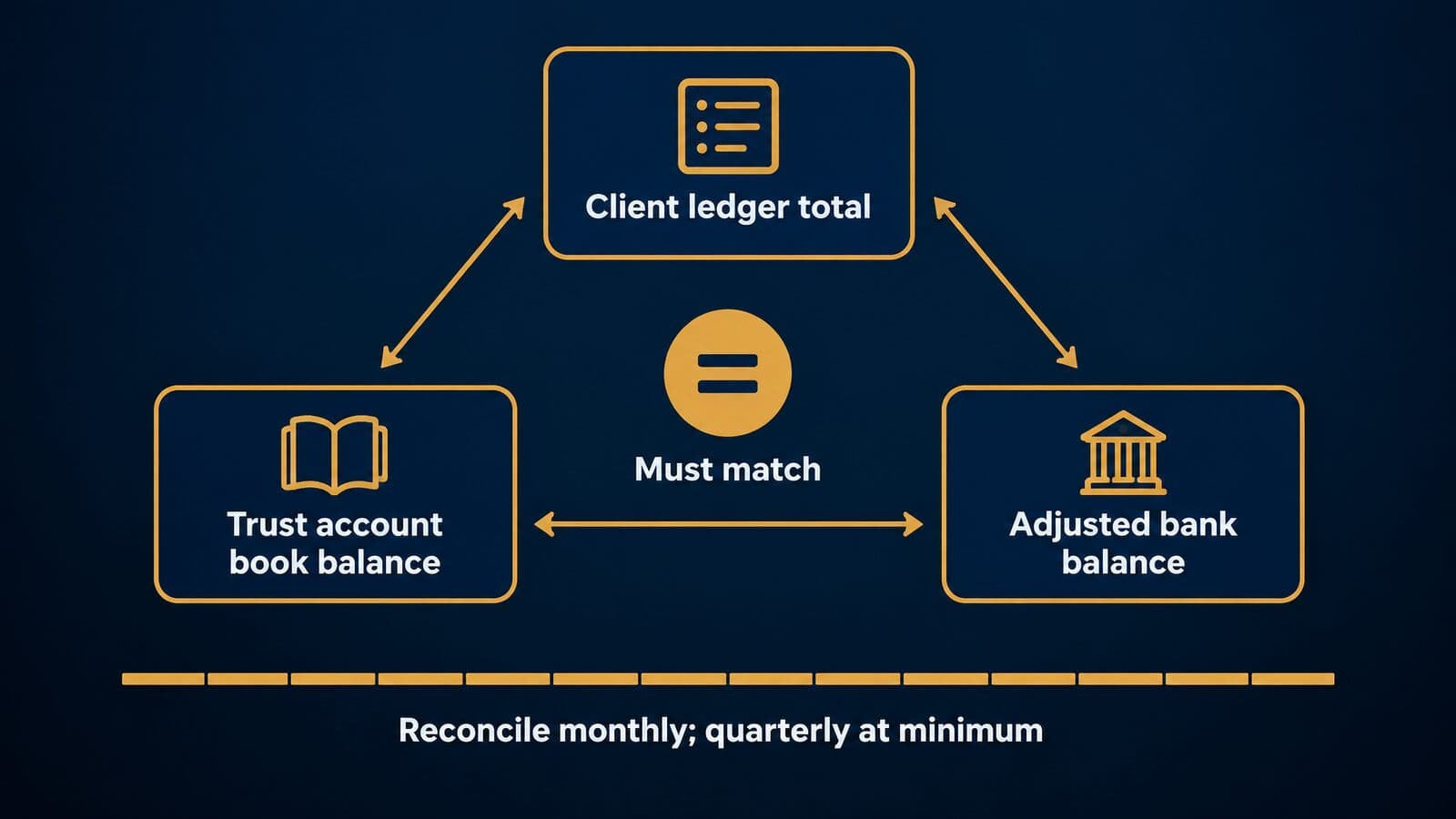
Trust accounting software keeps a separate ledger for each client's money held in trust, records every deposit and disbursement, and reconciles three figures every month: the total of client ledgers, the trust account's book balance and the adjusted bank balance. The ABA's model records rule calls monthly reconciliation the preferred practice.
What ABA Model Rule 1.15 requires
ABA Model Rule 1.15 sets four requirements that a platform has to support.
First, separation and records. Client and third-party property must be held separate from the lawyer's own, with funds kept "in a separate account maintained in the state where the lawyer's office is situated, or elsewhere with the consent of the client or third person." Complete records "shall be preserved for a period of [five years] after termination of the representation." Software requirement: separate trust and operating ledgers, and record retention that outlasts your subscription.
Second, earned fees and bank charges. Advance fees and expenses stay in trust until earned or incurred, and the lawyer's own money goes in only to cover bank charges. Software requirement: no transfer from trust to operating without an invoice or earned-fee record behind it.
Third, prompt delivery and disputes. The lawyer must promptly notify and deliver funds in which a client or third person has an interest, and disputed portions "shall be kept separate by the lawyer until the dispute is resolved." Software requirement: holdbacks that keep a disputed amount, such as a contested lien, in trust while the rest is paid out. This is central to settlements; see how mass tort settlements are paid out.
Fourth, current books. [Comment [1]](https://www.americanbar.org/groups/professional_responsibility/publications/model_rules_of_professional_conduct/rule_1_15_safekeeping_property/comment_on_rule_1_15/) says a lawyer "should maintain on a current basis books and records in accordance with generally accepted accounting practice." Software requirement: entries dated when they happen, with an audit trail of edits.
States adopt their own versions of Rule 1.15, with their own retention periods and reconciliation schedules. This is general information, not legal advice.
How IOLTA accounts work
The ABA describes IOLTA (Interest on Lawyers' Trust Accounts) as "a method of raising money for charitable purposes, primarily the provision of civil legal services to indigent persons." It followed federal banking changes in 1980, and "IOLTA programs currently operate in 50 states, the District of Columbia, Puerto Rico, and the U.S. Virgin Islands."
Client funds that are nominal in amount or held for a short time, and so cannot earn net income for the client, are pooled in an IOLTA account. The bank forwards the interest to the state program. Larger or longer-held funds may belong in a separate interest-bearing trust account for that client.
Software implication: IOLTA and any separate client trust accounts must be set up as different bank accounts, each with its own ledgers, journals and reconciliation.
The trust records your software must keep
The ABA Model Rules on Client Trust Account Records, Rule 1, lists ten categories of records to keep for [five years]. The table maps each to what your platform should produce.
| ABA Model Rule 1 record | What your software should produce |
|---|---|
| Receipt and disbursement journals | A dated journal per trust account |
| Client ledger records | One ledger per client and matter with a running balance |
| Retainer and compensation agreements | The signed fee agreement attached to the matter |
| Accountings to clients or third persons | Settlement and closing statements |
| Bills for fees and expenses | Invoices tied to each trust withdrawal |
| Disbursements on behalf of clients | Payee, purpose and check or transfer reference |
| Bank statements, deposit records and checks | Uploaded or synced statements |
| Records of electronic transfers | Transfer confirmations |
| Monthly trial balances and quarterly reconciliations | A reconciliation report saved each month |
| Trust-related portions of client files | Linked documents |
The brackets in the model text ([monthly], [quarterly], [five years]) mark points each state sets for itself. Check your state's rule and configure the software to match the stricter of your state's requirement and the ABA's preferred practice.
How three-way reconciliation works
The comment to the ABA records rule explains the core check: "The trial balance is the sum of balances of each client's ledger card (or the electronic equivalent). Its value lies in comparing it on a monthly basis to a control balance." It adds that quarterly reconciliation "is recommended only as a minimum requirement; monthly reconciliation is the preferred practice."
A three-way reconciliation compares three numbers that must agree. A hypothetical example for one trust account at month end:
- Client ledgers: $12,000 (client A) + $3,500 (client B) + $500 (client C) = $16,000.
- Trust account book balance (the firm's trust journal): $16,000.
- Bank statement balance of $16,450, less a $450 check written but not yet cleared, gives an adjusted bank balance of $16,000.
- All three equal $16,000, so the account reconciles. Save the report.
When the figures do not match, the usual causes are a disbursement recorded against the wrong client, a client ledger that went negative (one client's money was used for another), a bank charge never recorded in the books, or a deposit entered twice.
Vendors advertise this differently, as of October 2026. MyCase says its Accounting add-on offers "Compliance with three way trust reconciliations." Clio says every plan includes trust and operating reconciliation. PracticePanther says its Business Pro plan adds "an enhanced reconciliation process." Treat these as vendor claims.
Demo test: ask the vendor to attempt a disbursement that would take a client ledger below zero. The system should block it or require an override that is logged.
Built-in accounting or QuickBooks?
The choice is whether the firm's general ledger lives inside the practice platform or in a separate accounting system, with trust ledgers in one or both. There are three common setups.
Accounting inside the platform: Clio includes accounting on every plan from Starter, including bank sync, accounts receivable, trust and operating reconciliation and financial reports; PracticePanther's Business Pro adds PantherAccounting Plus; CosmoLex offers general ledger and payables on plans above Launch; and MyCase Accounting costs $39 per user per month on Pro and Advanced, all as of October 2026.
Trust in the platform, general ledger elsewhere: Lawcus's Growth plan adds a "QB & Xero Integration," and Smokeball's Bill tier includes accounting integrations.
Regional limits also apply. Actionstep's pricing page says its Legal Accounting is "Only available in North America."
Decision criteria: who keeps the books (an outside bookkeeper already on QuickBooks may resist moving), how many bank accounts you run, and whether your state's trust reports must come from one system. In my view, trust ledgers belong in the system where matters live, because that is where disbursements are approved and settlement statements are built. The general ledger can sit wherever your accountant works best.
AI features in practice management software
Most platforms now bundle or sell AI for drafting, summarizing and searching matter data. The ABA's 2024 survey found that 30% of respondents were using AI-based tools, up from 11% in 2023, according to the ABA's cloud computing TechReport, and ABA Formal Opinion 512 sets the ethics frame.
What the AI features do, platform by platform
As of October 2026, vendors describe their AI this way:
- Clio says AI "comes as part of the plan" on Core and above. Clio Work is described as "matter-aware AI to analyze evidence and research the law across over 1 billion cited documents," and Clio says vLex's Vincent AI draws on "more than one billion editorially enriched documents across 110 jurisdictions."
- MyCase sells 8am IQ: a writing and document assistant on Pro, plus a Case Assistant and a Discovery Assistant on Advanced, with OCR of 5,000 pages per user per month and 5,000 more for the firm for $30.
- CasePeer includes 8am IQ on its Pro plan.
- Filevine's homepage leads with LOIS, which it says is "Built on 40M+ matters." Its free LOIS Explore tier "does not provide access to Filevine Case Management."
- Litify says it is "Built on the world-class infrastructure of Salesforce, AWS, and Anthropic (our closed AI model)."
- Smokeball sells its "Archie AI assistant" as an add-on and also markets Smokeball AI.
- Lawcus includes "Nova AI" on its Growth plan.
- CARET Legal's Enterprise Plus plan adds "AI-Generated Document Summaries."
- CaseFleet charges $0.001 per credit for AI overages after 100,000 included credits per billed user per month.
- Assembly Software says "NeosAI Platinum is quoted to your firm."
- On the intake side, Lead Docket markets "Lead Viability" and Lawmatics markets "Merlin Qualify."
ABA Formal Opinion 512 and AI inside your platform
ABA Formal Opinion 512, issued July 29, 2024, applies the duties of competence, confidentiality, communication, supervision, meritorious claims, candor and reasonable fees to generative AI. It reads directly onto AI features built into a practice platform.
Confidentiality: for self-learning GAI tools, the opinion says "a client's informed consent is required prior to inputting information relating to the representation into such a GAI tool," and "merely adding general, boiler-plate provisions to engagement letters purporting to authorize the lawyer to use GAI is not sufficient." If a platform's AI learns from firm data, the consent analysis may apply to every matter it touches.
Competence: relying on output without "an appropriate degree of independent verification or review of its output" could violate Rule 1.1. The opinion cites a Stanford study (June 26, 2024) that found leading legal-research GAI systems "hallucinate between 17% and 33% of the time." An AI matter summary or draft is still work product a lawyer must check.
Fees: hourly billers "must bill for their actual time," a lawyer "may not charge a client to learn about how to use a GAI tool," and keeping the same flat fee when AI makes the work much faster "may be unreasonable under Rule 1.5." AI time savings change what is reasonable to bill.
Lawyers share these worries. Respondents to the ABA's 2024 survey named accuracy (75%), reliability (56%) and data privacy and security (47%) as their top AI concerns. State bars issue their own AI guidance, so check yours. This is general information, not legal advice.
Questions to ask a vendor about AI and client data
Put these eight questions to every vendor in writing:
- Is firm or client data used to train any model? Clio says firm data "is never used for AI training"; get every vendor's answer on paper.
- Which third-party AI providers process requests, and under what retention terms? Clio says Clio Work "operates under strict zero-data-retention agreements."
- Can AI be switched off by user, matter or practice group?
- Do AI answers respect matter permissions and ethical walls, so a user cannot surface data from a matter they are screened from?
- Are prompts and outputs logged, and can the logs be exported?
- Is AI included in the plan or billed as an add-on? Clio includes it on Core and above; Smokeball sells Archie as an add-on.
- What usage caps and overage charges apply? MyCase's OCR page allowance and CaseFleet's credit overages are two published examples.
- Where is data processed and stored, and does that change for AI features?
For AI tools used outside the practice platform, such as research and drafting assistants, see our guide to legal AI tools. With the feature criteria set, the next step is to compare the platforms themselves on price, tiers and fit.
Practice management software compared: 20 platforms
The table below compares 20 practice management platforms on parent company, public entry price, who each one is built for, and whether trust or accounting features and LEDES billing appear on the pricing page. Every value was read on the vendor's own site on 22 October 2026, and vendors that publish no prices are marked quote-only.
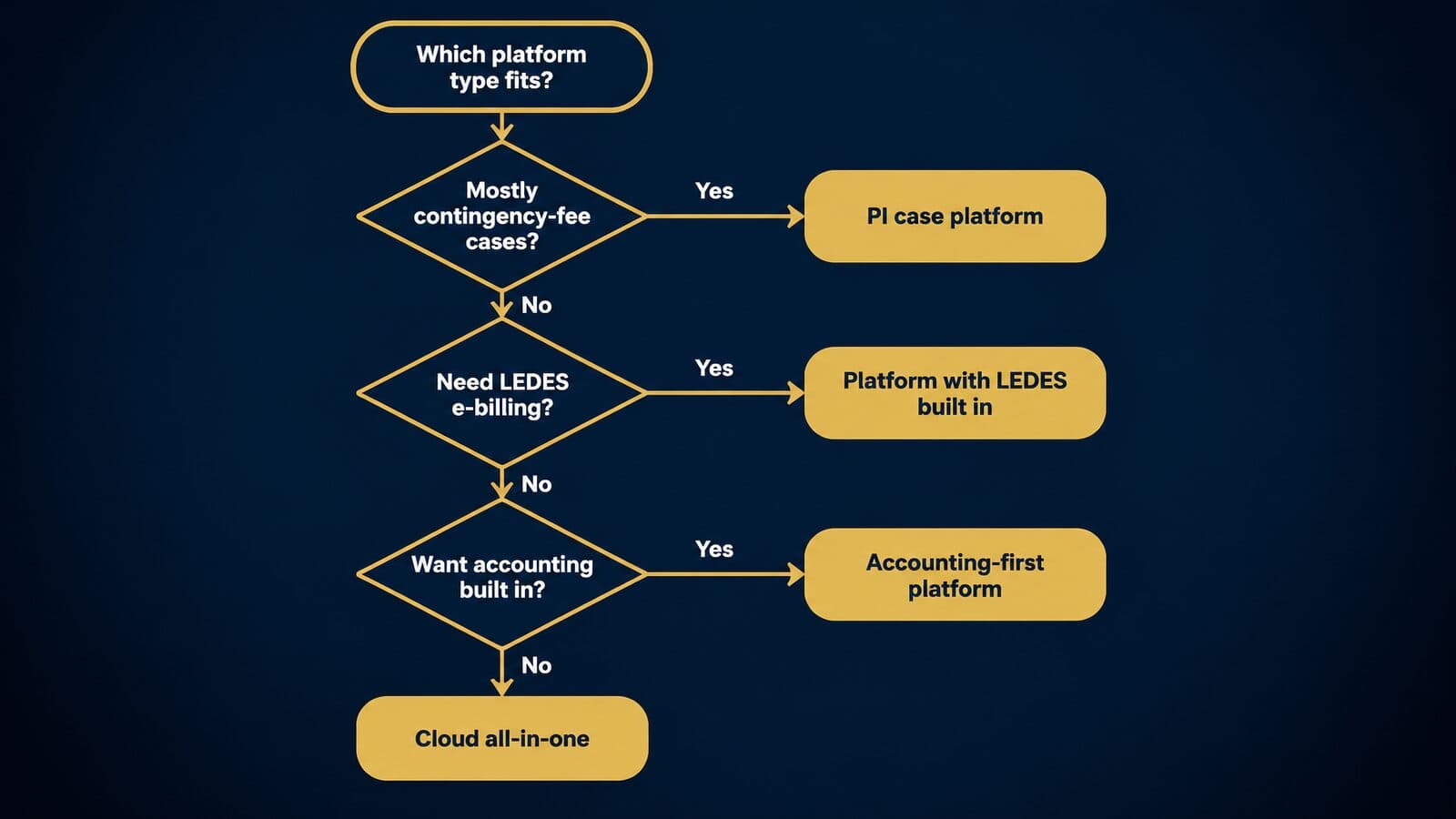
Answer the three questions in the decision tree before you read the rows: how your firm gets paid, whether any client requires LEDES e-billing, and whether you want accounting inside the platform or in a separate general ledger. Those answers usually rule out half the table on their own.
| Platform | Parent company | Entry price (as of Oct 2026) | Built for | Trust or accounting listed | LEDES listed |
|---|---|---|---|---|---|
| Clio | Clio | From $49/user/mo (basis not stated) | Solo to enterprise | Every plan | Not stated |
| MyCase | 8am | $50 annual, $60 monthly | Solo and small firms | Basic and up | Not stated |
| PracticePanther | PracticePanther | $49 annual, $59 monthly | Small to mid-sized firms | Business Pro | Business and up |
| Smokeball | Smokeball | Quote only | Grow plan: 3+ staff | Bill plan | Not stated |
| CosmoLex | ProfitSolv | $49 yearly, $59 monthly | Firms wanting built-in accounting | Built in | Above Launch |
| Rocket Matter | ProfitSolv | $59 paid annually | Not stated on pricing page | Not stated | Not stated |
| Lawcus | Lawcus | $39 annual, $49 monthly | Workflow-focused firms | QuickBooks/Xero sync on Growth | Not stated |
| CARET Legal | CARET | $79 billed annually + implementation | Small and mid-sized firms | Included | Enterprise and up |
| Actionstep | Actionstep | Quote, per user + implementation | Midsize firms | North America only | Not stated |
| Centerbase | Centerbase | Quote only | Midsize firms | Not stated | Not stated |
| LEAP | LEAP | Quote only | Not stated on pricing page | Not stated | Not stated |
| Tabs3 + PracticeMaster | ProfitSolv | Cloud $89, OnSite $69, PracticeMaster +$35 | Billing-first firms; on-premises option | Not stated | Not stated |
| Filevine | Filevine | Quote only | PI and high-volume firms | Not stated | Not stated |
| Litify | Litify | Demo request only | Salesforce-based firms | Not stated | Not stated |
| CasePeer | 8am | $90/user/mo (Basic) | Personal injury | Client trust tracking | Not stated |
| SmartAdvocate | SmartAdvocate | Demo request only | PI, mass torts, workers' comp | Not stated | Not stated |
| Jove | Jove | 6 months free + implementation fee | Plaintiff firms | Not stated | Not stated |
| Neos | Assembly Software | $109/user/mo billed yearly | Case management | Not stated | Not stated |
| MerusCase | MerusCase | Custom quote | Workers' comp and PI | Not stated | LEDES and UTBMS |
| CaseFleet | CaseFleet | $30/user/mo (Starter) | Litigators | Not stated | Not stated |
Pricing verified on 22 October 2026. Confirm current prices with each vendor. "Not stated" means the item was not on the pricing page, not that the feature is missing.
The order is not a ranking. The first seven rows are platforms sold mainly to solos and small firms, the next five are quote-based or on-premises systems aimed at larger or more complex firms, and the last eight are plaintiff and litigation platforms. The profiles below follow the same order and the same three groups, so you can read straight down from a row to its write-up.
How to read the comparison table
Entry prices are not comparable prices. Each vendor puts features on different tiers, so the cheapest plan at one company may lack the trust accounting or texting that sits in the cheapest plan at another. Annual and monthly rates also differ, and Clio's pricing page does not say whether its "Starting at $49/user" figure is the monthly or the annual-billing rate. Compare the tier that holds your must-have features, not the first number on the page.
The "Built for" column uses the vendor's own positioning where it states one. Where it does not, it uses Lawyerist's one-line descriptions (for example, Lawyerist calls Lawcus "workflow-focused" and describes PracticePanther's audience as small to medium-sized firms), or what the vendor's own pages show. Jove compares itself against plaintiff platforms such as Filevine, Litify and CasePeer. Neos sells a demand-letter add-on whose price scales with caseload. In the ABA's 2024 cloud computing survey, about 15% of respondents named Clio among their cloud tools and about 5% named MyCase, with stronger use among solos and smaller firms. Those figures describe survey respondents' tools, not market share.
A hypothetical example shows how far apart "entry" and "fit" can be. Take a five-lawyer firm that needs trust accounting and LEDES billing in one product, paying annually. Using only the published per-user prices as of October 2026, the cheapest tier that lists both on its pricing page costs:
| Platform | Tier that lists trust/accounting and LEDES | Per user per month | Five users per year |
|---|---|---|---|
| PracticePanther | Business Pro | $114 | $6,840 |
| CosmoLex | Core | $99 | $5,940 |
| CARET Legal | Enterprise (plus implementation) | $79 | $4,740 + fees |
Illustrative only; pricing verified on 22 October 2026, so confirm with each vendor. CARET's entry price looks lowest, but its implementation fee is unpublished, and PracticePanther's $49 entry tier is less than half its fit price. MyCase and Clio are left out because LEDES was not stated on their pricing pages, which means "ask," not "absent."
Quote-only does not mean expensive. It means you need per-user, implementation, migration and minimum-term terms in writing before you can compare the vendor with anyone else.
The table has no star ratings and no rank. That is an editorial choice: ratings change, and a single score hides the fit questions that matter. Community ratings exist on Lawyerist if you want them. Finally, the eight plaintiff platforms at the bottom are case-management-first. Their whole-firm features (billing, trust, accounting, reporting) vary widely, which is why so many of their cells say "Not stated."
Ownership changes and renames since 2025
Several of the names in the table have changed owners or brands recently. In date order, oldest first:
- June 2022: AffiniPay acquired MyCase, DocketWise, CasePeer, Soluno and Woodpecker, according to 8am's company history. It predates 2025, but it explains why MyCase and CasePeer share a parent today.
- March 2025: Clio acquired ShareDo, which Clio says "has evolved into Clio Operate" for large firms and corporate legal departments.
- August 2025: AffiniPay became 8am, and the AI features in MyCase and CasePeer are now branded "8am IQ."
- November 10, 2025: Clio completed its US$1 billion acquisition of vLex, alongside a US$500 million Series G at a US$5 billion valuation, per Clio's press release.
- January 2026: GrowPath rebranded as Jove (the date was reported by third parties in January 2026; the vendor page does not state one). The old growpath.com domain now redirects to Jove's about page and site.
- Undated but current: abacusnext.com redirects to CARET's website; Lead Docket is a Filevine property; and ProfitSolv owns CosmoLex, Rocket Matter and Tabs3.
Ownership matters to a buyer for practical reasons. A new parent can change the product roadmap, fold one product's features into another, bundle payments or accounting into a higher tier, and move support teams. Read the contract's assignment clause, which usually lets the vendor transfer your agreement to an acquirer without asking you. Check that the data-export terms survive a change of control, and ask the sales rep directly which products the parent plans to merge or retire over the next two years.
Shared ownership also explains some overlaps in the table. MyCase and CasePeer both carry 8am IQ and sit beside LawPay payments in the same company, so a firm running both a general practice and a PI group could keep them under one vendor relationship. CosmoLex, Rocket Matter and Tabs3 all sit under ProfitSolv, yet they price and package accounting very differently. Treat each product on its own merits, and do not assume that a sibling product's terms, security reports or integrations carry over.
Solo and small-firm platforms: Clio, MyCase and more
These seven platforms are aimed mainly at solos and firms of 2 to 9 lawyers, listed in the same order as the master table. Smokeball is the one that pairs browser-based plans with a native desktop application (on its Grow plan). All prices below are as of October 2026; confirm them with the vendor before you sign.
Clio
Clio sells four Clio Manage plans: Starter, Core, Signature and Elite. As of October 2026, only Starter carries a public price, "Starting at $49/user," on Clio's pricing page; Core, Signature and Elite say "Get pricing." Elite bundles Clio Manage with Clio Grow, the intake and CRM product, and Clio says the bundle saves "over 17%." Clio states that accounting is included "on every Clio plan, from Starter up," that its AI "comes as part of the plan" on Core and above, and that support runs "24/5, from Monday morning through Friday evening." Cancellation, per the same page, "takes effect at the end of your current term, whether monthly or annual." Larger Signature Work and Elite Work packages are quote-based, and Clio for Personal Injury, which Clio says manages "medical records, damages, and settlements, with HIPAA compliance included," is a quote-based add-on.
Clio's homepage claims "400,000+ legal professionals," "100+ bar approvals, including all 50 states" and "300+ app integrations." On security, Clio says data is "encrypted in transit and at rest," that it is "SOC 2 Type II certified," offers "a 99.9% uptime guarantee," and lets you export "in open, nonproprietary formats" while active or within 90 days of cancellation. Its CEO and founder is Jack Newton. Since the vLex deal, Clio markets an "Intelligent Legal Work Platform" built around vLex's Vincent AI. In a demo, ask what Core costs for your headcount, whether $49 is the monthly or annual rate, and which features move up to Signature.
Best for: firms that want a large integration ecosystem and room to grow.
MyCase
MyCase, owned by 8am (formerly AffiniPay), publishes three tiers per user per month as of October 2026 on MyCase's pricing page: Basic $50 billed annually or $60 monthly, Pro $100 or $120, and Advanced $130 or $150. Annual billing saves "up to 16%," and MyCase says "No long-term contract or setup fee is required." There is a 10-day free trial with no credit card. Basic includes trust accounting and a limited client portal. Pro adds e-signature, document generation, workflows, intake forms and legal CRM, two-way texting, the 8am IQ writing assistant and "70+ Integrations." Advanced adds the 8am IQ Case and Discovery Assistants, conflict check tracking, split billing and an "Open API."
MyCase Accounting is a $39 per user per month add-on on Pro and Advanced, and LawPay Payments is listed at "$0 No monthly fee." MyCase states that it uses "128-bit SSL for data in transit and 256-bit AES for stored data." Its parent, 8am, claims "260k+ professionals trust 8am" and "175+ bar and professional associations approve our solutions." In a demo, map your must-haves to a tier: texting and workflows sit on Pro, while conflict tracking and the API sit on Advanced, and that gap is $30 per user per month at annual rates.
Best for: solo and small firms that want trust accounting and payments in the entry tier.
PracticePanther
PracticePanther publishes four tiers per user per month on its pricing page, as of October 2026: Solo $59 monthly or $49 annual, Essential $79 or $69, Business $99 or $89, and Business Pro $124 or $114. Annual billing saves "$120/user/year," and there is a 7-day trial. You may see PracticePanther listed elsewhere at $39 with annual billing; that figure does not appear on the vendor's page, which starts at $49 annual. Every plan includes a secure client portal, unlimited storage and mobile apps. Business adds texting, intake forms, unlimited e-signature, an attorney revenue report and LEDES billing. Business Pro adds PantherAccounting Plus with trust and operating accounting, enhanced reconciliation, and general ledger, receivables and expense management.
PracticePanther says its platform is "secured by a 256-bit military-grade encryption" with SSL and per-user security roles. According to PracticePanther's about page, the company was founded in 2012, shipped its first beta in 2014, has been "backed by Alpine Investors" since 2018 and launched in-house payments in 2020; Soumya Nettimi is listed as CEO. In a demo, check whether you need full accounting (Business Pro) or only LEDES (Business), because that one decision moves the price by $25 per user per month.
Best for: small firms that want texting, e-signature and LEDES without enterprise pricing.
Smokeball
Smokeball sells four plans, Bill, Boost, Grow and Prosper+, and as of October 2026 every one says "Get pricing" on Smokeball's pricing page. The vendor explains that its pricing "depends on the number of users at your firm, your selected plan, your contract term, and any optional products or services." Bill covers invoicing, time and expense, online payments, trust accounting and accounting integrations. Boost is "Fully browser based." Grow "includes Smokeball's native desktop application and is designed for firms with three or more staff members." AutoTime, Smokeball's automatic time capture, is included in Prosper+ and is an add-on for Grow, and the Archie AI assistant is a separate add-on.
Smokeball says it is "Trusted by 34,000+ legal professionals worldwide." Migration costs, per the page, "will be confirmed in your quote." Because nothing is published, ask for the quote to break out per-user fees, the AutoTime add-on, migration and the contract term separately, so you can compare it line by line with the priced platforms above.
Best for: small firms that lose time to manual entry and want automatic capture.
CosmoLex
CosmoLex, part of ProfitSolv, publishes three tiers per user per month on its pricing page as of October 2026: Launch $49 yearly or $59 monthly, Core $99 or $109, and Pro $129 or $139. Yearly billing saves "$120 per user," and there is a 10-day free trial with no credit card. LEDES, split billing, and general ledger and payables appear above Launch. Add-ons include CosmoLex Pay, CosmoLex CRM, CosmoLex Websites and Google Ads services.
CosmoLex's selling point is accounting inside the practice system: Lawyerist says it "includes full law-firm accounting." CosmoLex states that "Enterprise-grade security comes standard, including SOC 2 Type 2 controls, encryption in transit and at rest, two-factor authentication." In a demo, have your bookkeeper run a month-end close and a trust reconciliation in the trial, since accounting depth is the reason to choose it.
Best for: firms that want one system for practice management and full accounting.
Rocket Matter
Rocket Matter, also a ProfitSolv company, shows four plan cards per user per month paid annually on its pricing page as of October 2026: Essentials $59, Pro $95, Premier $115 and Elite $145. The page's FAQ quotes a lower starting figure that does not match the plan cards, so rely on the cards and confirm in writing. Every plan includes "free data migration." Rocket Matter says it is "SOC 2 Type II certified" with "Bank-grade encryption."
The CRM is an add-on on Pro and Premier. Core CRM costs $39 per user per month billed annually ($49 monthly). Enterprise CRM costs $147 per month billed annually for up to 3 users ($49 per extra user), or $177 monthly ($59 per extra user), with a one-time $399 CRM onboarding fee and a 3-user minimum. E-signature overage is $2 per envelope, and a website add-on runs $149 per month plus $599 setup. Add those to the base price when you compare it.
Best for: small firms that want free data migration and an optional CRM add-on.
Lawcus
Lawcus publishes three priced tiers per user per month on its pricing page as of October 2026: Essential $39 annual or $49 monthly, Growth $59 or $69, and Elite $79 or $89. Enterprise is quote-based with a "Minimum 10 users." Growth adds "QB & Xero Integration" and "Nova AI." Texting is an add-on at $10 per attorney per month plus a one-time $50 or $150 registration.
Lawyerist describes Lawcus as "workflow-focused" with "a built-in CRM." Its entry price is the lowest published among the small-firm platforms here, but note that accounting sync starts on Growth, so a firm that needs QuickBooks or Xero should compare Growth, not Essential.
Best for: cost-conscious solos who want workflow tools and QuickBooks or Xero sync on Growth.
Mid-sized, quote-based and on-premises platforms
These five platforms serve firms that need deeper accounting, LEDES billing, configurable workflows or a desktop deployment. Most of them charge implementation fees on top of licenses, so the published per-user price, where one exists, is only part of what you will pay. Prices are as of October 2026.
CARET Legal
CARET Legal publishes three tiers per user per month billed annually on CARET's pricing page as of October 2026: Enterprise $79, Enterprise Plus $99 and Enterprise Insights $119. The page adds that "Pricing is per user plus one-time implementation fees," and a second block on the same page shows "Request Pricing." The implementation amounts are not published. Enterprise includes built-in email, LEDES invoicing, accounting, a client portal and "24/7/362 Phone Support." Enterprise Plus adds CARET Analytics, automated workflows and "AI-Generated Document Summaries." Premium Support requires "A minimum of 25 users" and a minimum term.
The old abacusnext.com domain now redirects to CARET, and Lawyerist lists the product as formerly Zola Suite. CARET says it "can help small and mid-sized firms capture an extra $20,000 in billable work per timekeeper," while the same page says results are illustrative and "Actual results may vary significantly." In a demo, get the implementation fee in writing before comparing CARET with the $69 to $129 platforms above.
Best for: small and mid-sized firms that bill insurers or corporate clients and want built-in email and accounting.
Actionstep
Actionstep prices every tier "per user plus implementation fees" and shows "Request Pricing" and "Get a Quote" rather than numbers on its pricing page, as of October 2026. It positions itself for "midsize law firms." Its Legal Accounting module is "Only available in North America," which matters for any firm with offices elsewhere.
Lawyerist calls Actionstep "all-in-one, cloud-based" with "document management, workflows, and full accounting." Ask for the per-user rate, the implementation fee and the minimum term in one written quote, and ask to see a workflow built for a matter type you actually handle.
Best for: midsize firms that want workflow-driven practice management with accounting in North America.
Centerbase
Centerbase is quote-based. Its pricing page says licensing, onboarding and add-on costs are all set out in your quote, and that the product is built "for midsize law firms." Centerbase states that "Onboarding typically spans 12-14 weeks," which is the vendor's own estimate, not a general benchmark. Centerbase Payments runs on Stripe, and Centerbase says it carries "no monthly or annual platform fees."
Lawyerist describes Centerbase as "highly configurable" with "customizable workflows." Configurability cuts both ways: it fits firms with distinct processes, and it needs someone to own the configuration. Ask who builds your workflows during onboarding, and what changes cost after go-live.
Best for: midsize firms that want a configurable system and a structured onboarding.
LEAP
LEAP publishes no US prices. LEAP's pricing page is a "Request Pricing" form promising "clear, straightforward pricing specific to your firm's needs." The page lists the systems LEAP migrates data from: Clio, MyCase, PracticePanther, PCLaw, Time Matters, Actionstep, Rocket Matter, Filevine, CosmoLex and Firm Central. LEAP says it is "hosted on Amazon Web Services (AWS) and is SOC 2 Type 2 certified," and it markets LEAP AI.
Lawyerist mentions LEAP for firms looking for on-premises features. The presence of PCLaw and Time Matters on the migration list makes LEAP a candidate for firms leaving older desktop systems. Ask for the migration scope (which records, how much history) in the quote.
Best for: firms moving off older desktop systems who want a quoted package.
Tabs3 and PracticeMaster
Tabs3 is billing software first, and PracticeMaster is its practice management add-on. As of October 2026, Tabs3's pricing page lists Tabs3 Cloud "Starting At $89 per user monthly (volume discounts may apply)," Tabs3 OnSite "Starting At $69 per user monthly," and PracticeMaster as a "$35 per user* monthly" add-on. The page notes that "Tabs3 Software is part of ProfitSolv."
That makes it the one platform in this comparison with a published on-premises price. A firm running OnSite with PracticeMaster would start at $104 per user per month before any volume discount, and a cloud firm at $124. The architecture suits firms whose billing is the center of operations and whose practice-management needs are secondary.
Best for: firms that need an on-premises deployment or already run Tabs3 billing.
Plaintiff platforms: Filevine, Litify, CasePeer and more
Plaintiff platforms are built around the case (intake, treatment, deadlines, demands and settlements) rather than the invoice, which suits contingency practices. In the ABA's 2024 practice management survey, firms of 2 to 9 lawyers reported the highest share of contingent-fee practice, at 23%.
Matter-level workflow (medical records, demands, MDL plaintiff fact sheets) is covered in our guide to legal case management software. This section looks at each platform as the firm's operating system: its pricing model, its billing and trust coverage, and its intake.
Filevine
Filevine publishes no prices. As of October 2026, Filevine's pricing page says "Contact our sales team for a custom quote." A free "LOIS Explore" tier "does not provide access to Filevine Case Management," and implementation runs through "Certified Implementation Partners." Filevine's homepage leads with LOIS, which it says is "Built on 40M+ matters." Filevine's security page says it "is hosted on AWS" and that its audits "include HIPAA, CJIS, and ISO 27001 security controls in addition to NIST 800-53 controls."
Lead Docket, Filevine's intake product, says "Filevine Sync" "natively transfers to Filevine, creating a unified client record and eliminating double entry." Lawyerist calls Filevine "a good fit for personal injury and process-oriented firms." Before data syncs, configure the intake questions in Lead Docket to match the qualification criteria by litigation, so screened claimants arrive in the case record already sorted.
Best for: PI and mass tort firms that want intake and case management from one vendor.
Litify
Litify publishes no prices: as of October 2026, Litify's pricing URL redirects to a demo request. Litify's homepage says it is "Built on the world-class infrastructure of Salesforce, AWS, and Anthropic (our closed AI model)." The Salesforce base shapes the buying questions: how much configuration your firm wants, whether you have or will hire a Salesforce administrator, and which reports and objects come standard. Treat those as demo questions rather than assumptions either way. Because no price is public, ask for the license cost, any Salesforce licensing that sits underneath it, implementation and the minimum term as separate lines in one written quote.
Best for: larger plaintiff firms that already use or want Salesforce.
CasePeer
CasePeer, an 8am product since June 2022, is the only plaintiff platform here with a full public price list. As of October 2026, CasePeer's pricing page lists Basic $90, Pro $130 and Advanced $160 per user per month, with "No long-term contract or setup fee required." Basic covers automated statute alerts, settlement negotiations, medical treatment tracking, case expense tracking and client trust tracking. Pro adds client intake management, unlimited two-way texting, litigation event plans, "Over 50 Additional Reports," "20+ Key Integrations" and 8am IQ. Advanced adds scheduled texts, data sync, multi-office reporting, an intake investigator portal, case grades and "NEW API Access."
Lawyerist cites CasePeer for "high-volume intake management and settlement tracking." The pricing page does not address invoicing either way, so if you bill hourly matters alongside contingency cases, test that in the demo.
Best for: PI firms that want published pricing and no setup fee.
SmartAdvocate
SmartAdvocate shows "Request Demo" and no prices on its homepage, and its /pricing page returned a 404 on 22 October 2026. Its listed practice areas include Personal Injury, Mass Torts, Worker's Compensation, Municipalities and Social Security. A dedicated mass torts listing matters if you are scaling from one tort to several, where docket-level views and bulk updates become daily needs. With no public pricing, the demo is where you learn the model: ask whether fees are per user or per case, what implementation and data migration cost, how billing and trust accounting are handled, and how intake records arrive from your lead sources. Get each answer in writing.
Best for: firms running PI, mass tort and workers' comp dockets together.
Jove (formerly GrowPath)
Jove publishes no per-user list price. Jove's pricing page says "We give you the first six months free – only charging for implementation – no per user fees," with pricing "based on firm complexity - not headcount" and "A single, fixed implementation fee." The growpath.com domain redirects to Jove, and the rebrand was reported in January 2026. Jove's team page lists James S. Farrin as founder, says the product began inside The Law Offices of James Scott Farrin, and lists Debbie McGrath as CFO and Christina Richards as COO. Ask what the fee becomes after month six.
Best for: plaintiff firms that prefer complexity-based pricing to per-user fees.
Neos
Neos, from Assembly Software, lists Essentials at $109 and Premium at $139 per user per month billed yearly on Assembly's pricing page, as of October 2026. "NeosAI Platinum is quoted to your firm," and "Demands Plus pricing scales with your caseload." Assembly states that "Most migrations land in 60 to 90 days." Assembly also sells Needles and Trialworks, and Lawyerist describes Neos as a cloud-based case manager combining Needles and TrialWorks.
Best for: firms coming from Needles or TrialWorks, or that want a published per-user price.
MerusCase and CaseFleet
MerusCase lists "Pricing Custom & Tailored to Your Needs" on its website, with practice-area pages for Workers' Compensation and Personal Injury, and markets "Ledes, and UTBMS" billing. Lawyerist calls it "best for small to medium-sized litigation firms." Best for: workers' comp and PI firms that also need LEDES and UTBMS billing.
CaseFleet is a litigation fact-management platform. As of October 2026, CaseFleet's pricing page lists Starter at $30 and Advanced AI at $140 per user per month, with Enterprise custom, a 22% saving for annual payment and a 14-day free trial. Advanced AI includes 100,000 AI credits per billed user per month, then $0.001 per credit, and the Casey AI Assistant. Lawyerist cites its "hard-to-find litigation specific features." Best for: litigators who want chronology and fact tools at a low entry price.
Knowing the field is half the work; the next step is matching these platforms to your firm's size and practice area.
Best platforms by firm size and practice area
Firm size decides your budget, how much implementation effort you can absorb and how much configuration you can maintain; practice area decides which features are non-negotiable. The picks below are my editorial "best for" judgments, based on published plans and features as of October 2026, not on hands-on testing.
The ABA's 2024 Practice Management TechReport shows how differently each band behaves: technology budgets, reported spend and fee methods all shift with headcount. Use the band that matches your firm today and the one you expect to reach within the contract term.
Solo practitioners
Solos are the band where use is falling. The ABA survey found solo use of case and practice management software dropped from 45% in 2022 to 37% in 2024, and solo respondents reported spending less than $3,000 a year on practice management software. About 65% of solos use cloud computing, the lowest rate of any size band, according to the ABA's 2024 Cloud Computing TechReport.
My shortlist for a solo: Lawcus Essential ($39 billed annually), PracticePanther Solo ($49 annual), MyCase Basic ($50 annual) and Clio Starter ("Starting at $49/user"), all per user per month as of October 2026. Buy the tier that includes trust accounting and online payments, because those protect your license and your cash flow. Skip AI and CRM add-ons until your matter volume justifies them, and confirm current prices with each vendor.
Small firms of 2 to 9 lawyers
Small firms spend the most per lawyer on deciding well. ABA respondents at 2 to 9 lawyer firms reported spending $10,000 to $20,000 a year on practice management software, 55% of these firms budget for technology, and this band reported the highest share of contingent-fee practice at 23%. That mix of real spend and contingency work shapes the shortlist.
My shortlist: MyCase Pro, PracticePanther Business, Clio Core (quote-based), CosmoLex Core and Smokeball (quote-based). Plaintiff firms in this band should add CasePeer or Neos to the demo list. This is the size where workflow automation, two-way texting and e-signature tiers start to pay for themselves, because the same five people repeat the same steps across dozens of matters. Price the tier that holds those features, not the entry tier.
Mid-sized firms of 10 to 99 lawyers
Mid-sized firms need configuration, reporting and a real implementation. In the ABA survey, 65% of 10 to 49 lawyer firms budgeted for technology. At this size, LEDES invoicing, departmental reporting, permissions and a structured onboarding program matter more than the per-user price.
My shortlist: CARET Legal, Actionstep, Centerbase and Clio's higher tiers. Centerbase says its onboarding "typically spans 12-14 weeks", which is a useful reminder of the scale of work involved; treat it as one vendor's statement, not a norm. Plan for an internal system owner with protected time and a paid implementation, and budget for both before you compare license prices.
Large firms and enterprise legal teams
Large firms buy differently, and this guide is not a large-firm RFP guide. The ABA survey found use of case and practice management software at firms of 100 or more lawyers rose from 19% in 2022 to 27% in 2024, and 90% of those firms budget for technology. These firms usually pair a practice or matter platform with a dedicated document management system. iManage claims "81% of the AmLaw 200" and "42% of the Fortune 100" as customers, and NetDocuments markets to "Law Firms", "In-House Legal Teams" and "Public Sector". Clio has also moved upmarket: its press release on the vLex acquisition describes Clio Operate for large firms and corporate legal departments.
Picks by practice area
Practice area narrows the list faster than any feature checklist. The table pairs each area with the features I would treat as non-negotiable and the platforms I would demo first.
| Practice area | Non-negotiable features | Platforms to demo (editorial) |
|---|---|---|
| Personal injury | Statute alerts, medical treatment tracking, settlement statements, trust holdbacks | CasePeer, Neos, Filevine, Litify, SmartAdvocate, Jove |
| Mass tort | Bulk intake, dedupe, consent records, census exports, bulk disbursement | Filevine with Lead Docket, Litify, SmartAdvocate |
| Workers' compensation | Claim deadlines; LEDES and UTBMS if payers require them | MerusCase, SmartAdvocate |
| Insurance defense | LEDES 98B, UTBMS codes, carrier guidelines | CARET Legal, PracticePanther Business, CosmoLex Core |
| Litigation boutique | Fact and evidence management, deadline chains | CaseFleet alongside a billing platform |
| Family law | Flat and hourly mixes, evergreen retainers in trust, client portal | MyCase, PracticePanther, Clio |
| Estate planning | Flat fees, document assembly, client portal | Clio, MyCase, Smokeball |
| Criminal defense | Flat fees paid in advance into trust, court dates, texting | MyCase, PracticePanther, Lawcus |
| Immigration | Form-heavy matters, client portal, deadline tracking | General platforms; ask about form libraries |
These pairings are editorial and based on published features. MerusCase lists workers' compensation and personal injury and markets LEDES and UTBMS billing, SmartAdvocate lists personal injury, mass torts and workers' compensation among its practice areas, and CaseFleet positions itself for litigators. Demo at least two platforms before you decide. Mass tort firms should also check that the platform can hold the records their advertising and TCPA compliance depends on, because consent and source data enter the system at intake.
Security, confidentiality and ABA ethics rules
The ABA Model Rules do not certify any software. They require lawyers to understand the technology they use, make reasonable efforts to protect client information and supervise the vendors who hold it, which makes security due diligence on a practice platform a professional duty that you should document before client data moves. This is general information, not legal advice, and each state adopts its own version of these rules.
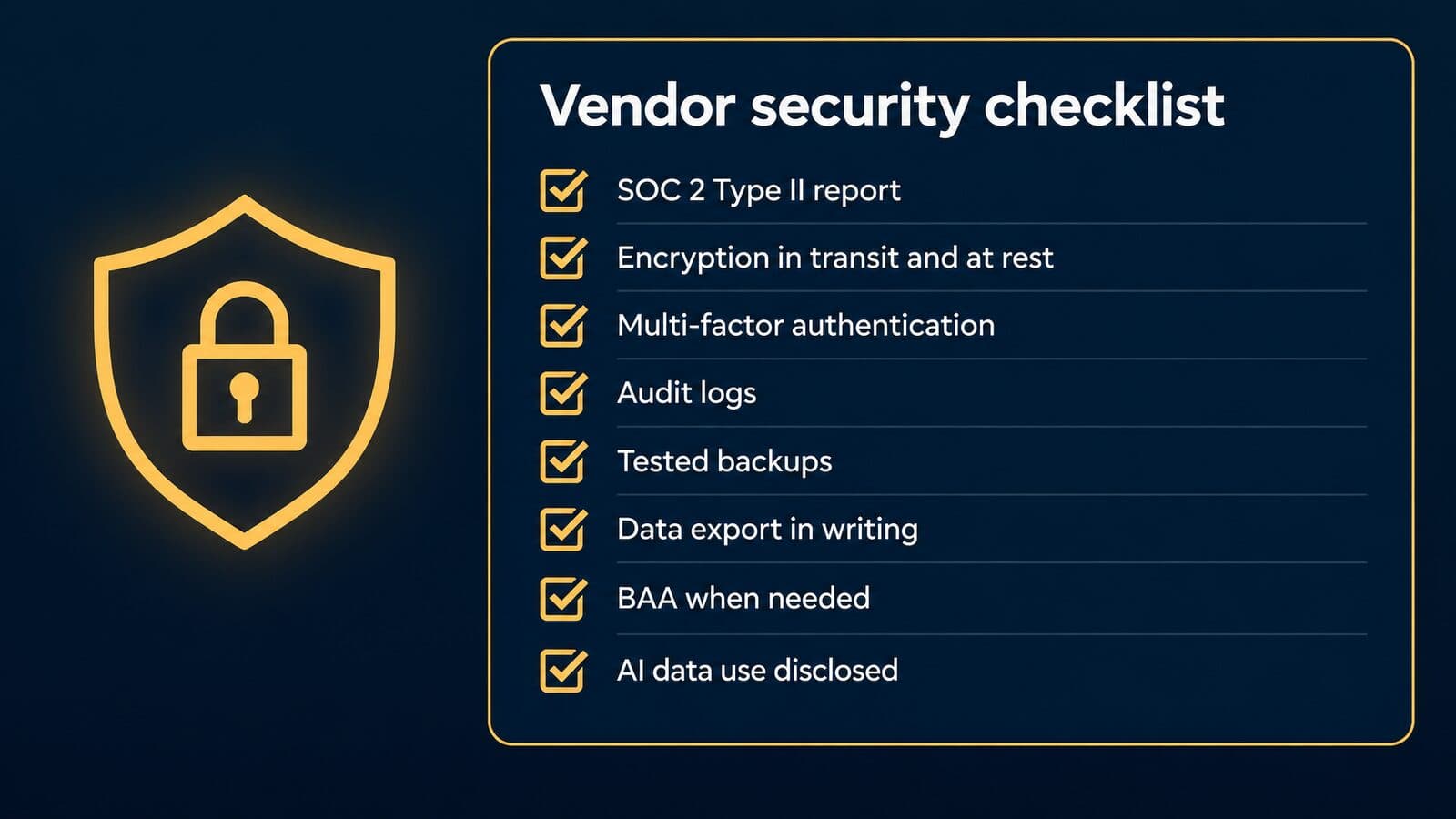
Rules 1.1, 1.6 and 5.3 applied to software
Competence now includes technology. [Comment [8] to Model Rule 1.1](https://www.americanbar.org/groups/professional_responsibility/publications/model_rules_of_professional_conduct/rule_1_1_competence/comment_on_rule_1_1/) says a lawyer should keep abreast of "the benefits and risks associated with relevant technology", language the ABA added in 2012. Robert Ambrogi's LawSites tracker reports that 40 states, D.C. and Puerto Rico have adopted the duty; Florida approved it on Sept. 29, 2016, and the District of Columbia on April 7, 2025. In the ABA's 2024 survey, 71% of attorneys "acknowledged their responsibility to understand the benefits and risks of technology as part of their competency requirement." Buying action: write a training plan into the rollout, not just a login list.
Model Rule 1.6(c) requires "reasonable efforts to prevent the inadvertent or unauthorized disclosure of, or unauthorized access to, information relating to the representation of a client." [Comment [18]](https://www.americanbar.org/groups/professional_responsibility/publications/model_rules_of_professional_conduct/rule_1_6_confidentiality_of_information/comment_on_rule_1_6/) lists the factors: the sensitivity of the information, the likelihood of disclosure without added safeguards, their cost, the difficulty of implementing them, and how far they hinder representation. A breach "does not constitute a violation of paragraph (c) if the lawyer has made reasonable efforts". Buying action: keep a written security review, because it is your evidence of those efforts.
[Comment [3] to Rule 5.3](https://www.americanbar.org/groups/professional_responsibility/publications/model_rules_of_professional_conduct/rule_5_3_responsibilities_regarding_nonlawyer_assistant/comment_on_rule_5_3/) names "using an Internet-based service to store client information" as nonlawyer assistance outside the firm. The lawyer must make reasonable efforts to ensure the services fit the lawyer's professional obligations, weighing the provider's "education, experience and reputation" and "the terms of any arrangements concerning the protection of client information." Buying action: negotiate contract terms on protecting client information, not just the price.
What Formal Opinions 477R and 498 add
Two ABA formal opinions turn those rules into a working method. Formal Opinion 477R, "Securing Communication of Protected Client Information" (May 11, 2017, revised May 22, 2017), says a lawyer "generally may transmit information relating to the representation of a client over the internet" if the lawyer makes "reasonable efforts to prevent inadvertent or unauthorized access", while special precautions may be required for sensitive matters. It lists seven considerations:
- Understand the nature of the threat.
- Understand how client confidential information is transmitted and where it is stored.
- Understand and use reasonable electronic security measures.
- Determine how electronic communications about client matters should be protected.
- Label client confidential information.
- Train lawyers and nonlawyer assistants in technology and information security.
- Conduct due diligence on vendors providing communication technology, which the opinion ties to Rule 5.3.
The seventh consideration is the one that governs a practice platform purchase. A practice management system is where client communications, documents and billing records are stored, so the vendor review is the 477R diligence step.
Formal Opinion 498, "Virtual Practice" (March 10, 2021), says the Model Rules "permit virtual practice". For files in the cloud, lawyers should "(i) choose a reputable company, and (ii) take reasonable steps to ensure that the confidentiality of client information is preserved, and that the information is readily accessible to the lawyer," and make sure "data is regularly backed up." Formal Opinion 512, which addresses generative AI, is covered in the AI features section of this guide.
SOC 2 reports, encryption and access controls
A SOC 2 is an audit report, not a badge. The AICPA describes SOC as "a suite of service offerings CPAs may provide in connection with system-level controls of a service organization", and SOC 2 covers controls "Relevant to Security, Availability, Processing Integrity, Confidentiality, or Privacy". A Type 1 report is commonly described as covering control design at a point in time, and a Type 2 as covering design and operating effectiveness over a review period, commonly described as 3 to 12 months. Ask for the report itself under NDA, check its period and read any exceptions the auditor noted.
Vendor statements, as read on 22 October 2026 and attributed to each vendor:
- Clio says data is "encrypted in transit and at rest", that "Clio is SOC 2 Type II certified and meets GDPR requirements", and that every plan includes multi-factor authentication.
- CosmoLex lists "SOC 2 Type 2 controls, encryption in transit and at rest, two-factor authentication"; Rocket Matter says "SOC 2 Type II certified. Bank-grade encryption."; LEAP says it is "hosted on Amazon Web Services (AWS) and is SOC 2 Type 2 certified."
- Filevine says it is hosted on AWS and that its audits "include HIPAA, CJIS, and ISO 27001 security controls in addition to NIST 800-53 controls."
- MyCase states "128-bit SSL for data in transit and 256-bit AES for stored data."
- PracticePanther describes "256-bit military-grade encryption", SSL and per-user security roles.
- Litify says it is "Built on the world-class infrastructure of Salesforce, AWS, and Anthropic."
Uptime claims differ in kind. Clio offers "a 99.9% uptime guarantee", while 8am reports "99.99% platform uptime measured across the last 24 months"; the first is a promise about the future, the second a measurement of the past. Few firms check any of this: the ABA cloud report found only 34% use software that guarantees SSL encryption, and "less than 30%" review ethics rules, privacy policies or vendor terms of service.
HIPAA and medical records in PI files
Personal injury files are full of medical records, so HIPAA questions come up in every plaintiff-firm demo. Under 45 CFR 160.103, a "business associate" includes a person who, other than as a workforce member, provides "legal, actuarial, accounting, consulting, data aggregation … management, administrative, accreditation, or financial services to or for such covered entity … where the provision of the service involves the disclosure of protected health information."
Status turns on services provided to or for a covered entity. A plaintiff firm that obtains its own client's records with an authorization is in a different position from a firm working for a hospital, so whether your firm is a business associate depends on the facts. Take your own counsel's view; this is general information, not legal advice.
Prudent practice applies regardless of status: HIPAA-aligned safeguards for medical records, role-based access so only the case team sees treatment files, audit logs, and a business associate agreement with vendors when your counsel concludes one is needed. Treat vendor HIPAA language as marketing. Clio says Clio for Personal Injury lets firms "Manage medical records, damages, and settlements, with HIPAA compliance included", and Filevine says its audits include HIPAA controls. No government agency issues a HIPAA certification for software, so ask what the claim covers and get it in the contract.
Data ownership and exit rights
The contract, not the marketing page, decides who controls your data and how it leaves. Clio's pricing page is a useful model of what to ask for: Clio says firms can retrieve data "such as contacts, matters, and financial records" in "open, nonproprietary formats at any time while your account is active, or within 90 days of cancellation." Clio also says "Cancellation takes effect at the end of your current term, whether monthly or annual." Get equivalent terms in writing from every vendor you shortlist.
The idea of written user rights is not new. LexisNexis proposed "The Legal Software Bill of Rights" "to set a new level of expectations about how legal technology should work for you." Whatever you call it, trust records are the non-negotiable part. Model Rule 1.15 says complete trust records "shall be preserved for a period of [five years] after termination of the representation", with the period left for each state to set, so export trust ledgers and reconciliation reports before you cancel.
Clauses to request:
- Export formats and the fields included, especially custom fields and trust ledgers
- The export timeline, both while active and after cancellation
- The cost of a full export, if any
- A deletion certificate once you confirm the export is complete
- Vendor assistance during the transition to a new platform
A vendor due-diligence checklist
This checklist extends the image above. Send it to every shortlisted vendor in writing and ask for documents, not answers on a call.
- A SOC 2 Type II report and its review period, with any exceptions noted.
- Encryption in transit and at rest, with the standards named.
- Multi-factor authentication enforced for all users, not just offered.
- Role-based permissions and ethical walls for conflicted matters.
- Audit logs the firm can export and keep.
- Backup frequency and evidence of a tested restore.
- Data export terms in writing: formats, timeline and cost.
- A business associate agreement when your counsel says one is needed.
- Disclosed AI data use: training, retention and subprocessors.
- Breach notification terms and the location where data is hosted.
File the answers with your engagement records. They are your evidence of reasonable efforts under Rules 1.6(c) and 5.3.
What practice management software costs in 2026
Practice management software is priced per user per month. As of October 2026, published entry tiers start at $39 (Lawcus Essential, billed annually), sit around $49 to $60 at Clio, PracticePanther and MyCase, and reach $89 (Tabs3 Cloud) and $109 (Neos Essentials, billed yearly), while Smokeball, Filevine, Litify and LEAP quote every plan. ABA respondents at 2 to 9 lawyer firms reported spending $10,000 to $20,000 a year, according to the ABA's 2024 Practice Management TechReport.
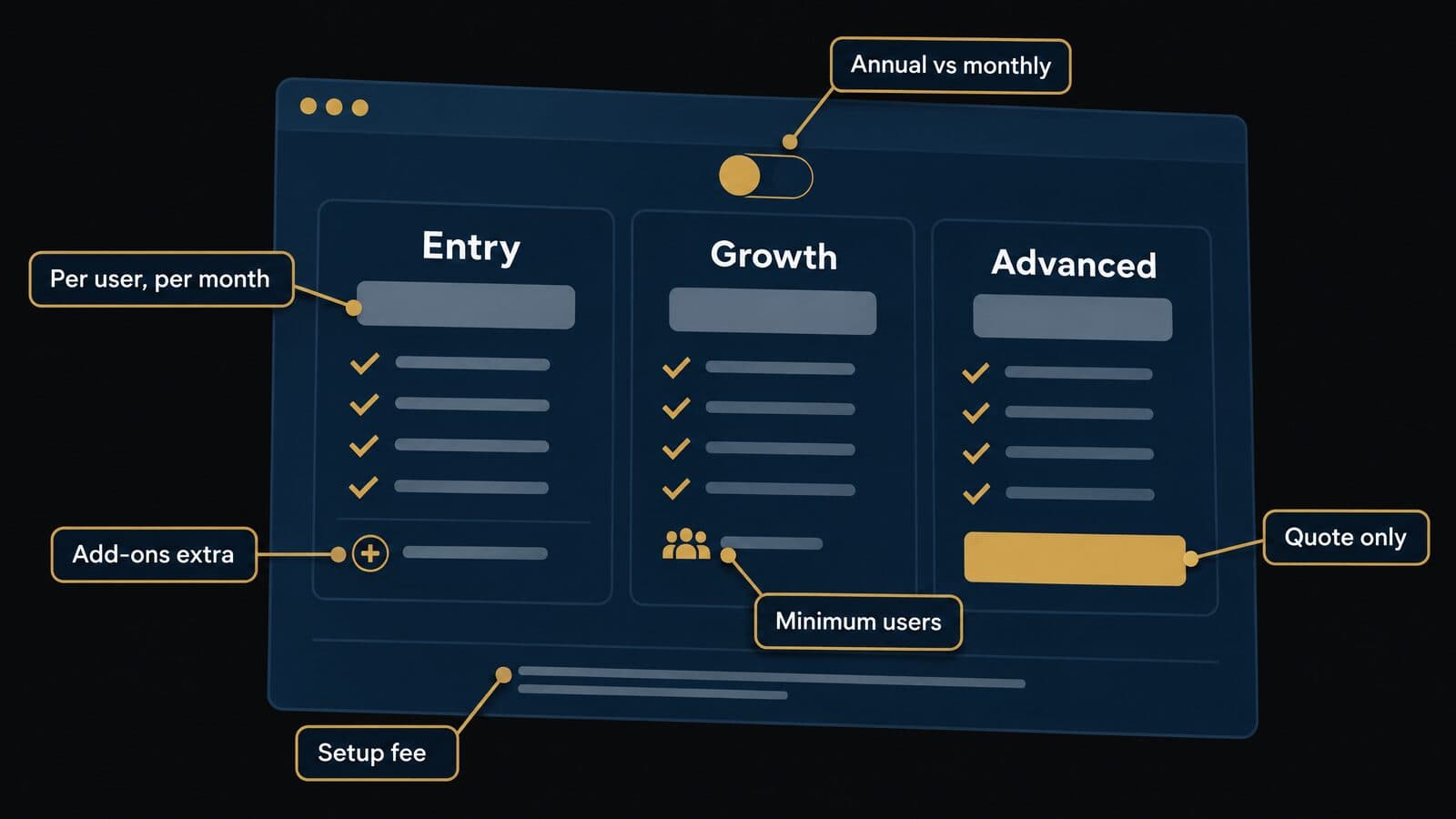
Headline prices are the least reliable number on a pricing page. The real cost depends on who needs a seat, which features sit in add-ons, and what you pay once to get started. The ABA TechReport author ties part of the fall in usage to pricing, noting that companies "often charge users 'a la carte,' or individually per add-on." That is the author's interpretation, but it matches what the pricing pages show.
How to read a vendor pricing page
Six things change the real price, and each appears in the mock-up above.
- Billing basis. Almost every vendor prices per user per month. Check whether paralegals and intake staff need full seats.
- Annual vs monthly rates. MyCase says annual billing saves "up to 16%"; PracticePanther advertises "Save $120/user/year" and CosmoLex "Save $120 per user with yearly"; CaseFleet offers "Pay annually (save 22%)".
- Add-ons billed separately. MyCase Accounting is a $39 add-on, and Rocket Matter sells CRM add-ons on top of its plans.
- One-time implementation fees. CARET Legal says "Pricing is per user plus one-time implementation fees"; Actionstep says "Priced per user plus implementation fees"; Jove charges "A single, fixed implementation fee".
- Minimum user counts. Lawcus Enterprise has a "Minimum 10 users", Rocket Matter's CRM a 3-user minimum, and CARET's Premium Support add-on "A minimum of 25 users".
- Quote-only tiers. Clio publishes only "Starting at $49/user" for Starter; Core and above are quoted, as are every Smokeball, LEAP, Filevine and Litify plan.
For quote-based vendors, ask for per-user, implementation, migration and minimum-term terms in writing before the demo.
Published prices side by side
The table lists every vendor in this guide that published dollar prices on 22 October 2026. Prices are per user per month, annual / monthly where both are shown.
| Platform | Entry tier | Top published tier | Annual vs monthly | Extra costs on the page |
|---|---|---|---|---|
| MyCase | Basic $50 / $60 | Advanced $130 / $150 | Annual saves up to 16% | Accounting $39 add-on |
| PracticePanther | Solo $49 / $59 | Business Pro $114 / $124 | Annual saves $120/user/yr | None listed |
| CosmoLex | Launch $49 / $59 | Pro $129 / $139 | Yearly saves $120/user | Pay, CRM, Websites add-ons |
| Lawcus | Essential $39 / $49 | Elite $79 / $89 | Enterprise quote, 10-user minimum | Texting $10 + registration |
| Rocket Matter | Essentials $59 (annual) | Elite $145 (annual) | Cards show annual | CRM add-ons, $399 CRM onboarding |
| CARET Legal | Enterprise $79 (annual) | Enterprise Insights $119 (annual) | Billed annually | One-time implementation fees |
| Clio | Starter from $49 | Core, Signature, Elite by quote | Basis not stated | Packages by quote |
| CasePeer | Basic $90 | Advanced $160 | Not stated | No setup fee |
| Neos | Essentials $109 (yearly) | Premium $139 (yearly) | Billed yearly | NeosAI Platinum quoted |
| Tabs3 | OnSite $69 / Cloud $89 | Not published | Monthly | PracticeMaster $35 |
| CaseFleet | Starter $30 | Advanced AI $140 | Annual saves 22% | AI credit overage |
Pricing verified on 22 October 2026. Annual / monthly where both are shown. Confirm current prices with each vendor.
Two notes on reading the table. Tabs3 prices are "Starting At" figures, and its PracticeMaster practice management module is an add-on at $35 per user per month on top of the billing product. Lawcus's texting add-on lists a one-time registration fee ($50 for a local number or $150 toll-free) on its pricing page; confirm it, because one rendering of the page omits those fees.
A total cost of ownership worksheet
Total cost of ownership is every dollar the platform costs over the contract term, not the license line alone. Use the worksheet to collect the same ten numbers from every vendor.
| Cost line | What to ask the vendor | Example from a published page (Oct 2026) |
|---|---|---|
| Licenses | Per-user rate for every role, including staff | MyCase Pro $100 annual |
| Billing basis | Annual prepay vs monthly | PracticePanther saves $120/user/yr annual |
| Add-ons | Accounting, CRM, AI, texting | MyCase Accounting $39; Lawcus texting $10 |
| Payments | Monthly fee and processing rates | LawPay $19/mo; 2.99% + $0.30 cards |
| Implementation | Fixed or hourly, what it includes | CARET and Actionstep charge implementation; Jove's fixed fee |
| Migration | Scope, data types, price | Rocket Matter free migration; Smokeball in the quote |
| Training | Sessions, seats, cost | Ask; not published |
| Usage overages | E-signature, OCR, AI credits | Rocket Matter $2/envelope; CaseFleet $0.001/credit |
| Minimums and term | User minimums, term length | Lawcus Enterprise 10 users; Law Ruler annual term |
| Exit | Export cost and overlap months | Clio: 90 days after cancellation |
Pricing verified on 22 October 2026. Confirm current prices with each vendor.
The payments line deserves its own scrutiny. LawPay lists a $19 monthly fee, 2.99% + $0.30 per card transaction for Visa, Mastercard and Discover, 3.90% + $0.30 for American Express and 1% for eCheck. On a firm that collects most fees by card, processing can cost more than the software. Centerbase says its Stripe-based payments carry "no monthly or annual platform fees", only transaction fees, which is a different structure to compare.
Here is an illustrative example using published prices as of October 2026. A firm with 5 lawyers and 2 staff on MyCase Pro billed annually pays 7 × $100 × 12 = $8,400 a year in licenses. Adding MyCase Accounting for 2 users adds 2 × $39 × 12 = $936, for $9,336 a year before payment processing, implementation time and training. That sits just under the $10,000 to $20,000 range ABA respondents at 2 to 9 lawyer firms reported, and the gap closes quickly once processing fees and staff hours are counted.
Plaintiff firms should keep this line in proportion. Software is usually a small number next to case acquisition, so compare the annual total with what a signed case costs to acquire before trading features away to save a few dollars per seat.
Contract terms: monthly, annual, minimums and exits
Contract structure varies more than price. MyCase says "No long-term contract or setup fee is required", and CasePeer says "No long-term contract or setup fee required". Clio says cancellation "takes effect at the end of your current term, whether monthly or annual", so an annual prepay commits you for the year. Law Ruler says "Subscription pricing is billed monthly on an annual term" and offers 15% off for annual prepaid, which means a monthly invoice can still carry a 12-month commitment. CARET's Premium Support add-on requires "a minimum term length", and Smokeball says its pricing depends on users, plan, "your contract term" and optional products.
Some vendors move away from per-user pricing altogether. Jove says its pricing is "based on firm complexity - not headcount", and Neos says "Demands Plus pricing scales with your caseload." Neither model is better by default. Per-user pricing punishes adding staff; complexity or caseload pricing can punish growth in volume. Model both against your expected headcount and matter count for the term.
Get these in writing before you sign:
- A price lock for the full term
- A cap on renewal increases
- An implementation statement of work with deliverables and dates
- User true-up rules for adding and removing seats mid-term
- Downgrade rights if a tier proves more than you need
- The exit terms from the data ownership section above
Free plans, free trials and bar member discounts
None of the 20 pricing pages read on 22 October 2026 offered a permanent free practice management plan. Free trials are common but short: MyCase offers 10 days with no credit card, CosmoLex 10 days with no credit card, PracticePanther a "7-Day Trial" and CaseFleet 14 days. Clio's pricing page does not state a trial length, so ask.
Some free offers are not full platforms. Filevine's "LOIS Explore" is a free tier of its AI that "does not provide access to Filevine Case Management". Jove gives "the first six months free – only charging for implementation", so the first-year cost is the implementation fee. Spreadsheets cost nothing to license; Lawyerist's software directory notes in its FAQ that some offices start with a Google or Excel spreadsheet tracking time. The risk is in trust records and missed deadlines, not the license line.
Bar approvals are vendor claims. Clio's homepage claims "100+ bar approvals, including all 50 states"; 8am claims "175+ bar and professional associations approve our solutions", and 8am's timeline says LawPay was "vetted and recommended by all 50 state bars" in 2020. Read your own bar's member-benefits page to see what an approval or discount means. A member-benefit listing is a commercial arrangement, not an ethics opinion on the product.
How to choose practice management software in 6 steps
Choose by process, not by feature list: map your work, check integrations, shortlist, score scripted demos, call references, then negotiate and pilot.
- Map how work moves through your firm and list must-haves.
- Check the integrations your intake, payments, accounting and documents depend on.
- Shortlist three platforms that fit your size, practice area and accounting approach.
- Run scripted demos and score every vendor the same way.
- Talk to current users at firms like yours.
- Get pricing, data and exit terms in writing, then pilot.
Step 1: Map your workflows and must-haves
Pick three typical matters and walk each one from first contact to closed file. Note every system, spreadsheet, email folder and handoff along the way, and who touches it. Each pain point becomes a requirement; sort them into must-haves and nice-to-haves, and include your trust accounting, billing model and reporting needs.
Example must-haves for a contingency firm:
- Statute of limitations alerts on every matter
- Medical treatment and records tracking
- Settlement statements with trust holdbacks
- Lead source captured at intake
- Case-cost tracking by matter
Example must-haves for an hourly firm:
- Time capture from email and calendar
- LEDES invoicing if clients require it
- Evergreen retainers held in trust
- Online payments on every invoice
- Utilization and realization reports
Step 2: Check integrations before features
A feature you cannot connect to your other systems becomes another manual task. List every system the platform must talk to: phones, intake CRM, payments, accounting, document management, e-signature, website forms and marketing vendors. For each one, ask three questions: is the connection native, via the vendor's API or through a third-party connector, and who maintains it when either side changes?
Ask for the connection to be shown working in the demo, not described. Native integrations usually break least often; API work depends on who builds and monitors it; third-party connectors add a subscription and another failure point. Firms whose marketing partners deliver leads straight into the system should also review these questions to ask an agency about CRM integration before they choose.
Step 3: Shortlist three platforms
Use the quick picks, the comparison table and the size and practice-area picks above to choose three platforms. Price the tier that actually holds your must-haves, not the entry tier, and run each through the total cost of ownership worksheet. Drop any vendor that will not give written pricing before the demo. Three is enough to compare and few enough to demo properly with the same script.
Step 4: Run scripted demos with a scorecard
Send the same script to every vendor and make them show your matter, not a canned one. Supply a sample matter with your custom fields, a party name with a spelling variant, a trigger date and a trust deposit. The weights below are an example that sums to 100; adjust them to your must-haves.
| Criterion | Example weight | What the vendor must show live |
|---|---|---|
| Matter setup from a template | 10 | Create a matter with your custom fields |
| Conflict search | 10 | Find a party under a name variant |
| Deadlines | 10 | Calculate a deadline chain from a trigger date |
| Time and billing | 15 | Capture time, invoice and take a payment |
| Trust accounting | 15 | Deposit, disburse, block an overdraft, run a three-way reconciliation |
| Intake and integrations | 10 | Create a record via API or your intake tool |
| Reporting | 10 | Utilization, realization, collection and lockup |
| Client experience | 5 | Portal and texting from the client's side |
| Security and data | 10 | SOC 2 report, MFA, a full export of one test matter |
| AI controls | 5 | Switch AI off, show data-use terms |
Score each criterion from 1 to 5 and multiply by its weight; the maximum is 500. A vendor that cannot show a criterion live scores 1 on it, whatever the slide says.
Step 5: Talk to current users
Ask each vendor for two references at firms of your size and practice area. Ask what broke in the first 90 days, what support was like when it mattered, and what they would configure differently if they started again. The community ratings in Lawyerist's directory help too; treat anonymous posts as leads, not evidence.
Step 6: Negotiate the contract and pilot
Get the written terms from the contract and data ownership sections, and put support hours in the contract: Clio lists support "24/5, from Monday morning through Friday evening", and CARET lists "24/7/362 Phone Support" on its Enterprise tier. If allowed, pilot with one practice group on real matters before signing firm-wide.
Data migration, onboarding and adoption
Migration moves contacts, matters, documents, time entries and trust ledgers from the old system into the new one, and then the firm has to actually use it. No independent benchmark exists for how long that takes. Vendors quote their own ranges: Neos says most migrations land in 60 to 90 days, and Centerbase says onboarding typically spans 12 to 14 weeks.
Signs your firm has outgrown its current system
These are the signals that usually justify a switch rather than a tune-up:
- Trust balances are reconciled in a spreadsheet outside the system, so nobody can produce a three-way report on demand.
- Court and statute deadlines live in individual lawyers' personal calendars instead of on the matter.
- Intake staff type the same client details into an intake form, then again into billing.
- There is no searchable conflict history, so conflict checks depend on someone's memory.
- Add-ons billed one by one now cost more than the next tier up. The ABA's TechReport author notes that vendors often charge "a la carte," or individually per add-on, which is the author's interpretation rather than a survey finding.
- Reports cannot show realization, collection or lockup without an export and a pivot table.
- A desktop server sits in a closet and nobody wants to own its backups or upgrades.
Switching has real costs: migration fees, retraining, a month or two of paying for both systems, and sometimes export fees on the way out. If the problem is that nobody set up the trust module, or staff were never trained on the calendar, fix the configuration first. Stay put when the fix is training, not a new vendor.
What migrates cleanly and what doesn't
Vendor migration tools usually handle contacts, matters, open tasks and documents well. Expect documents to arrive but folder structures to flatten or rename, so spot-check a few complex matters after the test run.
The harder items are time entries and invoice history (which may come across as summary balances rather than line items), custom fields, workflows and document templates (which are usually rebuilt by hand), and the links between emails and matters. Trust ledgers are the item that matters most. They must arrive with opening balances per client that reconcile to the bank, because the ABA's model trust records rule expects client ledgers, journals and reconciliations you can produce, and its comment calls monthly reconciliation the preferred practice.
Vendor terms differ, as of October 2026, so confirm each in writing:
- Rocket Matter's pricing page says every plan includes "free data migration."
- Smokeball says migration costs "will be confirmed in your quote."
- LEAP lists the systems it migrates from: Clio, MyCase, PracticePanther, PCLaw, Time Matters, Actionstep, Rocket Matter, Filevine, CosmoLex and Firm Central.
- Filevine routes implementation through "Certified Implementation Partners".
- Clio's pricing page says data can be retrieved "in open, nonproprietary formats at any time while your account is active, or within 90 days of cancellation," which shows what to ask any vendor about leaving.
Before export, reconcile trust to zero variance in the old system. Afterward, keep the old system's trust records (or a complete export) for your state's retention period; the ABA Model Rule brackets it at [[five years] after the representation ends](https://www.americanbar.org/groups/professional_responsibility/publications/model_rules_of_professional_conduct/rule_1_15_safekeeping_property/), and states set their own.
A phased rollout plan
A phased plan keeps the old system authoritative until the new one has proven itself. Set your own dates: vendors' timelines vary, and no neutral benchmark exists.
| Phase | What happens | Done when |
|---|---|---|
| Prepare | Clean contacts, close dead matters, reconcile trust, pick an internal owner | Trust reconciles and the data map is signed off |
| Configure | Templates, custom fields, permissions, integrations, invoice formats | A test matter runs end to end |
| Test migration | Migrate a sample practice group, compare counts and balances | Record counts and trust balances match |
| Train | Role-based sessions for lawyers, staff and intake | Every user completes a live task |
| Cut over | Freeze the old system, final export, final trust reconciliation | First month's invoices go out from the new system |
| Review | Adoption checks and fixes | The adoption measures below hold for a month |
Two habits make the plan work. First, write the data map (old field to new field) before configuration starts, and have the person who owns billing sign it. Second, never cut over in the same week as a month-end close; run the final trust reconciliation on a quiet day so any variance has time to be traced.
Driving adoption after go-live
Adoption fails quietly: lawyers keep a side spreadsheet, and six months later the new system holds half the truth. Name a champion in each practice group, and make the new system the only place a task, deadline or time entry counts. If it is not on the matter, it did not happen.
Frame training as part of the professional duty, not a perk. Comment [8] to ABA Model Rule 1.1 says lawyers should keep abreast of "the benefits and risks associated with relevant technology," and the ABA's 2024 survey found that 71% of attorneys acknowledged that responsibility.
Measures worth tracking monthly (editorial suggestions, not benchmarks): the share of time entered the same day it was worked, the share of matters with complete intake fields, whether monthly trust reconciliation was finished on time, and how many clients use the portal or texting. For plaintiff firms, the hardest part of adoption is usually the boundary between intake and casework, which is where the next chapter starts.
What PI and mass tort firms need from the platform
Plaintiff firms should judge a platform by whether a lead becomes a signed, tracked, paid case without anyone re-keying it. Intake data and consent evidence must flow into the matter, case outcomes must flow back to marketing, and settlements must be disbursed through trust with every lien and fee split recorded.
Mass Tort Marketing Agency works on the intake side of this boundary for PI and mass tort firms. This chapter reflects what a marketing and intake partner needs a firm's system to accept and report.
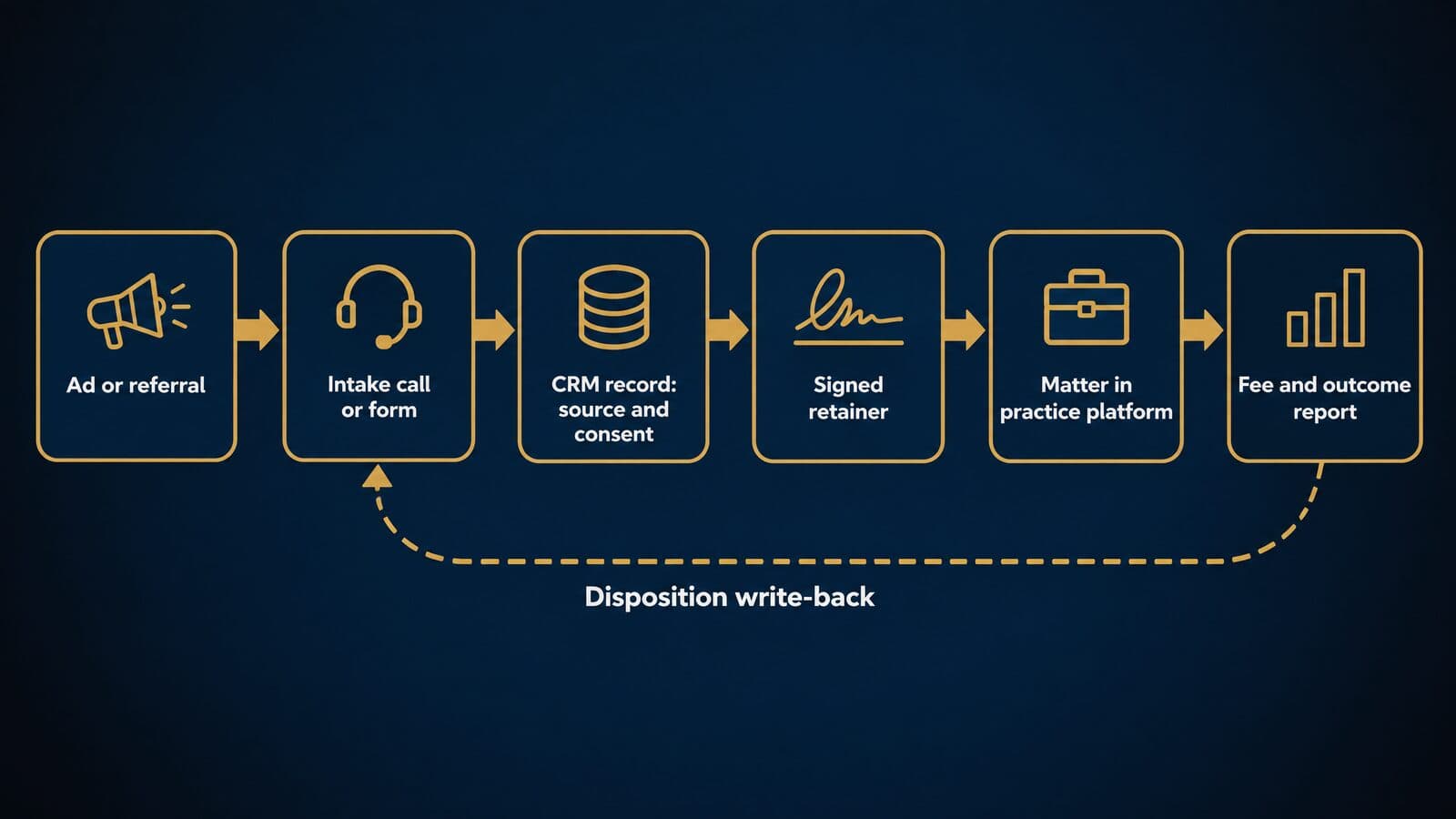
The intake-to-matter handoff
The cleanest rule is ownership by stage: the CRM or intake tool owns the prospect until the retainer is signed, and the practice or case platform owns the client after that. The common intake tools reach the platform in different ways.
| Tool | What it is | How it reaches the platform | Pricing (as of Oct 2026) |
|---|---|---|---|
| Lead Docket | "AI Legal Intake Software" | Native Filevine Sync; Filevine-owned | Not published |
| Lawmatics | Legal CRM, intake and marketing automation | Integrations (ask) | Custom quote |
| Law Ruler | Legal CRM | Integrations (ask) | Pro up to 3 users, annual term |
| Clio Grow | Clio's intake product, bundled in Elite | Clio Manage | Quote |
| CasePeer intake | Built-in intake on Pro | Same platform | Pro $130 |
Pricing verified on 22 October 2026; confirm with each vendor. Sources: Lead Docket's site (its Filevine Sync "natively transfers to Filevine, creating a unified client record and eliminating double entry," and its footer reads "©2026 Filevine, Inc."), Lawmatics pricing, Law Ruler pricing, Clio's pricing page for Elite's Clio Grow bundle, and CasePeer pricing, where Pro adds client intake management and Advanced adds an intake investigator portal and data sync.
Whatever the tools, design the handoff on paper first. These fields must map from the intake record to the matter: lead source and campaign, consent certificate reference, qualification answers, injury or product, key dates, state, and referral partner. Set a dedupe rule on phone, email and name before any new record is created, because the same claimant often comes in through two channels. Set a speed-to-lead target that your firm chooses and measures, and name one owner for each record at each stage. If you use an outside team for mass tort intake that writes qualified claimants into your case system, a 24/7 English and Spanish intake team or claimant verification and screening, give them the same field map.
Storing consent evidence on the claimant record
The TCPA requires the called party's "prior express consent" for robocalls, and under the FCC's 2012 rule telemarketing and advertising robocalls need "prior express written consent," as the Eleventh Circuit set out in Insurance Marketing Coalition Ltd. v. FCC, No. 24-10277. In that January 24, 2025 decision the court vacated Part III.D of the FCC's 2023 Order, the "one-to-one" consent rule, so that rule is not in force.
The practical requirement is to keep the consent record with the claimant, not only in the lead vendor's or CRM's system. Store the timestamp, the form or page version, the disclosure text shown, the consent-certificate reference from the lead vendor or a third-party consent-certificate service, and the phone number that consented. Map those fields into the matter so they survive the CRM-to-platform handoff and stay with the file if the claimant later disputes contact.
For the wider rules, see our guide to TCPA and bar-rule compliance for mass tort marketing. State telemarketing laws add their own requirements, ABA Model Rules are adopted and varied by each state, and this is general information, not legal advice.
Lead-source attribution and disposition write-back
The CRM knows where a lead came from; the platform knows what happened to it. Joining the two is the integration a marketing partner such as Mass Tort Marketing Agency asks for first, because without it nobody can say which campaign produced fees.
The mechanism is disposition write-back. Agree on a short code list and have the platform send the code back each time a case changes stage. An editorial example: contacted, qualified, signed, declined, unreachable, duplicate, referred out, withdrawn, resolved. With those codes attached to the original lead source, the firm can report cost per signed retainer and fee per case by campaign and by vendor.
There are two ways to build it. A native sync works when the intake tool and the platform are designed together (Lead Docket into Filevine is the clearest example). Otherwise, a webhook or scheduled API job pushes dispositions from the platform to the marketing system. Either way, agree on a reporting cadence with every lead vendor (weekly is common in lead contracts) and on who corrects a wrong code. More on measurement in lead conversion rates, call tracking and attribution and attribution from first click to signed retainer.
Settlement disbursement, liens and fee splits
Settlement money runs through trust, so the platform's trust ledger has to carry the whole settlement, not just the fee. ABA Model Rule 1.15(d) and (e) require prompt notice and delivery, and disputed portions "shall be kept separate by the lawyer until the dispute is resolved" while undisputed portions are distributed promptly. Rule 1.5(c) requires a written closing statement in contingent cases "showing the remittance to the client and the method of its determination." Rule 1.5(e) allows a fee division between firms only when it is proportional or each lawyer assumes joint responsibility, the client agrees "including the share each lawyer will receive" in writing, and the total fee is reasonable.
The comment to the ABA trust records rule lists settlement agreements, settlement statements, fee-division agreements and guarantees of payment to third parties among the records to keep. Medicare liens are a common holdback: the CMS Medicare Secondary Payer program recovers claims "where the beneficiary must repay Medicare" through its Benefits Coordination and Recovery Center.
Software requirements to test in a demo:
- A settlement statement generated from the fee agreement, expenses and liens.
- Per-claimant lien holdbacks inside the trust ledger.
- A fee-split ledger by co-counsel and referral firm, with the client's written consent attached.
- Bulk disbursement for group settlements, with per-claimant allocation records.
- An audit trail from settlement deposit to final check.
As a vendor example, Clio says Clio for Personal Injury "includes a settlement calculator for negotiations, and simplifies expense tracking for liens, damages, and fees." Our mass tort settlement guide covers how payouts work. State rules vary; this is not legal advice.
Mass tort dockets at scale
Mass tort volume breaks systems built for a few hundred matters. As of December 31, 2025, products liability was the largest category of pending MDLs at 61 MDLs, or 38%. Individual dockets run to tens of thousands of actions: the JPML's October 1, 2026 report lists 69,340 actions pending in MDL-2738 (Johnson & Johnson talcum powder) and 12,381 in MDL-3060 (hair relaxer), and counts 39 MDLs with 1,000 or more actions.
At that scale the platform needs bulk import and bulk update, claimant census exports, court-ordered deadlines (such as plaintiff fact sheets) tracked per claimant, records-retrieval status, tagging by tort and by defendant, and permission sets that let co-counsel see only their claimants. SmartAdvocate lists Mass Torts among its practice areas; ask any vendor to demo a bulk update on a few thousand test records. For the operating side, see scaling a single-tort practice into multi-litigation operations and the mass tort launch checklist.
A KPI dashboard for plaintiff firms
A plaintiff dashboard has to join marketing data with case data, so each KPI below names where its inputs live.
| KPI | Definition | Where the data lives |
|---|---|---|
| Contact rate | Leads reached ÷ leads received | Intake CRM and phones |
| Qualification rate | Qualified ÷ contacted | Intake CRM |
| Sign rate | Signed retainers ÷ qualified | CRM and e-signature |
| Cost per signed retainer | Marketing spend ÷ signed retainers | Ad platforms and CRM |
| Case cycle time | Days from signing to resolution | Practice platform |
| Fee per resolved case | Fees collected ÷ cases resolved | Trust and accounting |
| Collection lockup | (Unpaid invoices ÷ annual revenue) × 365 | Billing (hourly or hybrid work) |
The lockup formula is Clio's definition, and it matters mostly for hourly or hybrid work; the ABA found that 2 to 9 lawyer firms report the highest share of contingent-fee practice, at 23%. For outside reference points, see cost per signed retainer benchmarks and benchmarks by tort, and the mass tort marketing glossary for definitions.
Sources and methodology
This guide was researched from primary sources as of October 2026: vendor pages, ABA rules and reports, standards bodies, federal agencies and courts.
Vendor pricing and product pages for all 20 platforms and the intake tools were read on 22 October 2026. ABA, LEDES, AICPA, eCFR, CMS, JPML and court sources were read on their own sites. Some vendor and ABA pages block automated fetches, so they were read in a browser. Vendor claims are attributed to the vendor. There was no hands-on testing, no vendor interviews and no demos, and "best for" labels are the author's editorial judgment. Two pages in the search results could not be read (the Florida Bar's member-benefits page and a Reddit discussion), so nothing from them is used. The rankings.io post on this topic was read as a competing page.
- ABA 2024 Practice Management TechReport (April 18, 2025) and 2024 Cloud Computing TechReport (April 24, 2025).
- ABA news release on the 2024 Legal Technology Survey Report (March 2025).
- ABA Model Rules with comments: 1.1, 1.5, 1.6, 1.7, 1.15 and 5.3.
- ABA Formal Opinions 477R (May 22, 2017), 498 (March 10, 2021) and 512 (July 29, 2024).
- ABA Model Rules for Client Trust Account Records and comment.
- ABA Commission on IOLTA overview.
- LEDES Oversight Committee, LEDES 1998B format and UTBMS code sets.
- AICPA SOC 2 resources.
- 45 CFR 160.103 on eCFR.
- Clio Legal Trends benchmarks (2025 figures).
- JPML calendar-year 2025 statistics and the October 1, 2026 pending-dockets report.
- CMS Medicare Secondary Payer overview.
- Insurance Marketing Coalition v. FCC (11th Cir. Jan. 24, 2025).
- Vendor pricing pages: Clio, MyCase, PracticePanther, Smokeball, CosmoLex, Rocket Matter, Lawcus, CARET Legal, Actionstep, Centerbase, LEAP, Tabs3, Filevine, Litify, CasePeer, SmartAdvocate, Jove, Neos, MerusCase, CaseFleet, Lawmatics, Lead Docket, Law Ruler and LawPay.
- Lawyerist's practice management software directory (read October 22, 2026).
Prices and plans change often, so check the vendor's page before you buy.