

Quick answer. Legal case management software is the system of record for each matter: the people, documents, deadlines, tasks, communications and money tied to a case. Generalist platforms such as Clio, 8am MyCase and PracticePanther suit solos and small general practices. Purpose-built plaintiff platforms such as Filevine, Litify, SmartAdvocate, 8am CasePeer, CloudLex and Neos add medical records, liens, demands and settlement tools. Mass tort dockets also need bulk claimant handling. Published prices as of October 2026 run from $39 per user per month (Lawcus Essential, billed annually) to $160 (8am CasePeer Advanced), and many PI platforms are quote-only.
Key takeaways
- Case management, practice management and intake CRM overlap. Decide by the job you need done, using the taxonomy below.
- The ABA found that 53% of respondents reported case/practice management software at their firms in 2024, down from 63% in 2022.
- PI firms should weigh medical records, lien, demand and settlement-statement features above generic billing.
- Mass tort firms need bulk actions, census and fact-sheet deadline tracking. One MDL order allows dismissal with prejudice for willful failure to meet proof deadlines.
- Quote-only pricing is the norm for plaintiff platforms. Get per-user, implementation, storage, texting and AI terms in writing.
- Before signing, get a SOC 2 report, data-export terms and, for medical records, a business associate agreement (BAA) where the vendor offers one.
This guide is for personal injury firms, mass tort operations teams and general practice lawyers who are choosing a case system for the first time or replacing one that no longer fits. It explains what the software category is, how it differs from practice management and intake tools, which features matter for plaintiff work, what 17 platforms publish about themselves, what they cost, which ethics and security rules apply, and how to score and switch.
Most comparison pages stop at feature lists and stale prices. Here, every published price was read on the vendor's own page on 22 October 2026, the plaintiff workflows (records, liens, settlement statements, MDL fact sheets) get their own chapters, and the buying advice ends in a weighted scorecard. A disclosure: Mass Tort Marketing Agency delivers PI and mass tort claimants into firms' case and intake systems through its mass tort intake work, sells no software, and did not test these platforms hands-on; this guide is built from vendor documentation, court rules and ABA sources.
What is legal case management software?
Legal case management software is a database and workflow system that keeps every matter's parties, documents, deadlines, tasks, communications and case costs in one record, so the whole team works from the same file. Accounting tools track money and document tools store files; a case system connects both to the matter and the work still to be done.
A working definition
Vendors define the category in their own terms. Clio's FAQ says that "Legal practice and case management software is a digital tool that law firms use to manage their legal cases and clients and keep cases organized" (Clio). Clio also frames an AI version: in its words, "AI legal case management software maintains the matter instead of just storing it," reading uploaded documents, extracting dates and drafting calendar events. That is Clio's framing of where the category is heading, not an industry standard. For a wider view, see these legal AI tools beyond case management.
A neutral definition is simpler. A case management system holds one record per matter, links every person and document to that record, and drives the work forward with tasks, deadlines and templates. The test is whether a new paralegal could open the record and know what has happened, what is due and who owns it.
Vocabulary differs by audience. "Matter" is the broader word, used by firms with transactional and advisory work. "Case" is the litigation word. Plaintiff software tends to say case; general practice software tends to say matter. They mean the same container.
What a case system does that a spreadsheet cannot
A spreadsheet stores rows. A case system stores relationships. One client can have several matters; one matter can have many treating providers, adjusters, lienholders and co-counsel; one provider can appear across hundreds of matters. A case system models that once and reuses it. It also controls who sees what, keeps an audit trail of who changed a field, calculates deadlines from trigger dates, merges case data into letter and pleading templates, and reports across every open matter at once.
Take a rear-end auto case. The client treats with a chiropractor, an orthopedist and an imaging center. Her health plan has paid some bills and asserted a lien. The state limitation period is two years from the crash date. In a spreadsheet plus a shared drive, the records request to the imaging center sits in someone's sent folder with no follow-up date. When the orthopedist's bill arrives late, nobody updates the damages total. The lien amount lives in an email, so the settlement statement is drafted without a holdback. The limitation date is a cell that turns red only if someone opens the file.
In a case system, each provider is a linked contact with request and receipt dates, an overdue request creates a task, the lien sits in a structured field that the settlement statement pulls from, and the limitation date fires reminders at set intervals. That is what vendors mean by "centralized data": fields that drive actions, not a folder of files.
Why vendors say "case" and "practice" management interchangeably
The labels blur because the products blur. Clio's definition above uses "practice and case management" in one phrase, while the page heading reads "Legal case management software." 8am, which sells both CasePeer and MyCase, writes that "personal injury case management software and practice management software both refer to platforms designed to support the full PI case lifecycle, from initial client intake through final settlement" (8am).
The ABA does not split them either. Its Legal Technology Survey reports one combined category, "case/practice management software," and lists document assembly, accounting and billing, calendaring and contact management as separate categories (ABA 2024 Practice Management TechReport).
The practical takeaway: judge a product by its features and its fit for your case types, not by the label on its home page. A "practice management" product may handle PI matters well, and a "case management" product may include billing. The next section gives a clearer way to sort the market.
Case management vs practice management vs CRM
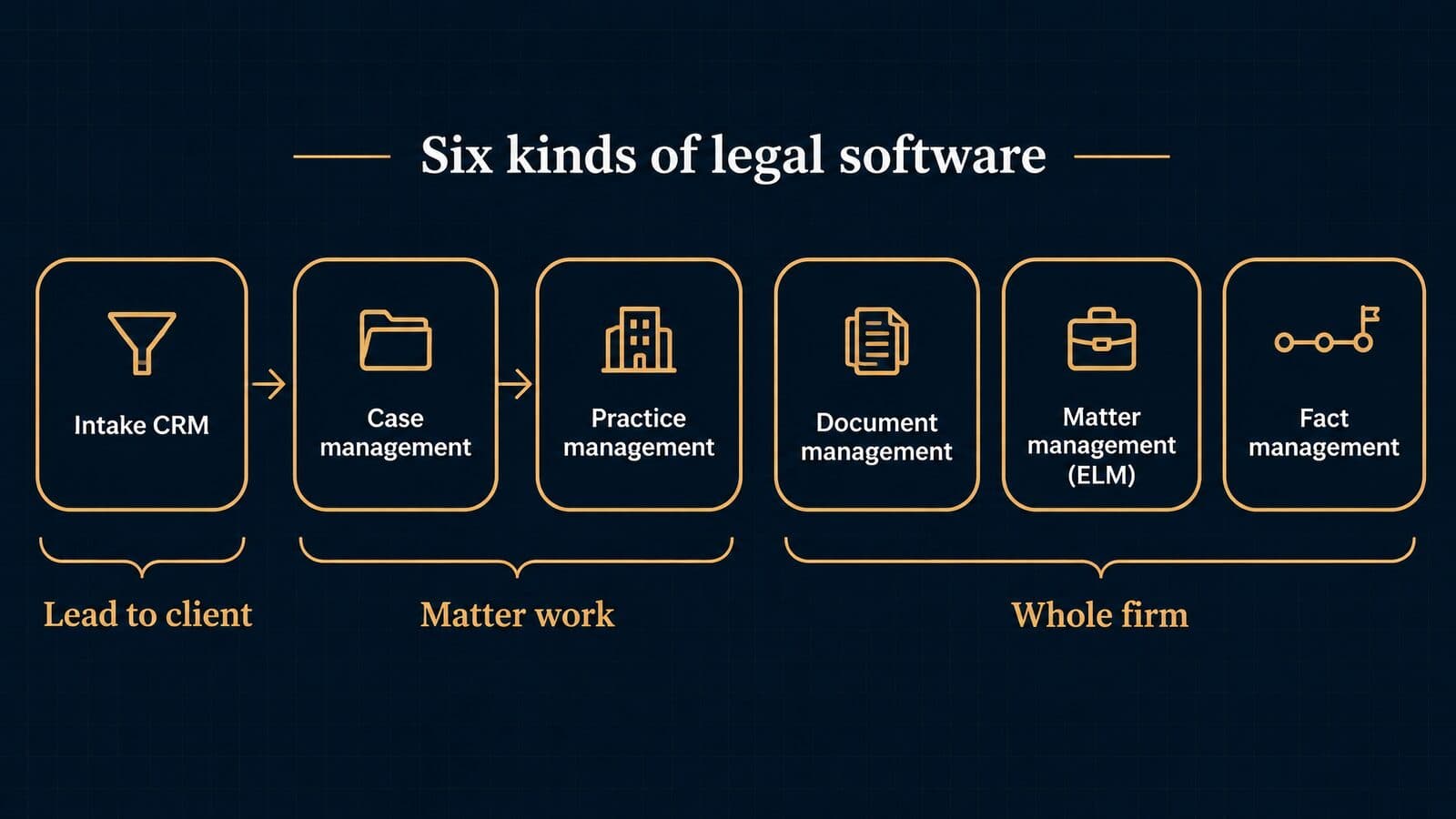
Case management centers on the matter and the work inside it. Practice management adds firm operations such as billing, trust accounting and firm-wide reporting. Intake CRM handles leads before a client signs. Document management, enterprise matter management and litigation fact management tools are narrower.
The six categories of legal software
Most buying confusion comes from comparing products that do different jobs. Sorting them by main job helps.
| Category | Main job | Typical user | Example products |
|---|---|---|---|
| Case management | Matter work: tasks, records, deadlines | Litigation and PI firms | Filevine, Litify, SmartAdvocate, 8am CasePeer |
| Practice management | Whole firm, incl. billing and trust | Solos, small general practices | Clio, 8am MyCase, PracticePanther, CosmoLex |
| Intake CRM | Lead to signed client | Intake teams | Lead Docket, Lawmatics, Clio Grow |
| Document management (DMS) | Files, versions, email filing | Document-heavy firms | NetDocuments |
| Enterprise matter management (ELM) | Legal department matters and spend | In-house counsel | LexisNexis CounselLink |
| Litigation fact management | Chronologies, facts, testimony | Trial teams | CaseFleet |
The categories overlap at the edges. Case management platforms built for plaintiff firms often include intake modules and some billing or cost tracking. Practice management platforms add case-type workflows and PI add-ons. Document management systems such as NetDocuments sit underneath either one. In-house departments use enterprise matter management; the LexisNexis CounselLink blog lists "Court date calculation and tracking" and "Statute of limitations tracking" among its case management features for legal departments (LexisNexis). Fact management tools such as CaseFleet describe themselves as "Case Chronology & Fact Management for Litigators" (CaseFleet), which is a layer on top of a case system rather than a replacement.
Many firms run two or three of these at once. A typical PI firm might pair an intake CRM with a case platform and a separate accounting package. A small general practice might run one practice management suite for everything. Neither is wrong. The cost of the multi-product approach is the handoff between systems, which is where data gets retyped, lost or duplicated.
When you build a shortlist, write down which of the six jobs you need covered and which you already cover elsewhere. That list, not a vendor's category label, should decide which products you compare.
Three common firm profiles show how the list changes the shortlist:
- Solo general practice, mostly hourly and flat-fee work. One practice management suite usually covers case work, billing and trust. A separate intake CRM is rarely worth the cost until lead volume grows.
- Ten-attorney PI firm buying advertising. A plaintiff case platform plus an intake CRM, either from the same vendor or connected by API, with accounting kept in a dedicated package. The handoff between intake and case is the part to test hardest.
- Mass tort operation with thousands of claimants. A case platform that supports bulk updates and claimant-level fields, an intake system sized for high call and form volume, and often a fact management or document layer for records review. Ask each vendor which of these jobs it covers itself and which it expects a partner product to cover.
Where intake CRM ends and case management begins
The handoff happens at signing. Before a retainer is signed, the person is a lead: a source, a contact record, screening answers, consent records and a disposition. After signing, the person is a client with a matter, and the case system takes over.
Some vendors close that gap by owning both sides. Lead Docket's site footer reads "©2026 Filevine, Inc.", and Lead Docket says its data "natively transfers to Filevine, creating a unified client record and eliminating double entry" (Lead Docket). That is a vendor claim to verify in a demo. Clio says intake forms built in Clio Grow "sync them to Clio Manage" (Clio, case management page).
When intake and case management are separate products from separate vendors, the usual losses are predictable: the lead source and campaign never reach the matter, so marketing cannot be judged on signed cases; screening answers are retyped or attached as a PDF instead of mapped to fields; consent records stay in the intake tool; and disposition updates never flow back to whoever delivered the lead. For terms used in this handoff, see these definitions of plaintiff fact sheets and lead ingestion APIs. Firms that outsource intake should ask for 24/7 bilingual intake with direct CRM delivery so signed clients arrive in the system with their data intact.
The full field-by-field specification for this handoff appears later in this guide, in the chapter on the intake-to-case handoff.
Is Clio case management or practice management?
Both. Clio's own FAQ calls it "practice and case management" software, and its case management page describes matter-level tools: case statuses ("Open, Pending, or Closed"), client and co-counsel portals ("Clio for Clients and Clio for Co-Counsel"), "Manage AI," and intake forms through Clio Grow. Clio Manage also covers billing and trust accounting, which places it in practice management.
For plaintiff work, Clio sells a quote-based add-on, "Clio for Personal Injury," which it says lets firms "Manage medical records, damages, and settlements, with HIPAA compliance included" (Clio packages). The case management page's PI card describes "organizing medical liens, damages, and settlements alongside your case files." Those are vendor descriptions; ask to see the lien and settlement screens on your own sample case.
The honest answer for buyers is that Clio is a practice management suite with case management inside it and a PI layer on top. If your main question is billing, trust accounting and firm-wide operations, compare it against law practice management software for the whole firm. If your main question is how records, liens and demands move through a PI docket, compare it against the purpose-built plaintiff platforms profiled later in this guide.
Not a law firm? Other kinds of case management
"Case management software" also names tools for healthcare, social services, law enforcement, courts and customer service. This guide covers law firms, but the other meanings show up in the same search results, so here is a quick map.
- Healthcare. The Case Management Society of America defines case management as "a collaborative process of assessment, planning facilitation, care coordination, evaluation, and advocacy for options and services to meet an individual's and family's comprehensive health needs" (CMSA). Software for nurse and social-work case managers serves that process, not legal matters.
- Law enforcement. Axon describes case management software as storing "all of the information regarding a particular case or client in one centralized location," used "by police departments and agencies throughout the world" (Axon).
- Courts. Court systems run their own dockets. Thomson Reuters describes C-Track as "a user-friendly, web-based system that helps you efficiently manage your court's workflow" (Thomson Reuters).
- Civil legal aid and public defense. LegalServer says it "is built exclusively for civil legal aid, public defense, and government law offices" and reports "over 550 implementations since 2002" (LegalServer).
- Customer service. Microsoft does have a case management tool, but for customer support: Dynamics 365 Customer Service lets agents "Track your cases efficiently and act on them quickly in the Copilot Service workspace application" (Microsoft Learn). It is not legal matter management.
Government law offices sit between these worlds. Filevine's "Who We Serve" menu lists Prosecutors, Public Defenders, States & Municipalities, Attorneys General and Federal Agencies alongside Personal Injury and Mass Torts (Filevine).
What is the "CMS case management system"? In health care, CMS usually refers to the Centers for Medicare & Medicaid Services, and "case management" means care coordination in the CMSA sense. In software, CMS can also mean a content management system. Check the context before you compare products.
Who uses case management software, by the numbers
Per the ABA's 2024 Legal Technology Survey, 53% of respondents reported case/practice management software at their firms, use is falling among solos and rising at large firms, and about 75% of attorneys use cloud tools for work.
What the ABA Legal Technology Survey shows
The ABA's TechReports are the most cited source on adoption, so it helps to read them precisely.
| Measure | Figure | Source year |
|---|---|---|
| Firms with case/practice management software available | 53% (63% in 2022) | 2024 |
| Solo use of case/practice management software | 37% (45% in 2022) | 2024 |
| Use at firms of 100+ attorneys | 27% (19% in 2022) | 2024 |
| Respondents to the Tech Basics and Security questionnaires | 435 | 2024 |
| Highest contingent-fee share (2–9 attorney firms) | 23% | 2024 |
| Annual practice management spend, 2–9 attorney firms | $10,000–$20,000 | 2024 |
| Attorneys using cloud computing for work | About 75% | 2024 |
| Respondents using AI-based tools | 30% (11% in 2023) | 2024 |
The availability, use, fee and spend figures come from the 2024 Practice Management TechReport; the cloud and AI figures come from the 2024 Cloud Computing TechReport. Solo respondents reported spending less than $3,000 a year on practice management software.
Two cautions. The sample is small (435 respondents, 18% of them solos), so treat year-to-year changes as directional. And the decline in availability has no single explanation in the data. The report's author offers one interpretation: vendors "often charge users 'a la carte,' or individually per add-on," and "Gone are the days when case management platforms offered simple pricing options for the entire product." That is his reading, not a survey result, but it matches what buyers see in add-on pricing today.
The contingency figure matters for plaintiff firms. Small firms of 2–9 attorneys reported the highest share of contingent fee practice, which is the segment most likely to need cost, lien and settlement tracking rather than hourly billing.
The typical law firm software stack
Clio describes the legal software suite as "the central and most important piece of the tech stack," alongside accounting software "such as QuickBooks Online or Xero," "document software such as Microsoft Word, and an email provider such as Microsoft Outlook or Gmail" (Clio, case management page). That is a fair picture of the small-firm stack: a case or practice system in the middle, accounting beside it, Microsoft or Google for documents and email.
The ABA cloud report shows which named tools respondents use. Microsoft 365 (OneDrive) leads at almost 72%, Microsoft Teams at about 63% and Dropbox at about 54%. NetDocuments is at about 17%, Clio about 15% and MyCase about 5%, with Clio and MyCase showing stronger use among smaller firms and solos. These are shares of respondents using each tool, not market share, and no reliable market-share figure for case management software is published.
So what software do most law firms use? Office productivity and file-sharing tools are nearly universal. Dedicated case or practice management software is in roughly half of firms, and the specific brand varies by size and practice area. PI and mass tort firms add specialist layers: intake CRM, medical-record retrieval, demand drafting and e-signature.
Cloud vs on-premise vs hybrid
Cloud is now the default for new purchases. Most platforms in this guide are browser-based with mobile apps, and the ABA reports about 75% of attorneys using cloud computing, with solos the slowest adopters at about 65%.
On-premises and hybrid systems still exist. Smokeball's Grow plan includes its native desktop application (Smokeball). Trialworks, a long-running PI system, lists server requirements such as Windows Server, SQL Server and "Microsoft Access 2010 Runtime," plus a "TrialWorks Hosted" remote-desktop option (Trialworks). Assembly Software now calls Needles "the Neos predecessor" and says "Neos carries that foundation into the cloud" (Needles), which shows the direction legacy PI platforms are moving.
- Choose cloud if you want vendor-managed updates, remote access and mobile intake, and you can review the vendor's security report.
- Consider on-premises only if a client contract or local policy requires data to stay on firm servers, and you have IT staff to patch, back up and secure them.
- Hybrid usually means a desktop application that syncs to cloud storage, or a hosted version of a legacy server product. Ask where the database lives and who backs it up.
Core features of case management software
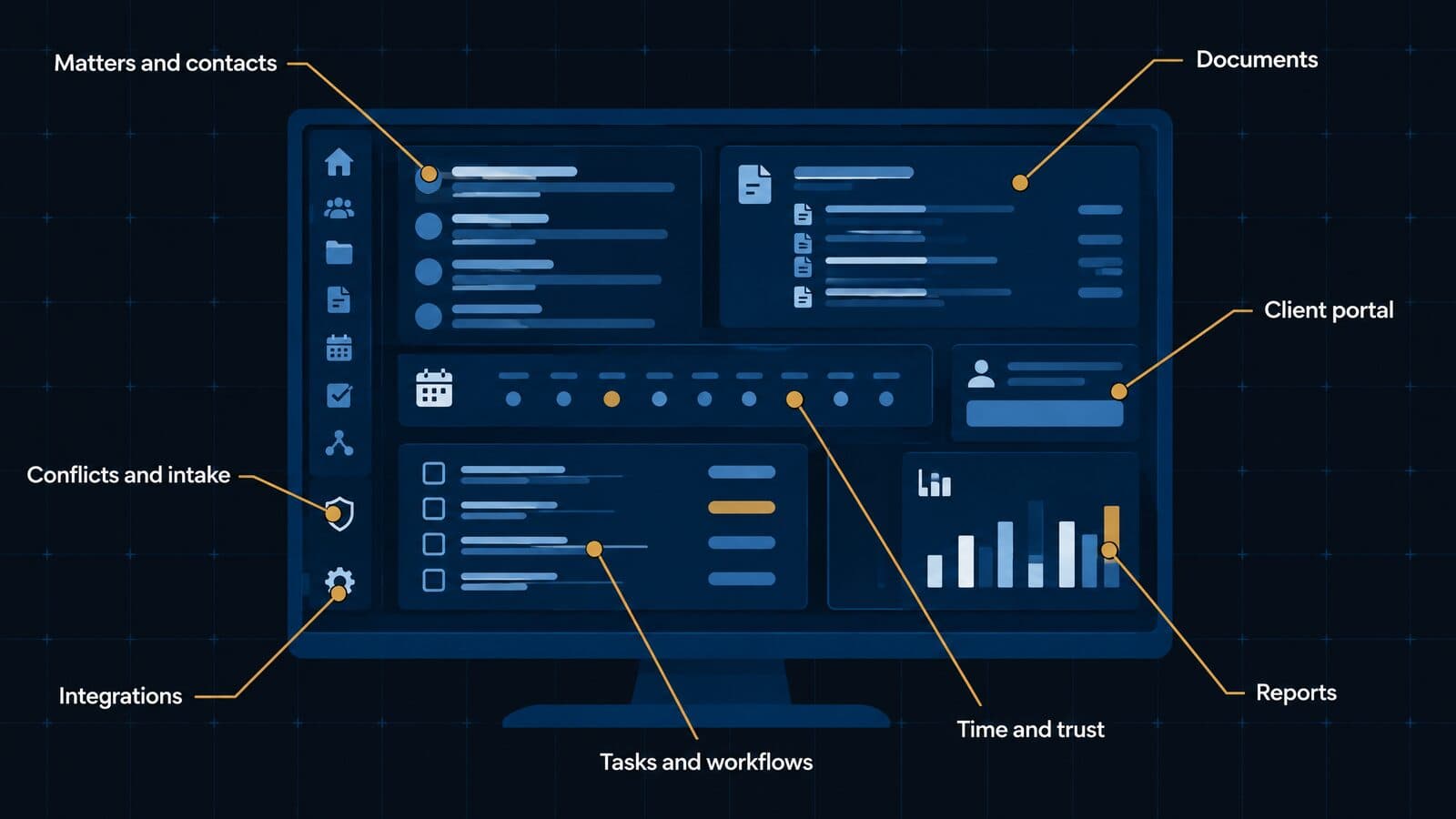
Every serious system covers eight groups: matters and contacts, documents, tasks and workflows, client communication, time and money, reporting, conflicts and intake, and integrations. The differences are depth and fit for your case types, so test each group against a real file from your own docket.
Matter, contact and custom-field management
This is the core record: the matter, its parties and the fields that describe it. Good systems let you define custom fields by case type, so an auto case captures policy limits and the at-fault carrier, a premises case captures the property owner and incident location, and a product liability case captures product, lot number and purchase date.
What good looks like: custom fields per case type, not one shared form; related contacts with roles (adjuster, treating provider, co-counsel, lienholder) that can be reused across matters; clear statuses and phases. Clio, for example, uses case statuses of "Open, Pending, or Closed" (Clio, case management page), and plaintiff platforms add phases such as treatment, demand and litigation.
Plaintiff example: an adjuster who handles 30 of your matters should be one contact linked to 30 matters, with each claim number stored on the link.
Demo question: "Add a custom field to auto cases only, then show me a report that filters on it."
Document management and email filing
Documents are where most case time goes. A case system should store files against the matter, keep versions, make scanned records searchable with optical character recognition (OCR), file emails to the right matter without forwarding tricks, and integrate with a DMS if you already run one.
What good looks like: email-to-matter filing from Outlook or Gmail; OCR on upload; templates that merge case fields into letters; bulk upload of records. SmartAdvocate says it supports batch scanning with barcodes and document templates built from "over 4,000 available merge codes" (SmartAdvocate), a vendor claim worth testing with your own templates.
Plaintiff example: a 600-page records production from a hospital should be uploaded once, OCR'd, and tagged to the provider contact so the treatment timeline can find it.
Demo question: "File this email and its attachment to the matter from my inbox, then find the attachment by a word inside it."
Tasks, workflows and case-type templates
Workflows turn a case system from storage into a work engine. A phase-based workflow defines what happens when a matter enters a stage; triggered tasks create the next step when a field changes.
What good looks like: case-type templates you can edit without vendor help; tasks triggered by dates and field changes; due dates calculated from other dates; workload views by staff member. 8am MyCase lists automated workflows on its Pro plan (MyCase).
Plaintiff example, a simple pre-litigation template:
- Matter opens in the treatment phase; records-request tasks are created for each provider added.
- When a provider's status changes to "treatment complete," a records and bills request is generated.
- When all records are marked received, a "draft demand" task goes to the case manager.
- When the demand is sent, a follow-up task is set for the response window your firm uses.
Demo question: "Change this matter's phase and show me which tasks were created automatically."
Client communication and portals
Plaintiff clients call when they hear nothing. Portals and texting reduce those calls and keep a record of every update.
What good looks like: a client portal with case status and secure document exchange; two-way texting logged to the matter; templates for routine updates; co-counsel access without full system licenses. Clio offers portals called "Clio for Clients and Clio for Co-Counsel" (Clio, case management page), and MyCase lists 2-way texting on its Pro plan. Texting often carries add-on fees or message limits, so price it separately.
Plaintiff example: an automatic text when a case moves from treatment to demand tells the client what happens next without a staff call.
Demo question: "Send a text from the matter, reply from my phone, and show me where the reply lands."
Time, billing and trust accounting
Contingency firms track costs and expenses more than hours. The ABA's 2024 data shows small firms of 2–9 attorneys reporting the highest contingent fee share, and those firms need case-cost ledgers, reimbursement at settlement and accurate trust records more than hourly invoicing.
What good looks like: per-matter cost ledgers with categories (filing fees, records, experts); cost approval workflows; trust accounting that ties deposits and disbursements to the matter; integration with your accounting system. Hourly billing still matters for firms with mixed practices.
Plaintiff example: every records invoice is entered as a matter cost, so the settlement statement pulls the reimbursement total instead of someone adding receipts by hand.
Trust accounting rules under ABA Model Rule 1.15 are covered later in this guide, in the security and ethics checklist.
Demo question: "Show me the cost ledger for a settled case and how it feeds the settlement statement."
Reporting and dashboards
Reporting is how a managing partner sees the docket without opening files. The useful reports for plaintiff firms are case aging, phase velocity (days in each phase), staff workload, statute exposure and source-to-settlement results.
What good looks like: saved reports by role; filters on custom fields; dashboards that refresh without exports; scheduled report emails. CasePeer advertises "50+ turnkey reports" (CasePeer), a vendor claim; check whether the reports you need exist or must be built.
Plaintiff example: a weekly report of matters in the demand phase for more than a set number of days, grouped by case manager, shows where work is stuck.
Demo question: "Build me a report of signed cases by lead source with their current phase and settlement amount."
The marketing and intake KPIs a case system should report appear later, in the intake handoff chapter.
Conflict checks, intake forms and e-signature
Conflict checking is an ethics duty, not a convenience. Comment [3] to ABA Model Rule 1.7 says a lawyer "should adopt reasonable procedures, appropriate for the size and type of firm and practice, to determine in both litigation and non-litigation matters the persons and issues involved," and that "Ignorance caused by a failure to institute such procedures will not excuse a lawyer's violation of this Rule" (ABA Rule 1.7, Comment).
What good looks like: a conflict search across all contacts and related parties, including adverse parties and insurers; intake forms that map answers to fields; e-signature inside the system so the signed retainer lands on the matter. Clio offers intake forms through Clio Grow, MyCase lists intake forms on Pro, and Filevine lists "Signatures" among its package areas (Filevine pricing).
Plaintiff example: before signing a premises case, a search on the property owner's name surfaces an older matter where the firm represented the same owner.
Demo question: "Run a conflict check on a defendant name and show me every matter and contact role where it appears."
Integrations, APIs and mobile apps
No case system does everything, so integrations decide how well it fits your stack. There are three levels: native integrations built by the vendor, middleware connections through tools such as Zapier, and an open API with webhooks that your team or vendor can build against.
What good looks like: native integrations for accounting, email and e-signature; a documented API; webhooks that fire on events such as a stage change; a mobile app that can open matters and capture intake in the field. Vendors publish numbers: Clio says it syncs with "over 300 other apps" (Clio, case management page), SmartAdvocate claims "Over 175+ integrations," and 8am CasePeer includes API access on its Advanced plan at $160 per user per month as of October 2026 (CasePeer pricing). Counts measure breadth, not depth, so test the two or three integrations you actually need.
Plaintiff example: a signed retainer from an outside intake team should create the matter, contacts and source fields through the API without manual entry.
Demo question: "Show me a webhook firing when a matter changes stage."
With the core features mapped, the next question is how far vendors' AI claims actually go, followed by the deadline and statute tools that protect every file.
AI features in case management: what is real
Case platforms now advertise AI that extracts dates from documents, summarizes medical records, builds chronologies and drafts demand letters. Treat every one of those features as a vendor claim until you have tested it on your own files, built an attorney review step around it, and read the vendor's terms on how your client data is used.
The useful way to think about AI in a case system is as a junior assistant that never gets tired and never knows when it is wrong. It can read a 900-page records production faster than any paralegal. It can also miss a treatment gap, misread a date of service, or attribute a bill to the wrong provider. The value comes from pairing speed with a verification habit, and that habit has to be built into the workflow rather than left to individual discipline.
What vendors say their AI does
Every major platform now markets some AI layer. The descriptions below are the vendors' own words, read on their sites in October 2026. None of them has been independently tested for this guide, and the labels change often.
- Clio frames AI case management as software that "reads the documents you upload, extracts the dates and drafts calendar events from them, and surfaces which matters need attention next", in contrast to standard case management that "gives you fields to fill in".
- Filevine says its LOIS assistant pulls "medical record summaries, damages estimates, and case narratives" into demands and offers "LOIS for Word". Its homepage says LOIS is "Built on 40M+ matters".
- Litify describes "Litify ACE" agents that run "end-to-end autonomous workflows". Its PI page lists named agents, including a "Total Policy Agent", a "Case Value Agent" and a "Strengths & Weaknesses Agent", plus "source‑linked medical chronologies and comprehensive demand packets".
- SmartAdvocate says it introduced "SmartIntelligence®" AI in a 2026 release.
- CloudLex says "Lexee AI" is built into its platform.
- Neos describes Demands Plus as a tool that "reads the records already in the case, builds a cited medical chronology, and drafts the demand" and says "nothing goes out until an attorney approves it."
- CaseFleet markets the "Casey AI Assistant" alongside its chronology tools.
- 8am MyCase includes the "8am IQ Writing and Document Assistant" in its Pro plan, as of October 2026.
Two patterns stand out. First, the PI-focused vendors (Filevine, Litify, Neos) concentrate their AI claims on medical chronologies and demand drafting, because that is where a plaintiff firm's paralegal hours go. Second, the generalist vendors (Clio, MyCase) concentrate on dates, calendaring and document drafting, which helps every practice area a little rather than one practice area a lot. Neither pattern tells you how accurate the output is.
Notice also the language of citation. Litify says "source‑linked", Neos says "Every fact links to its source", CaseFleet chronologies are linked to source. Source linking is the single most important AI property for a law firm, because it turns verification from re-reading the whole file into clicking each cited page. If a vendor cannot show you that link on every extracted fact, assume your team will be re-reading the records anyway.
What to verify before you rely on it
My advice is to run the same six checks on any AI feature before it touches a live matter. They take an afternoon and they surface most of the problems that matter.
- Source-linked output. Every extracted date, diagnosis, provider and dollar figure should link back to the page it came from. Ask the vendor to show this on a demo file, then on one of yours.
- An attorney review step the system enforces. Neos says its demands do not go out until an attorney approves them. Whatever platform you choose, configure a required approval task so AI drafts cannot be sent, filed or e-signed without a named reviewer.
- Whether client data trains the model. Get the answer in writing. Clio's pricing page says "Your firm's data stays in Clio and is never used for AI training." Ask every other vendor for the equivalent clause, and ask about their AI subprocessors.
- Credit and overage pricing. Some vendors meter AI usage. CaseFleet, for example, says AI overages cost "$0.001 per credit after 100,000 credits per billed user per month" as of October 2026. Ask how many credits a typical 500-page records summary uses.
- The informed-consent question. ABA Formal Opinion 512 says a client's informed consent is required before inputting representation information into a self-learning generative AI tool, and that boilerplate in engagement letters is not enough. The ethics section later in this guide covers it in detail; check your state's guidance too.
- A hallucination test on a closed file. Take a settled matter where you know every date, provider and bill. Run the AI chronology and demand draft on it, then compare line by line. Count omissions, wrong dates and invented facts. Repeat on a messy file with handwritten notes and faxed records.
Opinion 512 also warns that relying on AI output without "an appropriate degree of independent verification or review" could violate the competence rule, which is the professional reason behind checks 1, 2 and 6. If you also use a general-purpose assistant outside your case system, see how general-purpose assistants compare on confidentiality and verification.
Deadlines, statutes of limitations and court rules
Case systems calculate deadlines from a trigger date using a court's rule set and flag limitation periods automatically. The firm still has to pick the right rule set for each matter, enter the right trigger and accrual dates, and verify the limitation period for the state, claim type and defendant.
Missed deadlines are the classic malpractice exposure for plaintiff firms, and software has narrowed the risk without removing it. The calendar engine is only as good as the data typed into it. A wrong jurisdiction field, a date of incident keyed as the date of sign-up, or a governmental defendant nobody flagged will produce a confident and wrong deadline. The sections below explain the counting logic, list headline PI periods in four large states, and set out a protocol that catches the common input errors.
How court-rules calendaring works
Rules-based calendaring automates the counting rules courts already publish. In federal court, FRCP 6(a)(1) says to exclude the day of the triggering event, count every day including intermediate Saturdays, Sundays and legal holidays, and include the last day; if the last day is a Saturday, Sunday or legal holiday, the period runs until the end of the next day that is not. Rule 6(a)(4) ends the last day at midnight in the court's time zone for electronic filing, unless a statute, local rule or order says otherwise. Rule 6(a)(6) lists the legal holidays, including Labor Day.
A worked example shows why intermediate holidays do not matter but landing days do. Suppose a 14-day response period is triggered on Friday, September 4, 2026, the Friday before Labor Day (Monday, September 7). Day 1 is Saturday, September 5. The weekend and Labor Day count as ordinary days. Day 14 is Friday, September 18, a business day, so the deadline is midnight court time on September 18.
Now change one variable: a 10-day period triggered on Friday, August 28, 2026. Day 1 is Saturday, August 29, and day 10 lands on Monday, September 7, which is Labor Day. Because the last day is a legal holiday, the period continues to Tuesday, September 8. A good rules engine does both calculations instantly. A bad setup (wrong rule set, missing holiday table, state court matter calendared on federal rules) gets the second one wrong.
Vendors in every segment list this capability. The LexisNexis CounselLink post on legal department case management, for example, lists "Court date calculation and tracking" and "Statute of limitations tracking" as features. When you evaluate a platform, ask which state and local rule sets are maintained, who updates them when rules change, and whether a changed rule recalculates open deadlines or only new ones.
Personal injury limitation periods in four states
The table below gives the headline personal injury period in four high-volume states, read on the statute text. It is a starting point for configuring default SOL fields, not a substitute for checking each claim.
| State | General PI period | Source | Watch out for |
|---|---|---|---|
| Florida | 2 years (negligence) | § 95.11(5)(a) | 4 years may still apply to claims accruing before Mar. 24, 2023 |
| Texas | 2 years | § 16.003 (mirror) | Death claims accrue on the death |
| California | 2 years | CCP § 335.1 (mirror) | Confirm on leginfo.legislature.ca.gov |
| New York | 3 years | CPLR 214(5) | Exceptions in §§ 214-b, 214-c, 214-i and 215 |
Florida needs a second date field. The 2022 statutes listed negligence under "WITHIN FOUR YEARS". Chapter 2023-15 cut it to two years, effective when the Governor approved it on March 24, 2023, and applied the change to causes of action accruing after that date. A Florida firm's system should therefore key the SOL calculation to the accrual date, not the sign-up date. The Texas and California text above was read on public.law mirrors because the official sites blocked automated reading; confirm both on the official legislature sites.
These are headline periods only. Discovery rules, tolling for minors and incapacity, notice-of-claim requirements against government entities, and statutes of repose vary by state and claim type. Medical malpractice and wrongful death often run on different clocks (Florida's own § 95.11 sets separate rules for both). None of this is legal advice; your attorneys own the SOL determination on every file.
Building a statute-alert protocol
Software alerts help only if the inputs are right and someone owns the response. This six-step protocol is my recommendation for plaintiff firms; adjust the intervals to your caseload and state mix.
- Record the accrual date and its basis. Capture the date of incident and, separately, the claimed accrual date with a note on why (incident, discovery, death, age of majority). Never let sign-up date stand in.
- Set a required jurisdiction and claim-type field. The SOL template should be selected by state plus claim type plus defendant type, so a government defendant triggers its own notice deadline.
- Auto-create the SOL date and require two independent reviewers. The system calculates; an intake supervisor and the responsible attorney each confirm it in a logged task.
- Fire alerts at 180, 90, 30 and 7 days. Send them to the attorney, the case manager and a supervisor, so a single absence never silences the warning.
- Block case closing without an SOL disposition. A matter cannot be closed or rejected until someone records "filed", "settled", "declined with letter sent" or a similar outcome.
- Run a monthly report of open matters within 120 days of SOL. Review it in a standing meeting; any matter on the list without a filing plan gets escalated.
Vendors build pieces of this in. Filevine's PI dashboard shows "statute of limitations alerts", according to Filevine, and 8am CasePeer says its Basic plan includes "automated statute alerts". Steps 3, 5 and 6 usually need configuration, custom fields or a report you build yourself, so ask each vendor to demonstrate them on a test matter.
Personal injury case management workflows
PI platforms organize each case around medical treatment, records, liens, insurance, the demand and the settlement statement. Those six workflows are what generalist tools most often lack out of the box, and they are where a plaintiff firm's staff hours and malpractice risk concentrate.
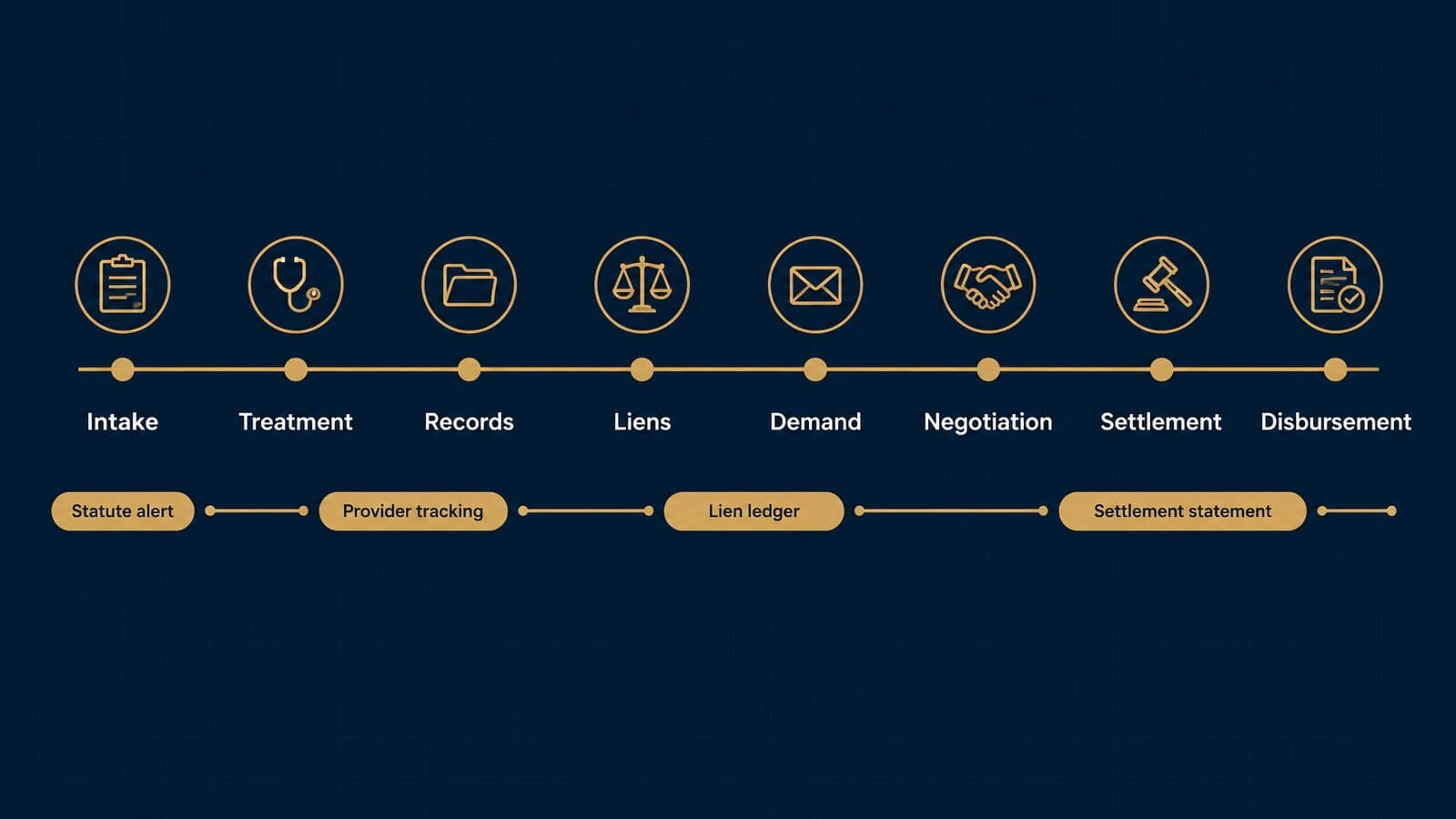
A contingency practice is paid only at the end, so every stage before settlement is cost without revenue. The case system's job is to move each file through treatment and documentation without stalls, then produce an accurate demand and a clean disbursement. The subsections below walk the lifecycle, then the four workflows that carry the most risk.
The PI case lifecycle from intake to disbursement
The table maps each stage to the feature that supports it and what goes wrong when the feature is missing.
| Stage | What happens | Feature to look for | Risk if missing |
|---|---|---|---|
| Intake and sign-up | Screen, conflict check, sign retainer | Intake forms, e-signature, conflict search | Signed case with a conflict or no SOL date |
| Treatment | Client treats with providers | Provider list, treatment status, check-in tasks | Treatment gaps nobody notices |
| Records and bills | Request and track records | Request log by provider, due dates, follow-ups | Demand delayed by missing records |
| Liens | Identify and resolve payers' claims | Lien ledger per payer, status, final amount | Funds disbursed before liens are paid |
| Demand | Assemble damages and send | Damages summary, demand template, AI draft review | Undervalued or inaccurate demand |
| Negotiation | Offers and counteroffers | Offer log with dates and authority | Lost track of offers and client authority |
| Litigation (if filed) | Pleadings, discovery, trial | Court-rules calendar, chronology | Missed deadline |
| Settlement and disbursement | Statement, trust payments | Settlement calculator, trust ledger | Wrong net to client; trust violation |
Medical records requests and treatment tracking
Records drive every PI case, and HIPAA sets the clock for the client's own access requests. Under 45 C.F.R. § 164.524(b)(2), a covered entity must act on an access request within 30 days and may extend once, by no more than 30 days, with a written statement of reasons. Under § 164.524(c)(3), the individual may direct a copy to a designated person, such as the firm, if the request is in writing, signed, and clearly identifies the recipient and where to send it.
Many firms instead send a HIPAA authorization. The core elements in § 164.508(c)(1) make a useful template checklist for your document generator:
- A specific description of the information to be disclosed
- Who may disclose it
- Who may receive it
- Each purpose ("at the request of the individual" suffices when the client initiates)
- An expiration date or expiration event
- The client's signature and date, with a representative's authority described if applicable
- The required statement of the right to revoke in writing
The system should log each request by provider, with sent date, method, due date and follow-up tasks. Filevine says its PI matter types track document requests so firms "know which medical providers and insurance companies owe you documents". Whatever the vendor, test whether one screen shows every outstanding request across the caseload.
Copy fees are a common question, and the answer is not a single federal number. The cost-based fee limit in § 164.524(c)(4) applies to the individual's own access request. A 2020 federal court decision, Ciox Health v. Azar, is reported to have vacated HHS's extension of that limit to third-party directives; confirm the current position with counsel. State law also governs copy fees.
Liens: Medicare, Medicaid, ERISA and providers
Liens are where a good settlement turns into a malpractice claim. CMS explains that the Medicare Secondary Payer program exists so Medicare knows when it should not be the primary payer. Under 42 C.F.R. § 411.24, CMS may start recovery as soon as it learns a liability payment has been or could be made, has a right of action against any entity that received a primary payment, including an attorney, and requires a beneficiary or other party who receives a primary payment to reimburse Medicare within 60 days.
Medicare also shares the cost of getting the recovery. Under 42 C.F.R. § 411.37, when Medicare's payments are less than the settlement, CMS reduces its recovery by the ratio of procurement costs (fees and costs) to the total settlement. In plain terms, if fees and costs were 40% of the settlement, Medicare's claim is cut by 40%. When Medicare's payments equal or exceed the settlement, the recovery is the settlement minus procurement costs. Your settlement calculator should apply this formula, not just subtract the conditional payment amount.
Medicaid and ERISA follow different rules. In *Ahlborn (No. 04-1506, decided May 1, 2006), the Supreme Court held that federal Medicaid law did not let Arkansas assert a lien beyond the portion of the settlement representing medical expenses. In McCutchen* (decided April 16, 2013), the Court held that an ERISA plan's terms govern an equitable lien by agreement, but where the plan is silent on attorney's fees, the common-fund doctrine fills the gap. That makes the plan document itself a required upload on every ERISA lien.
The feature list follows directly: a lien ledger per payer (Medicare, Medicaid, ERISA plan, private insurer, provider), with payer type, claimed amount, status, reduction requests, final agreed amount and a holdback figure that flows into the settlement statement. Under ABA Model Rule 1.15(e), funds that two or more persons claim must be kept separate until the dispute is resolved; the ethics section covers the trust side.
Insurance, policy limits and demand packages
The demand depends on knowing whom to ask and how much is available. The case record should hold, per policy: carrier, adjuster name and contact, claim number, policy type, policy limits and the date limits were confirmed, plus underinsured and uninsured coverage. Without those fields, nobody can run a report of cases where damages exceed the known limits.
Vendors are aiming AI at this step. Litify lists a "Total Policy Agent" among its named PI agents, according to Litify's site. Filevine says LOIS pulls medical summaries and damages estimates into demands, and Neos says Demands Plus drafts the demand from a cited chronology with attorney approval. Separate AI demand products such as EvenUp sit on top of case systems; they are compared with the platforms later in this guide. Whatever drafts the demand, the attorney signs it.
Settlement statements and disbursement
Model Rule 1.5(c) requires that, on conclusion of a contingent fee matter, the lawyer provide the client a written statement of the outcome and, if there is a recovery, showing the remittance to the client and the method of its determination. The same rule requires the fee agreement to say whether expenses come off before or after the fee is calculated, so the statement must follow the agreement's math.
A case system should generate the statement from data already on the file: gross settlement, attorney's fee and percentage, case costs itemized, each lien with its final amount and any holdback, and the net to client. It should also refuse to print a statement while any lien is still marked unresolved. Clio says its quote-based Clio for Personal Injury add-on includes a settlement calculator and organizes records and bills by provider. Litify advertises same-day digital settlement disbursement on its PI page. Ask any vendor to produce a statement from a test file where expenses come off before the fee, then after.
Litigation chronology and fact management
When a PI case is filed and heads into discovery, the work shifts from collecting records to organizing facts and testimony. Fact management tools build chronologies where each entry links to the source document and page. CaseFleet, for instance, describes fact chronologies "linked to its source", transcript management that lets users "cite testimony as facts", and medical chronologies.
Most PI firms that settle pre-suit rarely need a separate fact tool; the chronology features inside a PI platform are enough. A firm that tries cases regularly, handles catastrophic injury files with thousands of pages, or takes depositions in volume may want one. The test is simple: can the trial attorney find every fact supporting a damages element, with its source page, in under a minute? If not, look at a dedicated fact management product alongside the case system.
Mass tort and MDL case management
Mass tort firms manage hundreds or thousands of claimants under court orders with hard deadlines, so they need bulk actions, census and fact-sheet tracking, records retrieval at scale and co-counsel accounting. A system built for 200 individual PI files strains when 2,000 claimants share one set of deadlines.
How MDLs change the job (FRCP 16.1 and § 1407)
Under 28 U.S.C. § 1407(a), civil actions involving common questions of fact pending in different districts may be transferred to one district for coordinated or consolidated pretrial proceedings, and each action is remanded at or before the end of pretrial proceedings. Section 1407(d) sets the Judicial Panel on Multidistrict Litigation at seven circuit and district judges designated by the Chief Justice, no two from the same circuit.
The Civil Rules now address MDLs directly. FRCP 16.1 was added effective December 1, 2025; its Committee Note observes that there had been no reference to MDL proceedings in the Civil Rules before. The rule says the transferee court "should" schedule an initial management conference, "should" order a report, and "should" enter an initial management order. The wording is "should", not "must", so the actual obligations on your docket come from each court's orders.
Scale explains why this matters for software. The JPML's pending-dockets report dated October 1, 2026 lists 162 dockets with 204,977 actions pending. Just 21 dockets with 1,000 or more pending actions hold 94.58% of them. The largest include MDL-2738 J&J Talcum Powder (69,340), MDL-2846 Bard hernia mesh (23,324), MDL-3060 Hair Relaxer (12,381) and MDL-3140 Depo-Provera (6,412). The JPML's calendar-year 2025 statistics put products liability at 61 MDLs, 38% of pending MDLs, as of December 31, 2025. For a sense of the plaintiff fact sheet workload in a mature MDL, see our social media addiction litigation tracker.
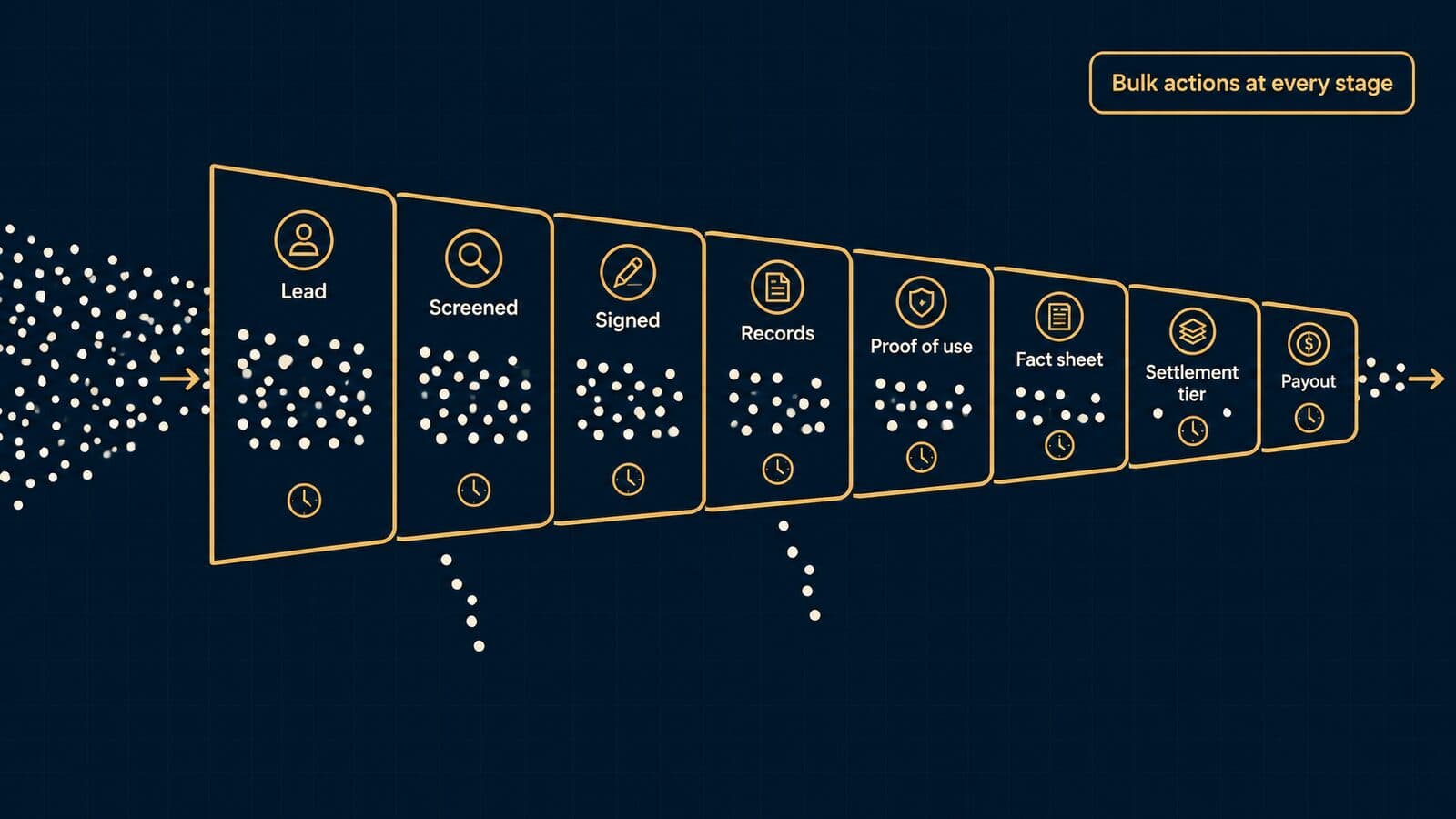
The high-volume claimant pipeline
A mass tort docket is a pipeline with a deadline at nearly every stage. The table lists the stages and the bulk capability each needs.
| Stage | System action | Bulk need |
|---|---|---|
| Lead received | Create lead, dedupe, tag source | Import and match across sources |
| Screened | Record qualification answers | Filter by criteria, reject in batch |
| Signed | Retainer e-signed, matter opened | Batch send of retainers |
| Records ordered | Requests to providers and pharmacies | Batch authorizations and requests |
| Proof of use and injury | Upload and review proof | Checklist status across claimants |
| Filed or registered | Short-form complaint or census entry | Generate and file in batches |
| Fact sheet or census | Questionnaire completed, signed | Deadline tracking per claimant |
| Settlement tier | Assign tier and points | Bulk tier assignment and review |
| Notified | Offer letters, elections | Group communications with tracking |
| Disbursed | Payment, lien holdbacks | Batch statements and payments |
Duplicate detection matters most at the top. The same claimant can arrive from a TV campaign, a web form and a referral partner within weeks. The system should match on name, date of birth, phone and email before creating a matter, and keep every source on the record. Jove says each claimant "runs as their own matter, related claims link as companion cases", and that "leads carry their marketing source through to resolution".
From the lead-generation side, which is where Mass Tort Marketing Agency works, the stages before "signed" are where duplicate and unverified claimants enter a docket, which is why verification fields belong on the claimant record itself. Look for claimant verification with disposition reporting back to the source and screening built on tort-by-tort qualification criteria, so rejected and signed outcomes flow back into the lead source data. Firms buying signed retainer mass tort cases need the same fields filled in before the file arrives.
Census, fact sheets and proof-of-use deadlines
The FRCP 16.1 Committee Note says "Some courts have utilized 'fact sheets' or a 'census'" to survey the claims and defenses, mainly as a management method, and that the level of detail "should be carefully considered" to avoid undue burdens. Rule 16.1(b)(3)(B) asks the parties for initial views on how and when they will exchange information about the factual bases of their claims. Fact sheet content and deadlines come from each MDL's own orders, so your system must model the order, not a generic template.
The Depo-Provera MDL shows what an order demands of a case system. Pretrial Order No. 17 in MDL 3140 (filed March 14, 2025, Judge M. Casey Rodgers) requires every plaintiff to provide proof of use and proof of meningioma injury through a questionnaire on the MDL Centrality system designed and provided by BrownGreer. Existing cases had 120 days, until July 14, 2025; later cases get 120 days from filing or transfer. Answers are made under penalty of perjury and treated as Rule 33 interrogatory responses, and the deadline can be extended only by the court for good cause or by agreement with leave of court.
Pretrial Order No. 22 (filed May 6, 2025) adds document rules: proof of use must show the plaintiff's name, the date, a requisite product and that it was administered; no more than five pages per product, with the relied-on pages bookmarked; and a diagnosis date within one year of the date claimed in the questionnaire. Uncured deficiencies go to the court, which issues an order to show cause, and an action may be dismissed with prejudice for willful noncompliance. Exhibit A says a lawyer may not sign for a plaintiff even with a power of attorney.
A later amendment, PTO 22A (September 11, 2025), is reported to address plaintiffs whose use was many years ago; read it on the court's site before relying on it. Do not assume other MDLs work the same way. The system features these orders imply are general, though: a per-claimant deadline field keyed to the governing order and its trigger (entry, filing or transfer), a document checklist that mirrors the order's requirements, page-count and bookmark checks before upload, cure-period tracking, and e-signature sent to the claimant, never signed by staff.
Bulk records, documents and claimant communications
Volume turns every single-file task into a batch job. SmartAdvocate says its mass torts module supports bulk document imports for "multiple plaintiffs in the same MDL" with automated filing, categorization and barcode routing, plus medical record request tracking. Filevine says its DocGen can "generate compliant HITECHs, HIPAAs, and short-form complaints, with mass customization possible in just a few clicks."
Communication needs the same scale. Jove says a firm "selects a group of claimants, writes one email and sends it to all of them." In a demo, ask each vendor to send a templated status update to 500 test claimants, log it on every matter, and show replies threading back to the right file. Then ask how texting is priced at that volume.
Co-counsel, referral splits and common benefit
Most mass tort dockets involve more than one firm, so the system has to track who referred each claimant, who works it and how the fee divides. Model Rule 1.5(e) allows a fee division between firms only if it is proportional to services performed or each lawyer assumes joint responsibility, the client agrees to the arrangement including each lawyer's share in a writing, and the total fee is reasonable. Model Rule 1.1, Comments [6] and [7], expects informed client consent before retaining outside lawyers and consultation among firms on the allocation of responsibility. The record should store each firm's role, share, the client's written agreement and its date.
Common benefit adds another ledger. The FRCP 16.1 Committee Note says courts have entered common benefit orders "establishing specific protocols for the management of case staffing, timekeeping, cost reimbursement" and related issues. A firm doing leadership work needs time and cost entries that can be tagged and exported to the order's format.
Vendors approach this differently. Jove says co-counsel and referring attorneys sit on the case as involved parties. Filevine says it tracks referrals, joint ventures and lien resolution in one place. Lexamica describes a shared platform where cases "worked jointly across two or more firms" have fee splits, obligations and status tracked between firms. These records become critical when scaling from one tort to a multi-tort docket.
Settlement tiers and claimant notifications
Global settlements usually sort claimants into tiers by injury severity and evidence, then send each claimant an offer and an election deadline. SmartAdvocate says its custom fields support "different settlement tiers, enabling efficient categorization and tracking of plaintiffs based on injury severity, exposure levels, or other relevant factors", and that its client portal can be adapted for secure information sharing with leadership committees.
Notification is also an ethics duty. Under Model Rule 1.15(d), a lawyer who receives funds in which a client or third person has an interest must promptly notify them and promptly deliver what they are entitled to. At docket scale, that means a notification log per claimant showing when the offer, the funds notice and the disbursement went out. With census, deadlines, bulk documents, co-counsel and tiers in view, the next section compares the purpose-built platforms built for this work with the generalist systems that can be stretched to it.
Purpose-built PI platforms vs generalist systems
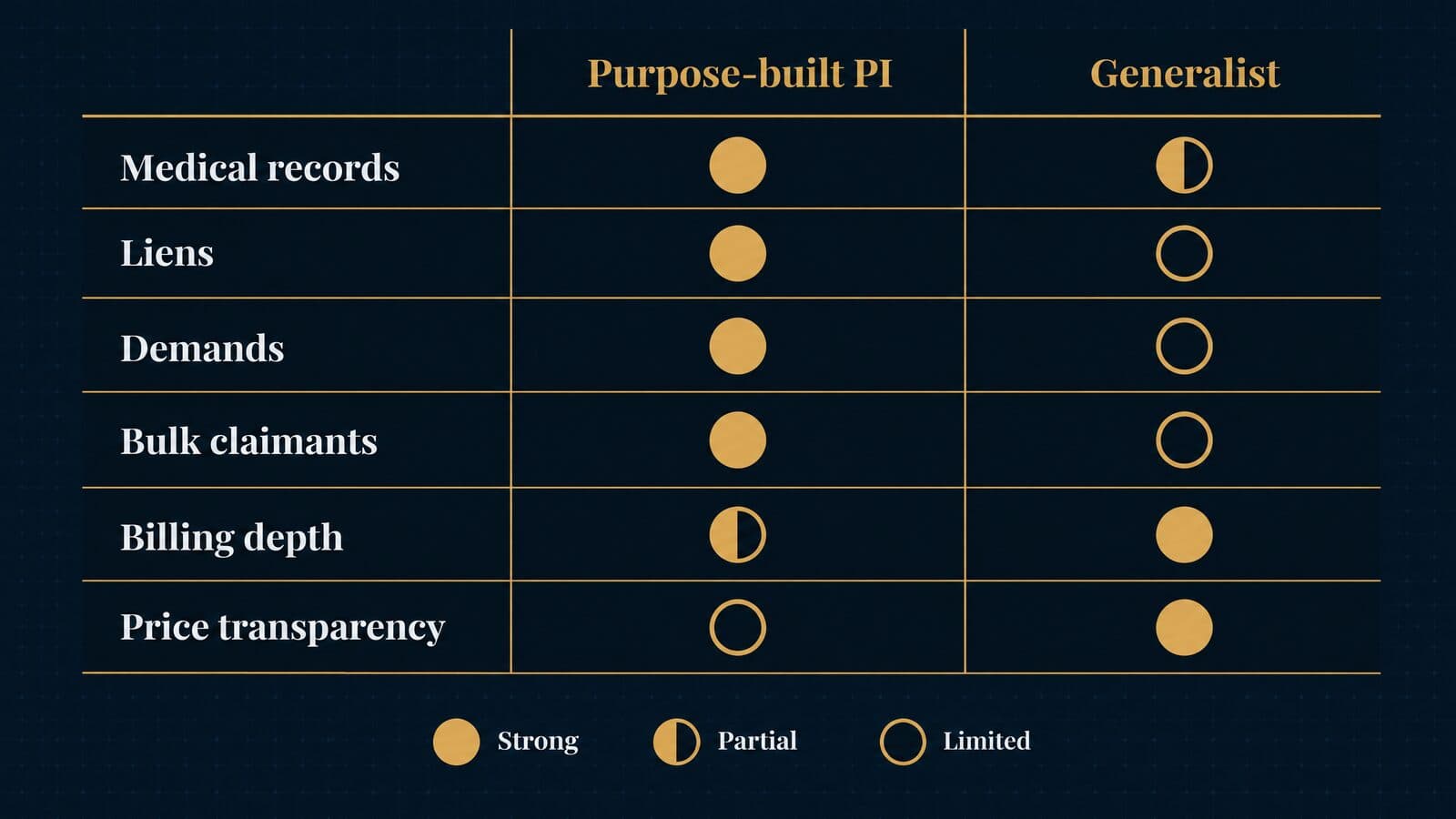
Purpose-built plaintiff platforms model medical treatment, liens, demands and settlements out of the box. Generalist platforms cost less, cover more practice areas and usually bill and account for trust better, but they need add-ons or careful configuration before they handle personal injury depth.
The split matters because the expensive part of a PI or mass tort file is rarely the matter record itself. It is the long middle of the case: chasing records from a dozen providers, tracking what each one billed, reconciling liens, assembling a demand, and producing a settlement statement the client can read. A platform that treats those as first-class objects saves staff hours on every file. A platform that treats them as custom fields and notes can still work, but someone at the firm has to design, maintain and police that structure.
What purpose-built platforms add
The clearest way to see the difference is need by need. The table below describes each category in general terms; where a vendor documents a specific feature, the example is attributed to that vendor's own page.
| Need | Purpose-built PI platform | Generalist platform |
|---|---|---|
| Medical treatment tracking | Provider-by-provider treatment and records status built in | Custom fields or a PI add-on |
| Lien ledger | Lien records tied to the matter and settlement | Usually notes, fields or a spreadsheet |
| Demand drafting | Templates, often with AI chronology and demand tools | Document assembly from general templates |
| Settlement statement | Settlement and disbursement worksheets | Built from trust and billing records |
| Statute alerts | Statute alerts on PI matter types | Calendar rules or manual deadlines |
| Intake CRM | Often bundled or owned by the same vendor | Separate intake product or add-on |
| Bulk claimant actions | Group emails, bulk imports in mass tort modules | One matter at a time |
| Trust accounting depth | Varies; some rely on payment partners | Usually a core strength |
| Pricing transparency | Mostly quote-based | Mostly published per-user prices |
| Contract and onboarding | Implementation projects, sometimes fixed fees | Self-serve trials and month-to-month plans |
Three published examples show the pattern. 8am CasePeer says it was built "specifically for personal injury law firms" to organize "medical treatment, liens, tasks", and its pricing grid lists automated statute alerts, settlement negotiations, medical treatment tracking and case expense tracking on the Basic tier. Clio, a generalist, sells a separate Clio for Personal Injury package that Clio says lets firms "Manage medical records, damages, and settlements, with HIPAA compliance included", with records and bills organized by provider and a settlement calculator. That package is quote-based as of October 2026.
The third example is the most telling. 8am MyCase's own personal injury page sends PI-specific needs to a sister product: "8am CasePeer, part of the 8am professional business platform alongside 8am MyCase, delivers PI-focused workflows for managing treatment, driving settlements, and maximizing case value." When one vendor owns both a generalist and a PI-specific system and steers PI buyers to the specialist, that is a fair signal of where the vendor believes the line sits.
When a generalist platform is enough
A generalist platform is often the right call, and plenty of plaintiff work runs well on one. The question is whether PI depth is the center of the firm's economics or one practice area among several. My advice is to pick a generalist when most of these are true:
- Low PI volume. If the firm opens a handful of injury matters a month, a well-built matter template with custom fields for providers, bills and liens is manageable. The staff time lost to manual tracking is small next to the cost of a quote-based specialist.
- Mixed practice. A firm doing estate planning, family law, business work and some PI needs one system that fits all of them. Purpose-built PI platforms can feel awkward for hourly matters.
- Billing and trust are the priority. Generalists grew up around time entry, invoicing and trust accounting. Firms with substantial hourly revenue usually get more from that strength than from a lien ledger.
- Published pricing and short commitments matter. Most generalists publish per-user prices and offer free trials, while most PI specialists quote.
- An add-on can close the gap. Clio's PI package is the obvious example; a generalist plus a document or AI layer may cover demand work.
Pick a purpose-built platform when PI or mass tort fees drive most revenue, when the firm handles high volume where medical records and liens consume paralegal time, or when mass tort intake requires group actions across hundreds of claimants. MyCase routing PI buyers to CasePeer shows that vendors see the same split, so ask each one plainly which product it would recommend for your caseload.
PI and mass tort case management platforms
The platforms plaintiff firms most often shortlist are Filevine, Litify, SmartAdvocate, 8am CasePeer, CloudLex, Neos and Jove, with Lucid IQ CaseManagerPro positioned for mass torts and CaseFleet for litigation fact management. The order below is not a ranking; it follows the sequence used throughout this guide.
Every profile uses the same structure: who it suits, what the vendor says it does (attributed, since these are vendor claims rather than tested results), one thing to watch, published pricing as of October 2026, and a question to ask in the demo. Most of these vendors quote rather than publish prices, so where a profile says "quote-based", ask for per-user, implementation, migration, storage, texting and AI-credit terms in writing.
Filevine
Best for: PI and mass tort firms that want configurable case types and AI-assisted demands.
Filevine's personal injury page describes a dashboard showing "case status, document requests, upcoming deadlines, and statute of limitations alerts", and says "dedicated personal injury matter types keep track of document requests" so firms "know which medical providers and insurance companies owe you documents". Its AI, LOIS, pulls "medical record summaries, damages estimates, and case narratives" into demands, and Filevine offers "LOIS for Word". The homepage says LOIS is "Built on 40M+ matters".
For mass torts, Filevine's mass torts page says its "AI-enhanced intake tool summarizes large quantities of intake information in seconds", that DocGen can "generate compliant HITECHs, HIPAAs, and short-form complaints", and that it tracks "referrals, joint ventures, and lien resolution in one place". Filevine also owns the intake CRM Lead Docket, whose site says data "natively transfers to Filevine". The about page says Filevine "now serves over 6,500 customers" and carries a letter from CEO Ryan Anderson. Its security page says its latest SOC 2 Type II audit included testing for HIPAA safeguards.
Watch for: packages are "custom built", so two firms of the same size can receive very different quotes.
Pricing as of October 2026: quote-based (Filevine pricing).
Ask in the demo: which package areas (Matters, Intake, Depositions, Signatures) are in the quote, and what LOIS usage costs beyond the base?
Litify
Best for: larger plaintiff firms that want a platform built on Salesforce.
Litify says it is "Built on the world-class infrastructure of Salesforce, AWS, and Anthropic (our closed AI model)", and that its "Litify ACE" agents run "end-to-end autonomous workflows". The PI page lists "LitifyAI Call Intelligence", "universal telephony integration across 20+ VoIP providers", marketing spend and ROI monitoring "across campaigns and channels", "source-linked medical chronologies and comprehensive demand packets", named agents such as a "Total Policy Agent" and "Case Value Agent", same-day digital settlement disbursement, and a free referral portal.
The Salesforce base cuts both ways. It gives large firms reporting depth and a broad admin ecosystem, and it usually means the firm needs someone who understands Salesforce administration. Litify's About page lists Curtis Brewer as Chief Executive Officer and Lauren Rothrock as Chief Product Officer.
Watch for: the homepage line that firms can "handle 2X as many matters with the same staff" is a vendor claim, not a typical result.
Pricing as of October 2026: no public prices; litify.com/pricing redirects to a demo request.
Ask in the demo: which costs are Litify's and which are Salesforce licensing, and who administers the org after go-live?
SmartAdvocate
Best for: high-volume PI and mass tort firms that want deep document automation.
SmartAdvocate says its "SmartIntelligence" AI arrived in a 2026 release, that it offers "Over 175+ integrations", and that document templates draw on "over 4,000 available merge codes". It supports batch scanning with barcodes and says it is "used by more than 20,000 legal professionals nationwide". Its news section lists Igor Selizhuk as Chief Technology Officer and reports a vendor-announced New York Law Journal award.
The mass torts page is specific about volume work. SmartAdvocate describes bulk document imports for "multiple plaintiffs in the same MDL" with "automated filing and categorization", custom fields "for different settlement tiers" by injury severity or exposure level, a client portal "adapted for secure information sharing with leadership committees", and medical record request tracking. Those features map closely to the census and tiering work described earlier in this guide.
Watch for: no pricing is published anywhere on the site, so budget comparisons start only after a demo.
Pricing as of October 2026: no public prices; smartadvocate.com/pricing returned a 404 when checked.
Ask in the demo: can you export every document, merge template and custom field in a usable format if you leave?
8am CasePeer
Best for: small and mid-size PI firms that want published pricing.
8am CasePeer says it was built "specifically for personal injury law firms", organizing "medical treatment, liens, tasks", with "50+ turnkey reports" and LawPay "IOLTA-compliant payment processing". The site also displays "4.8/5.0 stars rated on Capterra", a vendor-reported rating. Its Advanced tier adds "Text Scheduling, Office Reporting Suite, CasePeer Intake Portal, Data Sync" and API access.
CasePeer belongs to 8am, formerly AffiniPay, which acquired MyCase, CasePeer and others in June 2022 and adopted the 8am name in August 2025. That ownership explains why MyCase points PI buyers here.
Watch for: the page says the "monthly subscription rate depends on the number of active firm users" but does not separate annual and monthly billing, so confirm the basis.
Pricing as of October 2026: Basic $90, Pro $130 and Advanced $160 per user per month; "No long-term contract or setup fee required" (CasePeer pricing).
Ask in the demo: which tier includes the API and intake portal you need for lead delivery, and how is an "active" user counted?
CloudLex
Best for: PI firms that want software plus optional human services.
CloudLex describes itself as "Complete practice management built exclusively for personal injury firms" covering intake through settlement, with "Lexee AI" built in. Its distinguishing offer is add-on services: medical record retrieval, medical summaries, a "24/7 Bilingual Call Center" in English and Spanish, and paralegal support. It also publishes a mass tort software page.
Watch for: CloudLex warns against third-party "estimates or pricing assumptions that are not provided or authorized by CloudLex", so ignore listicle prices.
Pricing as of October 2026: quote-based across three packages, Professional, Advanced and Enterprise (CloudLex pricing).
Ask in the demo: are records retrieval and call-center services priced per case, per hour or per month, and can you cancel them separately from the software?
Neos (formerly Needles)
Best for: Needles users moving to the cloud, and PI firms that want published pricing with AI demands available.
Assembly Software calls Needles "the Neos predecessor" and says thousands of PI firms ran their cases on it before "Neos carries that foundation into the cloud". On the Assembly pricing page, Essentials includes "Intake forms, intake CRM, and lead tracking", document assembly and expense tracking; Premium adds PDF editing and redaction.
The AI product is Demands Plus. Assembly says it "reads the records already in the case, builds a cited medical chronology, and drafts the demand from it in your firm's voice", and that "nothing goes out until an attorney approves it." Assembly also says "Most migrations land in 60 to 90 days", the only implementation timeline any vendor in this guide publishes.
Watch for: Demands Plus "Requires NeosAI Platinum", and both are priced separately from the published tiers.
Pricing as of October 2026: Essentials $109 and Premium $139 per user per month, billed annually; NeosAI Platinum quoted; Demands Plus "scales with your caseload".
Ask in the demo: what does Platinum plus Demands Plus cost at your current caseload, and how does that change as volume grows?
Jove (formerly GrowPath)
Best for: PI and mass tort firms that prefer a fixed implementation fee over per-user pricing.
GrowPath is now Jove; the old domain redirects to jovelegal.com. Jove says it "was built by a leading personal injury firm", and its about page lists James S. Farrin as founder, with the product beginning inside The Law Offices of James Scott Farrin. Readers who saw GrowPath on older lists are looking at this product.
Jove's mass torts page says a firm "selects a group of claimants, writes one email and sends it to all of them", that co-counsel and referring attorneys "sit on the case as involved parties", that each claimant "runs as their own matter" with related claims linked as companion cases, and that "leads carry their marketing source through to resolution". Lead Scoring and a Lexamica integration sit on the Elite plan. For firms that buy claimants, a mass tort intake that writes qualified claimants straight into your case management system depends on exactly that kind of source field.
Watch for: no dollar figures are published for the implementation fee or plans.
Pricing as of October 2026: "the first six months free – only charging for implementation – no per user fees"; a single fixed implementation fee; Essentials and Elite plans priced by firm complexity (Jove pricing).
Ask in the demo: what is the subscription after month six, and what does the contract say about price changes?
Lucid IQ CaseManagerPro
Best for: mass tort and MDL dockets, on either side of the bar.
Lucid IQ titles its page "Legal Case Management Software - Mass Tort and Multi-District Litigation" and says CaseManagerPro is "Designed for Mass-Torts and MDL" and "the core case management system for major firms on both sides of the bar". The company lists Dallas, Texas. It is a narrow tool aimed at docket-scale work rather than a general PI practice system.
Watch for: its testimonials name firms under former names such as "Hunton & Williams LLP", so they are older than the 2026 page date suggests.
Pricing as of October 2026: quote-based; the site says it "fits your needs and your budget" and offers a demo.
Ask in the demo: name two current plaintiff-side customers of similar docket size you can call.
CaseFleet
Best for: litigators who need fact chronologies alongside another case system.
CaseFleet positions itself for "Case Chronology & Fact Management for Litigators": facts "linked to its source", transcript management that lets teams "cite testimony as facts", medical chronologies and the "Casey AI Assistant". It is a fact-management tool, so most PI firms run it next to a case system rather than instead of one. Older lists sometimes describe a "Standard" plan; there is none today.
On HIPAA, CaseFleet says it is "HIPAA compatible" and will "sign a Business Associate Agreement (BAA) for annual accounts", for an additional fee, with the agreement option shown on Advanced AI and Enterprise only.
Watch for: Starter limits each case to 20 documents, storage over 5 GB per account costs $10 per GB per month, and AI use beyond 100,000 credits per billed user per month costs $0.001 per credit.
Pricing as of October 2026: Starter $30 per user per month billed annually or $40 month to month; Advanced AI $140 annually or $180 month to month; Enterprise custom for 20+ users; 14-day free trial (CaseFleet pricing).
Ask in the demo: how much storage and how many AI credits does a typical PI file with full medical records use?
AI layers on top: EvenUp and Supio
EvenUp and Supio are not case management systems. They are AI products that sit on top of one, reading records the firm already holds and producing demands, chronologies and case analysis. A firm still needs a system of record underneath. For a wider view of this category, see our roundup of AI tools built for law firms.
EvenUp says its AI "extracts key information from your CMS", draws on a "250K+ verdict and settlement dataset", and is "SOC2-audited and HIPAA-attested". It headlines "Why 2,000+ Personal Injury Firms Choose EvenUp" and a $150M Series E at a $2B+ valuation, per its about page. Treat the site's customer-outcome lines as marketing and testimonials; they are not evidence of what EvenUp will do for a given firm.
Supio says it is "SOC 2 Type II certified, HIPAA, PHIPA, and GDPR compliant", that it "partners with Thomson Reuters and leading Trial Lawyer Associations", and claims "$500-1000 saved per case". Those are Supio's figures, not independent measurements.
Watch for: an AI layer duplicates medical records into a second vendor's environment, so security review and a BAA apply to it as much as to the case system.
Pricing as of October 2026: quote-based for both.
Ask in the demo: does the tool read from and write back to your specific case system, and who owns the generated work product if you cancel?
Generalist case management software for law firms
Clio, 8am MyCase and PracticePanther lead for solos and small firms, with published per-user prices and free trials. Smokeball, Lawcus, CARET Legal, CosmoLex and Rocket Matter each fill a narrower niche, and older on-premises and specialist systems still run in many offices.
These profiles follow the same template as the PI platforms. The main difference is that most generalists publish prices, so the "Watch for" lines lean on what the pricing pages leave unclear.
Clio
Best for: solos through mid-size firms that want the largest integration ecosystem.
Clio's case management page says Clio is "Trusted by 400,000+ legal professionals" and "approved by 100+ bar associations and law societies worldwide, including all 50 US state bars". A resource card on the same page says "over 150,000 legal professionals use Clio", so treat both as Clio's own claims. The page lists sync with "over 300 other apps", client and co-counsel portals ("Clio for Clients and Clio for Co-Counsel"), "Manage AI", and intake forms in Clio Grow that "sync them to Clio Manage".
For PI, Clio sells Clio for Personal Injury as a quote-based package. Support is "unlimited support 24 hours a day, 5 days a week", and Clio says its "data migration team can assist" with moves from another system. The trial is 7 days, no credit card. On its pricing page, Clio says data is "encrypted in transit and at rest", that firms can retrieve data "in open, nonproprietary formats at any time while your account is active, or within 90 days of cancellation", and that data "is never used for AI training". That is the clearest exit term any vendor here publishes. Clio completed its acquisition of vLex in November 2025; Jack Newton is CEO and founder.
Watch for: only Starter shows a price; Core, Signature and Elite are "Get pricing", and the page does not say whether $49 is the monthly or annual-billing rate. Clio's case management page quotes a different starting figure, so rely on the pricing page.
Pricing as of October 2026: from $49 per user per month (Clio pricing page); four plans, Starter, Core, Signature and Elite.
Ask in the demo: is $49 the annual or monthly rate, and what do Core and the PI package cost for your headcount?
8am MyCase
Best for: small firms that want all-in pricing published on both billing bases.
8am MyCase lists three tiers per user per month: Basic $50 billed annually or $60 monthly, Pro $100 or $120, and Advanced $130 or $150. Annual billing saves "up to 16%", "No long-term contract or setup fee is required", and the free trial runs 10 days with no credit card. Pro adds intake forms and legal CRM, automated workflows, two-way texting and the "8am IQ Writing and Document Assistant". The AI is branded 8am IQ, and the parent company is 8am.
Older comparison posts, including the rankings.io list, still show MyCase at $39 / $79 / $99. Those numbers are out of date. MyCase's own PI page also claims "Join 19,000+ firms" and refers PI-specific needs to 8am CasePeer, which is useful when deciding between the two sister products.
Watch for: intake, CRM and texting start at Pro, so a firm that needs them should budget from $100, not $50.
Pricing as of October 2026: Basic $50 / Pro $100 / Advanced $130 per user per month billed annually; $60 / $120 / $150 monthly.
Ask in the demo: if you later add CasePeer for PI matters, do contacts, documents and billing move between the two systems?
PracticePanther
Best for: small firms that want rule-based automation and a choice of four tiers.
PracticePanther publishes four plans per user per month. Solo costs $59 monthly or $49 annually. Essential costs $79 or $69. Business costs $99 or $89. Business Pro costs $124 or $114. The trial is 7 days with no credit card needed. Some older lists quote "$49 to $89", which covers only the annual prices and omits Business Pro entirely.
For a PI practice, PracticePanther is a generalist and should be judged on how well its custom fields, templates and automation can model providers, bills, liens and settlement math. Build one sample PI matter during the trial and see how much structure you have to create yourself.
Watch for: the spread between the annual and monthly rates means the tier you pick and the billing basis both change the budget.
Pricing as of October 2026: Solo $49 / Essential $69 / Business $89 / Business Pro $114 per user per month billed annually; $59 / $79 / $99 / $124 monthly.
Ask in the demo: which tier includes the workflow automation you plan to use, and what does a full data export include?
Smokeball
Best for: firms that want a desktop application alongside cloud access and automatic time capture.
Smokeball offers four plans, Bill, Boost, Grow and Prosper+, all marked "Get pricing". It says pricing "depends on the number of users at your firm, your selected plan, your contract term, and any optional products or services." Grow includes Smokeball's native desktop application, and the "Archie AI assistant" and AutoTime are listed as add-ons on Grow. Smokeball also says it is "Trusted by 34,000+ legal professionals worldwide."
The desktop-plus-cloud design appeals to offices that live in Word and Outlook and want time captured as they work. That suits hourly practices more than contingency practices, where time capture matters less.
Watch for: the pricing page names contract term as a price factor, so a lower rate may come with a longer commitment.
Pricing as of October 2026: quote-based.
Ask in the demo: what contract term does the quoted price assume, and what are the AI and AutoTime add-on costs?
Lawcus
Best for: budget-conscious small firms.
Lawcus lists Essential $39, Growth $59 and Elite $79 per user per month billed annually ($49 / $69 / $89 monthly), plus an Enterprise plan by quote with a minimum of 10 users. Growth adds "QB & Xero Integration" and "Nova AI & Custom Fields". Older lists show plan names "Standard, Plus, Business" at different prices; those are outdated.
Because custom fields arrive at Growth, a PI firm modeling providers and liens should price from that tier. The pricing page offers a free trial but does not state its length, so ask before you plan your evaluation.
Watch for: custom fields, which PI tracking depends on, are not on the entry tier.
Pricing as of October 2026: Essential $39 / Growth $59 / Elite $79 per user per month billed annually; Enterprise by quote.
Ask in the demo: how long is the trial, and can you export custom-field data in a structured format?
CARET Legal, CosmoLex and Rocket Matter
These three serve firms where billing, accounting and trust work matter as much as matter management. CARET Legal lists Enterprise $79, Enterprise Plus $99 and Enterprise Insights $119 per user per month billed annually, and says "Pricing is per user plus one-time implementation fees." Enterprise includes LEDES invoicing and "24/7/362 Phone Support". The old AbacusNext domain now redirects to CARET.
CosmoLex lists Launch $49, Core $99 and Pro $129 per user per month with yearly billing, and says yearly billing saves $120 per user. Rocket Matter plan cards, paid annually, show Essentials $59, Pro $95, Premier $115 and Elite $145. CosmoLex, Rocket Matter and Tabs3 are all owned by ProfitSolv, per their page footers.
Watch for: CARET Legal's one-time implementation fees are not priced on the page; Rocket Matter's FAQ says plans start at $49, which contradicts its own plan cards, so rely on the cards.
Pricing as of October 2026: CARET Legal from $79, CosmoLex from $49, Rocket Matter from $59, all per user per month billed annually.
Ask in the demo: for CARET, the implementation fee in writing; for the ProfitSolv products, whether data moves cleanly between them if you change product later.
Legacy and specialist systems
Some firms still run older on-premises systems, and a few specialist tools fit practices the main platforms do not. Trialworks is one example. Its support pages list Windows Server, SQL Server (2008–2019), "Microsoft Access 2010 Runtime" and Active Directory among server requirements, plus a "TrialWorks Hosted" remote-desktop option. Assembly Software now owns it and says it "brings together two of the legal profession's pioneering case management brands, Needles and Trialworks." Firms on Trialworks or legacy Needles should expect Assembly to steer them toward Neos.
MerusCase targets workers' compensation practices and shows "Pricing Custom & Tailored to Your Needs". LegalServer says it "is built exclusively for civil legal aid, public defense, and government law offices", with "over 550 implementations since 2002". Lawmatics is an intake CRM rather than a case system, priced by custom quote; firms usually pair it with a separate case platform.
Ask in the demo: for any legacy system, what the vendor's supported migration path is, and whether historical documents and notes move or only structured fields.
Master comparison table: 17 platforms
The table condenses the profiles above. "Quote" means the vendor publishes no price; "Not stated" means the pricing page does not say. Starting prices are the lowest published per-user monthly figure, on the billing basis shown.
| Platform | Best for | Starting price (as of Oct 2026) | Billing basis | Trial | PI/mass tort focus | AI (vendor name) |
|---|---|---|---|---|---|---|
| Filevine | Configurable PI and mass tort | Quote | Quote | LOIS free trial | Yes | LOIS |
| Litify | Large firms on Salesforce | Quote | Quote | Not stated | Yes | LitifyAI, Litify ACE |
| SmartAdvocate | High-volume document automation | Quote | Quote | Not stated | Yes | SmartIntelligence |
| 8am CasePeer | Small to mid PI firms | $90/user/mo | Not stated | Not stated | PI | Not stated |
| CloudLex | Software plus services | Quote | Quote | Not stated | PI | Lexee AI |
| Neos | Needles users moving to cloud | $109/user/mo | Annual | Not stated | PI | NeosAI, Demands Plus |
| Jove | Fixed implementation fee | Implementation fee only, first 6 months | Not stated | Not stated | PI and mass tort | Not stated |
| Lucid IQ CaseManagerPro | Mass tort and MDL dockets | Quote | Quote | Not stated | Mass tort | Not stated |
| CaseFleet | Fact chronologies | $30/user/mo | Annual | 14 days | Litigation | Casey AI Assistant |
| Clio | Largest integration ecosystem | $49/user/mo | Not stated | 7 days | PI add-on | Manage AI |
| 8am MyCase | All-in small-firm pricing | $50/user/mo | Annual | 10 days | Routes to CasePeer | 8am IQ |
| PracticePanther | Four tiers, automation | $49/user/mo | Annual | 7 days | General | Not stated |
| Smokeball | Desktop plus cloud | Quote | Quote | Not stated | General | Archie |
| Lawcus | Budget small firms | $39/user/mo | Annual | Length not stated | General | Nova AI |
| CARET Legal | Billing-heavy firms | $79/user/mo plus implementation | Annual | Not stated | General | Not stated |
| CosmoLex | Built-in accounting | $49/user/mo | Annual | Not stated | General | Not stated |
| Rocket Matter | Billing-focused firms | $59/user/mo | Annual | Not stated | General | Not stated |
Pricing checked on 22 October 2026 on each vendor's own pricing page; confirm with the vendor before buying.
Two cautions apply when reading the table. A lower starting price often excludes the features a plaintiff firm needs most, such as intake, texting, custom fields or an API, which sit on higher tiers. And a quote-based vendor is not necessarily more expensive; it is simply harder to compare until you hold a written quote.
List prices are also only the first line of what a system costs. Implementation fees, migration, storage overages, AI credits, add-on packages and contract length usually decide the real figure, and those terms rarely appear on a pricing page. The next section turns these sticker prices into a full cost of ownership.
How much legal case management software costs
As of October 2026, published prices run from $30 per user per month (CaseFleet Starter, a fact-management tool, billed annually) and $39 (Lawcus Essential, annual) through $49 (Clio Starter, PracticePanther Solo annual, CosmoLex Launch) up to $160 (8am CasePeer Advanced), while most plaintiff platforms are quote-only. The license is only one line of the bill: implementation, migration, storage, texting and AI usage can add as much again.
Published per-user prices, October 2026
The table lists every platform in this guide that prints a dollar figure on its own pricing page. All figures are per user per month, as of October 2026. Where a vendor does not say whether a figure is the annual or monthly rate, the cell says so.
| Platform | Plan | Annual billing | Monthly billing | Source |
|---|---|---|---|---|
| CaseFleet | Starter | $30 | $40 | CaseFleet pricing |
| CaseFleet | Advanced AI | $140 | $180 | CaseFleet pricing |
| Lawcus | Essential / Growth / Elite | $39 / $59 / $79 | $49 / $69 / $89 | Lawcus pricing |
| Clio | Starter | Not stated | Not stated | Clio pricing ($49 listed) |
| PracticePanther | Solo / Essential | $49 / $69 | $59 / $79 | PracticePanther pricing |
| PracticePanther | Business / Business Pro | $89 / $114 | $99 / $124 | PracticePanther pricing |
| 8am MyCase | Basic / Pro / Advanced | $50 / $100 / $130 | $60 / $120 / $150 | MyCase pricing |
| CosmoLex | Launch / Core / Pro | $49 / $99 / $129 | Not listed | CosmoLex pricing |
| Rocket Matter | Essentials to Elite | $59 to $145 | Not listed | Rocket Matter pricing |
| CARET Legal | Enterprise to Enterprise Insights | $79 to $119 | Not listed | CARET Legal pricing |
| Neos | Essentials / Premium | $109 / $139 | Not listed | Assembly pricing |
| 8am CasePeer | Basic / Pro / Advanced | Not stated | $90 / $130 / $160 | CasePeer pricing |
Pricing checked on 22 October 2026. Confirm every figure with the vendor before you budget.
A few notes keep the table honest. Clio's page says "Starting at $49/user" and names four plans (Starter, Core, Signature and Elite), but only Starter carries a public price and the page does not say whether $49 is the annual or the month-to-month rate. CasePeer quotes its tiers as a monthly rate that "depends on the number of active firm users." CARET Legal adds that its pricing "is per user plus one-time implementation fees." Rocket Matter's FAQ mentions a $49 starting point that contradicts its own plan cards, so the table uses the cards.
The ABA 2024 Practice Management TechReport gives a reality check on what firms actually spend: solo respondents reported spending less than $3,000 a year on practice-management software, and firms of 2 to 9 attorneys reported $10,000 to $20,000. At list prices, a five-person firm on a $100 plan spends $6,000 a year on licenses alone, so the ABA ranges suggest most small firms land in the mid-tier plans once add-ons are counted.
Quote-only vendors and how to get a real number
Most platforms built for plaintiff work publish no prices. As of October 2026 that includes Filevine ("All packages are custom built"), Litify (its pricing URL redirects to a demo request), SmartAdvocate (no pricing page), Smokeball, Jove, Lucid IQ CaseManagerPro, Clio's upper tiers and its Personal Injury add-on, and NeosAI Platinum. Intake CRMs such as Lawmatics quote too.
CloudLex goes further: its pricing page warns readers not to rely on third-party "estimates or pricing assumptions that are not provided or authorized by CloudLex." Take that at face value and ignore listicle numbers for quote-only products. Smokeball is unusually candid about what drives a quote: "the number of users at your firm, your selected plan, your contract term, and any optional products or services."
To turn a demo into a comparable number, ask for a written quote that states:
- The per-user monthly price for each user type, including paralegals and intake staff.
- Whether the price assumes annual prepayment, and the month-to-month rate if one exists.
- One-time implementation, onboarding and data-migration fees, itemized.
- Storage limits and the overage rate.
- Texting, e-signature, payment-processing and AI usage charges, with any caps.
- Contract length, renewal terms and the cap on price increases at renewal.
- Exit terms: export formats, the window to retrieve data after cancellation, and any export fee.
Total cost of ownership worksheet
Budget over 36 months, because implementation costs land in year one and a switch rarely happens sooner. Fill in each line from the written quote and your own payroll numbers.
| Cost line | How to calculate | Where to find it |
|---|---|---|
| Licenses | Price × users × 36 months | Written quote |
| Implementation | One-time fee | Quote (CARET Legal, Jove charge one) |
| Data migration | One-time fee or internal hours | Quote plus your staff time |
| Training | Vendor fee plus staff hours off billable work | Quote, payroll |
| Storage overage | GB over limit × rate × months | CaseFleet: $10 per GB beyond 5 GB |
| Texting | Messages or numbers × rate | Add-on schedule |
| AI usage | Credits or seats × rate | CaseFleet: $0.001 per credit over 100,000 |
| Payment processing | Volume × card or ACH rate | Payments addendum |
| BAA or compliance options | Annual fee if charged | CaseFleet charges for its BAA |
| Integrations | Middleware subscriptions, API fees | Quote, Zapier or similar bills |
| Internal admin | Hours per month × loaded rate | Your estimate |
The storage, AI-credit and BAA lines come from CaseFleet's pricing page, the clearest example of how add-ons are published; it states that extra storage beyond 5 GB per account costs $10 per GB per month, AI overages cost $0.001 per credit after 100,000 credits per billed user per month, and "An additional fee applies for the BAA."
Here is a hypothetical, using only published list prices as of October 2026. An eight-person PI firm on 8am MyCase Pro billed annually pays 8 × $100 × 12 = $9,600 a year, or $28,800 over 36 months, before any add-on. The same eight users on 8am CasePeer Pro at $130 would pay $12,480 a year, or $37,440 over 36 months. Neither figure includes migration, training time or texting, which is why the worksheet matters more than the sticker.
Two checks make the worksheet more honest. First, run it at your headcount a year from now, not today, because per-user pricing means every new case manager or intake rep raises the license line, and some add-ons scale with users too. Second, count who actually needs a full seat. Intake staff, part-time contract attorneys and co-counsel may need only limited access, so ask each vendor in writing whether it offers lighter seat types or guest access and what those cost. Then compare the three-year totals side by side, with the same assumptions in every column, before anyone sits through a second demo.
Contract terms and add-on traps
Contract terms differ more than prices. MyCase states that "No long-term contract or setup fee is required," and CasePeer uses nearly identical wording. Smokeball lists contract term as a price factor, which signals that longer commitments buy lower rates. Jove prices on a different model entirely: "A single, fixed implementation fee," "Pricing based on firm complexity - not headcount," the first six months free apart from implementation, and "No surprise fees or mid-contract markups."
The ABA TechReport author offers one explanation for rising bills, labeled as his interpretation rather than a survey finding: vendors "often charge users 'a la carte,' or individually per add-on to the original product." In practice that means the plan you demo may not be the plan you price. Check whether texting, intake forms, e-signature, AI drafting and advanced reporting sit in your tier or cost extra.
Peer threads on Reddit's legal-practice forums often argue for one-year terms over three-year terms so a firm can leave if the product disappoints. Treat that as peer opinion, not data, and weigh it against any discount a multi-year term buys.
Free and open-source options
I found no free legal case management product I could verify on a primary source for this guide, so none is named here. What vendors do offer free is a trial: as of October 2026, Clio offers 7 days, MyCase 10 days, PracticePanther 7 days and CaseFleet 14 days, all without a credit card per their pages.
Free or self-hosted open-source tools move the cost rather than remove it. Model Rule 1.6(c) requires "reasonable efforts to prevent the inadvertent or unauthorized disclosure of, or unauthorized access to, information relating to the representation of a client." With a self-hosted tool, the firm owns patching, backups, access control and encryption, and there is no vendor SOC 2 report to review. For most small firms, those hours cost more than a mid-tier license.
If you still want to price a self-hosted route honestly, list the jobs the vendor would otherwise do and put an owner and an hourly estimate next to each one:
- Server or cloud hosting, plus monitoring for downtime.
- Security patches for the application, the database and the operating system.
- Encrypted, tested backups, with a restore drill at least once a year.
- User provisioning and removal when staff join or leave.
- Multi-factor authentication and audit logging, if the tool supports them at all.
- Integrations you would have to build yourself, such as e-signature, texting and lead intake.
A short trial is easier to waste than a long one. Before you start the clock, load a copy of five real matters (one new lead, one in treatment, one in demand, one in litigation, one settled), script the tasks your intake team and paralegals do every day, and have the people who will actually use the system run them. Write down every step that needed a workaround. That list, not the sales demo, is what you compare across vendors when the trials end.
The intake-to-case handoff: what your system must hold
The case file should start with the lead's source, consent proof and qualification answers, not just a name and phone number. That data lets the firm defend TCPA claims, pay lead vendors fairly and measure cost per signed case.
Why the handoff is where cases leak
Three handoff failures are mundane and easy to prevent: intake staff re-key data from an email into the case system, the source tag gets dropped on the way, or nobody sends a disposition back to whoever generated the lead. None of this is a measured statistic, but each failure has a predictable cost. Re-keying introduces wrong phone numbers and misspelled names. A lost source tag means the firm cannot tell which campaign produced its signed cases. Missing dispositions mean vendors keep sending the same unqualified profiles.
Vendors have started to close the gap by joining intake and case records. Filevine's intake product Lead Docket says its data "natively transfers to Filevine, creating a unified client record and eliminating double entry." Clio says intake forms built in Clio Grow sync to Clio Manage. Both are vendor claims, and both only help if the fields you need exist on both sides. For the people and process side of the same problem, see the complete mass tort intake guide.
The rule of thumb: every fact collected before signing should land in a named field on the matter, not in a notes blob or an attachment. If it cannot be filtered or reported on, it will not survive the first busy month.
Lead ingestion field spec
Below is the minimum field set I would require before any lead source goes live. Values are generic examples; map each to a custom field in your case or intake system.
| Field | Example value | Why it matters |
|---|---|---|
| Lead ID | LD-000123 | Shared key across vendor, intake and case records |
| Received timestamp | 2026-10-22 14:03 ET | Speed-to-contact and dispute timelines |
| Source or vendor | Vendor A | Cost and quality by supplier |
| Campaign | Tort X, Q4 | Spend allocation |
| Ad or keyword | Search term or ad ID | Creative-level learning |
| Landing page URL | [landing page URL] | Ties consent to the page shown |
| Consent certificate URL | [certificate URL] | TCPA proof of consent |
| Consent language version | v3 | Proves the exact disclosure seen |
| Phone and email | [phone], [email] | Contact and duplicate matching |
| State of residence | Ohio | Jurisdiction, SOL, advertising rules |
| Tort or case type | Product liability | Routing and qualification rules |
| Qualification answers | Used product 2019 to 2023 | Screening audit trail |
| Proof-of-use status | Pending records | Gates signing or filing |
| Injury or diagnosis date | 2024-05 | Limitations clock |
| Duplicate check result | New | Avoids paying twice |
| Assigned intake rep | Rep 4 | Accountability and coaching |
| Disposition | Signed / not qualified / no contact | Vendor feedback and billing |
| Disposition date | 2026-10-25 | Cycle time and return windows |
How the data arrives matters as much as what arrives. Email parsing is the weakest option: formats change and fields drift. A webhook pushes each lead the moment it is created, and a direct API write lets the source create the record with validated fields. Insist that your case system exposes an API, and check which tier includes it; 8am CasePeer, for example, lists API access on its Advanced plan as of October 2026. When vetting a lead provider, work through questions to ask a vendor about native CRM integration, and use the mass tort launch checklist to confirm the field mapping is tested before spend starts.
Test the mapping with a handful of dummy leads before launch. Check that every field lands where it should, that duplicates are flagged, and that a disposition changed in the case system reaches the vendor.
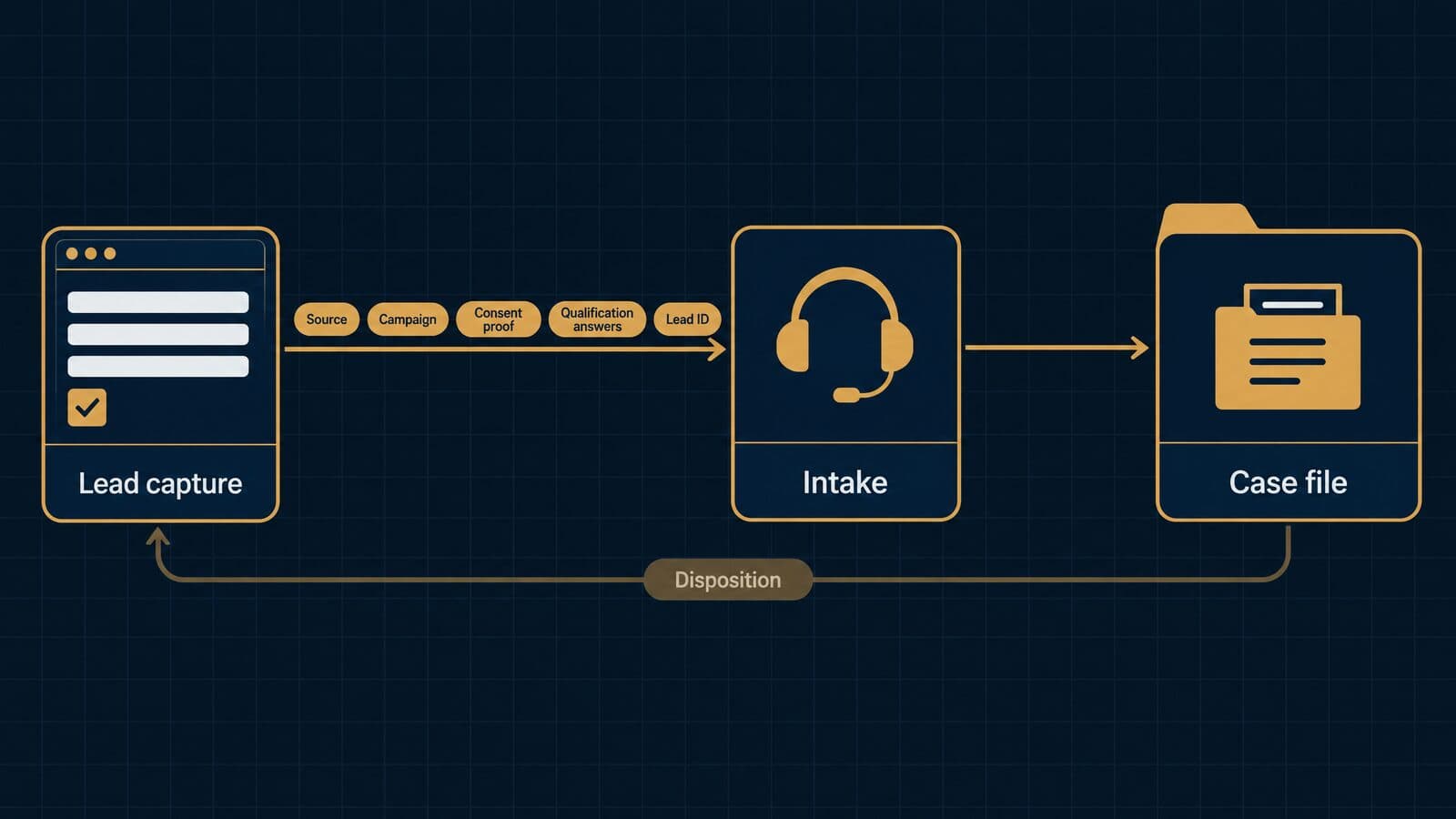
TCPA consent records on the claimant file
Consent evidence belongs on the claimant record because the exposure is per call or text. Under 47 U.S.C. § 227(b)(3), a person may recover actual loss or "$500 in damages for each such violation, whichever is greater," and a court may raise the award to "not more than 3 times" that amount for willful or knowing violations.
The FCC's rule at 47 C.F.R. § 64.1200(f)(9) defines prior express written consent as a signed written agreement that clearly authorizes autodialed or prerecorded telemarketing to a specific number, and it must disclose that signing is not a condition of purchase; electronic signatures count. Revocation is just as important. Under § 64.1200(a)(10), a person may revoke "by using any reasonable method," words like "stop" or "unsubscribe" are reasonable per se, and requests must be honored "within a reasonable time not to exceed ten business days."
You may still see references to the FCC's "one-to-one" consent rule. The Eleventh Circuit vacated that part of the 2023 order on January 24, 2025, and the current eCFR text contains no one-to-one language. Do not build workflows around it as current law.
Consent certificates are the usual proof. ActiveProspect describes TrustedForm certificates as "timestamped, replayable" records showing the page URL, consent language and a session replay, retained "for up to 5 years" (vendor claim). Jornaya, the other common name, is no longer a Verisk product: Verisk announced the sale of the business to ActiveProspect on January 8, 2026, and jornaya.com now redirects to InfutorData.
What the case system needs: a field for the certificate ID or URL, a field for the consent language version, a revocation flag with a date, and a sync that stops texting and dialer campaigns the moment that flag is set. Several states have their own telemarketing laws that add requirements, so have counsel review your setup; this is not legal advice. For a fuller treatment, see TCPA consent records that belong on the claimant file.
Source attribution and disposition write-back
Attribution answers which dollars produced signed cases; write-back tells each source what happened to its leads. Without both, a firm pays every vendor the same way regardless of results, and vendors cannot fix the profiles they send.
Some case platforms now treat source as a permanent attribute of the matter. Jove says on its mass torts page that "leads carry their marketing source through to resolution." Litify's personal injury page says firms can "Monitor marketing spend and ROI across campaigns and channels." Both are vendor claims; ask to see the report built on your own sample data during the demo.
The mechanics are simple once the field spec above is in place. The lead ID travels from the vendor to intake to the matter. Each disposition change (contacted, qualified, signed, rejected with reason, case later dropped) fires a webhook or a scheduled export back to the source, keyed on that ID. Call-tracking platforms can join the same way, which is the approach described in joining call-tracking data to signed outcomes on a shared lead ID.
Agree the disposition codes in the vendor contract, not after launch. A shared list with reasons ("no injury," "outside criteria," "represented by other counsel") makes return windows and credits enforceable and keeps billing disputes short.
KPIs your case system should report
If the system holds the fields above, it can report the eight numbers that tell you whether marketing and intake are working. I have left out benchmark figures on purpose: compare your own sources against each other over time.
- Contact rate: leads reached by a live conversation ÷ leads received.
- Qualification rate: leads meeting criteria ÷ leads contacted.
- Sign rate: signed retainers ÷ qualified leads.
- Cost per signed retainer by source: spend with a source ÷ signed retainers from that source.
- Time to first contact: median minutes from received timestamp to first live contact.
- Records turnaround: median days from records request to records received, by provider.
- Case cycle time by phase: median days in each phase, from intake to pre-lit to demand to settlement.
- Settlement rate by source: matters resolved with a recovery ÷ signed matters, per source.
The first five come from the intake handoff. The last three need the case system to keep the source tag for the life of the matter, which is why the field spec matters. For outside reference points on the fourth metric, see cost per signed retainer benchmarks, and for the channel side of the equation, our guide to law firm marketing.
Security, ethics and compliance checklist
ABA Model Rules require competence with relevant technology and reasonable efforts to protect client information, and ABA ethics opinions add vendor due diligence and informed-consent steps for AI. States adopt their own versions of these rules, so check your jurisdiction; nothing here is legal advice.
Technology competence and confidentiality (Rules 1.1 and 1.6)
[Model Rule 1.1, Comment [8]](https://www.americanbar.org/groups/professional_responsibility/publications/model_rules_of_professional_conduct/rule_1_1_competence/comment_on_rule_1_1/) says a lawyer should keep abreast of changes in practice, "including the benefits and risks associated with relevant technology." Robert Ambrogi's LawSites tracker, a secondary source, reports that 40 states, D.C. and Puerto Rico have adopted that duty. Choosing and configuring a case system falls squarely inside it.
Rule 1.6(c) supplies the confidentiality standard: reasonable efforts to prevent unauthorized disclosure or access. [Comment [18]](https://www.americanbar.org/groups/professional_responsibility/publications/model_rules_of_professional_conduct/rule_1_6_confidentiality_of_information/comment_on_rule_1_6/) lists the factors that decide what is reasonable: the sensitivity of the information, the likelihood of disclosure without more safeguards, the cost and difficulty of those safeguards, and how much they hamper the representation.
For a PI or mass tort firm holding medical records on thousands of claimants, sensitivity is high, so the bar rises. In system terms that means multi-factor authentication for every user, role-based permissions so intake staff cannot open settled files, audit logs of who viewed what, encryption in transit and at rest, and a tested process for removing departed staff on their last day.
Vendor due diligence under Rule 5.3 and Opinions 477R and 498
[Rule 5.3, Comment [3]](https://www.americanbar.org/groups/professional_responsibility/publications/model_rules_of_professional_conduct/rule_5_3_responsibilities_regarding_nonlawyer_assistant/comment_on_rule_5_3/) uses examples that read like a case management purchase: "hiring a document management company to create and maintain a database for complex litigation" and "using an Internet-based service to store client information." The lawyer must make reasonable efforts to ensure those services fit the lawyer's obligations, considering the provider's reputation, the terms protecting client information and where the services are performed.
Formal Opinion 477R (2017) allows transmitting client information over the internet with reasonable efforts against unauthorized access, and its considerations end with "Conduct Due Diligence on Vendors Providing Communication Technology." Formal Opinion 498 (2021) says to choose a reputable company, keep information confidential and "readily accessible to the lawyer," and make sure "data is regularly backed up."
Many firms skip these steps. The ABA 2024 Cloud Computing TechReport found that "Less than 30%" of respondents review ethics rules, privacy policies or vendor terms, only 23% evaluated vendor company history, and "almost 20%" used no precautions at all.
A six-item due-diligence file for each vendor:
- The latest SOC 2 Type II report and any bridge letter.
- Where data is hosted, and which subcontractors process it.
- Encryption, MFA and access-logging details.
- Backup frequency, restore testing and recovery time.
- Breach-notification terms and timelines in the contract.
- Data export formats and the retrieval window after cancellation.
Generative AI under Formal Opinion 512
Most case systems now ship AI drafting or summarization, so Formal Opinion 512 (July 29, 2024) applies. For self-learning tools, "a client's informed consent is required prior to inputting information relating to the representation," and "merely adding general, boiler-plate provisions to engagement letters" is not enough. Relying on output without "an appropriate degree of independent verification or review" can breach Rule 1.1.
The opinion also covers fees: hourly billers "must bill for their actual time," and a lawyer "may not charge a client to learn about how to use a GAI tool" used regularly for clients. Contingency firms bill differently, but the consent and verification duties still apply.
Questions for the vendor: does the AI train on our data, can we switch it off per matter, are prompts and outputs logged, and which model provider processes the text? Clio, for one, states on its pricing page that firm data "is never used for AI training" (vendor claim). Get the equivalent statement in writing from every vendor you shortlist.
Trust accounting and settlement records (Rules 1.5 and 1.15)
Contingency practice depends on two rules. Rule 1.5(c) requires a signed written fee agreement stating percentages and how expenses are deducted, and at the end a written statement "showing the remittance to the client and the method of its determination." Rule 1.5(e) allows fee division with outside counsel only with proportionality or joint responsibility, client agreement "confirmed in writing" and a reasonable total.
Rule 1.15 requires client and third-party funds to be held separately, with complete records kept for a period the Model Rule brackets as five years, which states set for themselves. Disputed funds, such as a contested lien, "shall be kept separate by the lawyer until the dispute is resolved," while undisputed portions go out promptly. The Model Rules for Client Trust Account Records list the journals and ledgers to keep; the Comment calls "monthly reconciliation" the preferred practice and names settlement statements and fee-division agreements as records to retain.
The system should also block closing a matter until the trust balance is zero, liens are released and the signed settlement statement is filed to the matter. Retention and destruction periods differ by state, so configure holds per jurisdiction.
| Rule or source | What it requires | System feature to check |
|---|---|---|
| Rule 1.1 cmt 8 | Understand relevant technology | Admin training, release notes |
| Rule 1.6(c) | Reasonable security efforts | MFA, roles, audit log, encryption |
| Rule 1.7 cmt 3 | Conflict-check procedures | Searchable parties and adverse parties |
| Rule 1.5(c) | Written fee terms, closing statement | Fee fields, settlement statement builder |
| Rule 1.5(e) | Written fee-division consent | Co-counsel splits, consent documents |
| Rule 1.15 | Separate funds, kept records | Trust ledgers, lien holdbacks |
| Trust Records Rule 1 | Journals, reconciliations | Three-way reconciliation reports |
| Rule 5.3 cmt 3 | Vet outside providers | Vendor security file |
| Op. 477R | Secure transmission, vendor diligence | Encrypted portals and email |
| Op. 498 | Reputable host, access, backups | Backups, export terms |
| Op. 512 | AI consent and verification | AI controls, no-training terms |
| Rule 7.2 cmt 5 | Lead generator conditions | Vendor contracts and ads on file |
The conflict-check row rests on [Rule 1.7, Comment [3]](https://www.americanbar.org/groups/professional_responsibility/publications/model_rules_of_professional_conduct/rule_1_7_conflict_of_interest_current_clients/comment_on_rule_1_7/), which expects "reasonable procedures, appropriate for the size and type of firm and practice" to identify the persons and issues involved.
SOC 2 reports, BAAs and medical records
A SOC 2 is an audit report, not a certification. The AICPA describes SOC services as offerings "CPAs may provide in connection with system-level controls of a service organization," with SOC 2 covering security, availability, processing integrity, confidentiality or privacy. Ask for the Type II report itself and read the exceptions section. Harvey's buyer's guide gives the same advice: ask early for "an independent audit such as a SOC 2 report."
Vendors describe their own security in their own words, and those words should stay attributed. Filevine's security page says its latest SOC 2 Type II audit "included security control testing for the HIPAA Administrative, Physical and Technical Safeguards." Clio's pricing page says "Clio is SOC 2 Type II certified" and that data is "encrypted in transit and at rest." EvenUp calls itself "SOC2-audited and HIPAA-attested," and Supio says it is "SOC 2 Type II certified, HIPAA, PHIPA, and GDPR compliant." There is no government HIPAA certification, so read any "certified" wording as marketing and ask for the report.
Medical records raise the HIPAA question. Under 45 C.F.R. § 160.103, business-associate status turns on providing services "to or for" a covered entity, so whether a plaintiff firm or its software vendor is a business associate depends on the facts. HIPAA-aligned safeguards and a business associate agreement, where the vendor offers one, are prudent for files full of treatment records; take your own counsel's view. Some vendors charge for it: CaseFleet will sign a BAA for annual accounts and says "An additional fee applies," with the option shown on its Advanced AI and Enterprise plans only.
Paying for leads: Rule 7.2 and your case records
Paying for leads is allowed with conditions. [Rule 7.2, Comment [5]](https://www.americanbar.org/groups/professional_responsibility/publications/model_rules_of_professional_conduct/rule_7_2_advertising/comment_on_rule_7_2/) says a lawyer "may pay others for generating client leads" if the generator does not recommend the lawyer, payment is consistent with Rules 1.5(e) and 5.4, and the generator's communications comply with Rule 7.1, which bars false or misleading statements. Comment [2] defines a recommendation as something that "endorses or vouches for a lawyer's credentials, abilities, competence, character, or other professional qualities."
Payment structure matters too. If what you pay a source starts to look like a share of the fee in a particular case, Rule 1.5(e)'s conditions on fee division come into view, so keep lead pricing tied to the lead or the service, not the recovery.
Your case system can hold the evidence. Store the vendor contract, the pricing basis, copies of the ads and landing pages that ran, and the consent certificate for each claimant, all linked by the lead ID. If a regulator or opposing counsel asks how a client found you, the answer should take minutes. That record, along with the cost worksheet and field spec above, gives you the criteria for the scorecard in the next section.
How to choose: the plaintiff-firm scorecard
Profile your caseload first, weight the criteria that matter for your practice, then score two or three finalists in scripted demos built on your own files. Make the final call on three-year cost and data-exit terms, not on the length of a feature list.
Most buying mistakes happen before the first demo. A firm books calls with five vendors, watches five polished walkthroughs of five different sample cases, and ends up choosing the platform whose salesperson told the best story. The method below forces every vendor to work on the same problem, scored against weights you set before anyone pitched you. It takes a few extra hours up front and saves the far larger cost of a second migration two years later.
Step 1: Profile your caseload
Write down the facts about your practice before you look at any software. Vendors will ask these questions anyway, and having the answers in one document keeps every demo on your terms rather than theirs.
- Case types and mix. What share of matters are auto, premises, med-mal, workers' comp, mass tort, or non-PI work such as family or criminal?
- Monthly new matters. How many signed cases open each month, and how many leads arrive to produce them?
- Claimant volume per tort. For mass tort dockets, how many claimants per litigation today, and how many you plan to carry in 12 months.
- Users. Attorneys, case managers, intake staff, accounting and outside co-counsel who need access, with their roles.
- Existing intake CRM. Do leads arrive in a separate intake tool, a call center, or straight from web forms and vendors?
- Accounting. Which system holds operating and trust books today, and who reconciles them?
- Medical-record volume. Requests per month, average pages per case, and whether you use a retrieval vendor.
- MDL participation. Which MDLs you file in, and whether any require fact sheets or questionnaires through a third-party portal.
The answers decide which weight column you use in Step 2. A firm with 40 auto cases a month and no MDL filings is a PI firm. A firm carrying 3,000 claimants across four torts is a mass tort shop, even if it also runs auto cases. A small firm splitting time between estate, family and the occasional injury case belongs in the general-practice column.
Step 2: Score platforms on weighted criteria
Score each finalist from 1 to 5 on every criterion, multiply by the weight for your practice type, and add the results. The weights below are my recommendation, not an industry standard; adjust them before you see any demos so a slick presentation cannot move them. Each column sums to 100, so a perfect platform scores 500.
| Criterion | Weight: general practice | Weight: PI | Weight: mass tort | What a 5 looks like |
|---|---|---|---|---|
| Matter and workflow fit | 20 | 10 | 8 | Case-type templates match your stages without custom code |
| PI tools (records, liens, demands) | 2 | 18 | 8 | Provider-level record tracking, lien ledger, demand builder |
| Bulk claimant actions | 0 | 2 | 18 | Update, message and file for hundreds of claimants at once |
| Deadline and SOL engine | 12 | 12 | 10 | Court-rules calendaring plus statute alerts on every matter |
| Intake handoff and API | 6 | 10 | 14 | Webhook or API creates matters with source and consent fields |
| Reporting and KPIs | 8 | 10 | 10 | Source-to-signed and stage-aging reports without exports |
| Security artifacts (SOC 2, BAA) | 10 | 10 | 8 | Current SOC 2 Type II report shared; BAA offered in writing |
| Trust and settlement accounting | 16 | 12 | 8 | Three-way reconciliation and settlement statements built in |
| Total 3-year cost | 16 | 10 | 8 | All-in cost known in writing, within budget |
| Data export and contract terms | 10 | 6 | 8 | Full export in open formats, short term, no exit fee |
The PI column leans on records, liens and accounting because those are where a PI matter earns or loses its fee. The mass tort column moves weight to bulk actions and the intake handoff, because a docket of thousands of claimants lives or dies on how fast records, fact sheets and messages move in batches. The general-practice column rewards matter fit, billing and cost, since most of that work bills by the hour or flat fee.
Two rules keep the scorecard honest. First, score from what you saw done in the demo or read in a contract, never from a slide. Second, if a vendor cannot show a criterion, it gets a 1, not a "we'll circle back". A tie within 20 points means the platforms are effectively equal on fit, and cost and exit terms should decide.
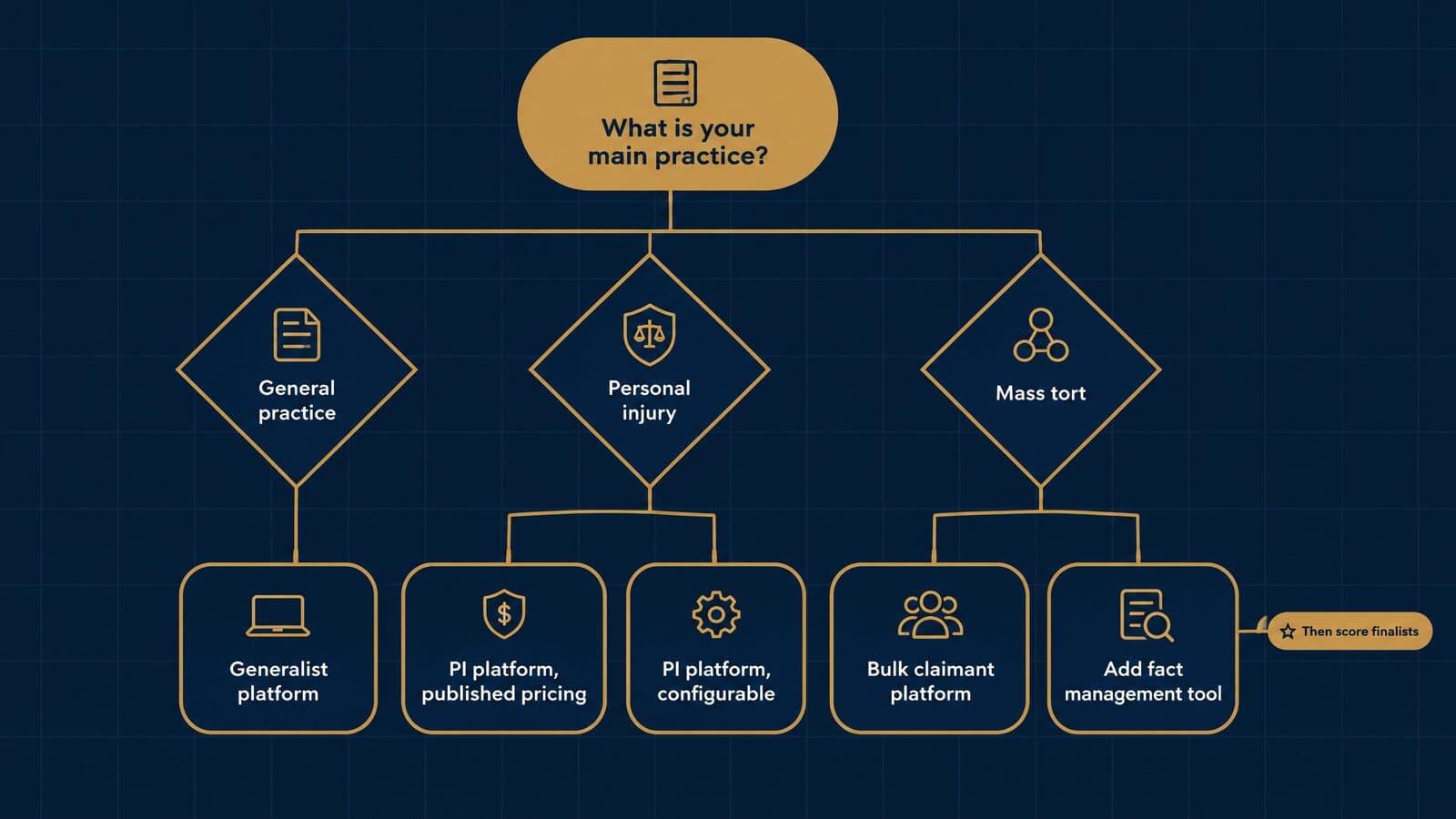
Step 3: Run a scripted demo
Send every finalist the same script and an anonymized sample file one week before the demo, and ask them to perform each step live in a sandbox. A recorded tour of someone else's case tells you nothing about how the system handles yours.
- Create a matter from a webhook lead. Post a test lead with name, phone, case type, source and consent certificate URL, and watch it land as a matter or intake record with every field mapped.
- Calculate a deadline. Enter a trigger date and have the system compute a response deadline and a statute date for your state, then show the alert that fires before it.
- Request records. Generate a medical records request to a provider from a template, and show how the outstanding request is tracked until the records arrive.
- Enter a lien. Record a health-plan lien with the claimed amount, then a reduced final amount, and show where the change is logged.
- Draft a demand. Build a demand package from the sample records. If AI drafts it, ask the vendor to show the source link for each fact and the attorney approval step.
- Generate a settlement statement. Enter a gross settlement, fee, costs and liens, and produce the client's closing statement.
- Run a source-to-signed report. Show how many leads from each source became signed cases last month, without exporting to a spreadsheet.
- Export all data. Export the sample matter, its documents, notes and audit trail, and open the files outside the platform.
Step 7 matters more than most firms expect. If you pay for marketing, the case system is where you learn which channels produce signed cases and which only produce calls. That is the basis for tracking ROI from first click to signed retainer, and a platform that cannot report it forces a manual spreadsheet every month.
Recommendations by firm type
These are starting shortlists, not rankings. Every firm should still score its finalists, and every price should be confirmed with the vendor, since published prices change often.
- Solo and small general practice: consider Clio, 8am MyCase, PracticePanther and Lawcus. All four publish a starting price, and MyCase lists plans from $50 per user per month billed annually (MyCase pricing, as of October 2026).
- Small to mid-size PI firms that want published pricing: consider 8am CasePeer and Neos. CasePeer lists Basic at $90 per user per month (CasePeer pricing); Neos lists Essentials at $109 billed annually (Assembly pricing), both as of October 2026.
- Mid-size to large PI firms, or firms already on Salesforce: consider Litify, Filevine and SmartAdvocate. All three are quote-based.
- Mass tort dockets: consider Filevine, SmartAdvocate, Jove, Lucid IQ CaseManagerPro and Litify, and test bulk actions hardest.
- Litigation-heavy fact work: consider CaseFleet as a chronology layer alongside or in place of a larger system.
- Workers' compensation: consider MerusCase, which is quote-based.
- Civil legal aid and public defense: consider LegalServer, which says it is built for those offices.
- Immigration, criminal defense and family law: these firms usually start from a generalist platform. Test practice-specific forms and deadline rule sets in the demo before you commit.
Reading Capterra, G2 and Reddit reviews
Review sites help you find complaints, not winners. Vendors cite them selectively: Clio says it rates "4.5/5 or higher" on G2, Capterra, SoftwareAdvice.com and Lawyerist, and CasePeer displays "4.8/5.0 stars rated on Capterra". Both are vendor claims about self-selected reviewers, and a half-point gap between two platforms says little about fit for your firm.
Read the one- and two-star reviews instead, filtered to firms your size. Look for repeated patterns: slow support, failed migrations, price increases at renewal. On Reddit's r/LawFirm, recurring threads from practitioners cover contract length, upsells into higher tiers and who owns the data at exit. Treat those as peer opinion that points to questions for your contract, not as evidence about any single vendor.
Switching systems: migration and implementation
Secure export rights in the contract before you sign, migrate in phases from a written data map, and plan on 60 to 90 days or more for a plaintiff platform. Assembly Software says that for Neos "most migrations land in 60 to 90 days" (Assembly pricing), which is a useful benchmark even for other vendors.
A migration has two jobs: move the data intact and move the people. Firms that fail usually do the first and skip the second, so the new system holds clean data that nobody enters anything into. The three sections below cover the contract, the plan and adoption.
Data ownership and exit terms
The time to negotiate your exit is before you sign, while the vendor still wants the deal. Clio's pricing page offers a useful model clause: firms can retrieve data "in open, nonproprietary formats at any time while your account is active, or within 90 days of cancellation" (Clio pricing, vendor claim). Most other vendors in this guide publish no comparable statement, so ask for it in writing.
There is an ethics reason too. ABA Formal Opinion 498 says lawyers using cloud-hosted files should choose a reputable company and take reasonable steps to ensure client information "is readily accessible to the lawyer" and that "data is regularly backed up" (ABA Formal Opinion 498). A contract that traps your files behind a fee or a proprietary format sits poorly with that guidance. State rules vary, so check your own bar's opinions.
Put these items in the contract checklist:
- Format. Matters, contacts, notes and custom fields in CSV or another open format; documents in their native formats with folder structure kept.
- Timing. How fast the vendor delivers a full export on request, both during the term and after notice.
- Cost. Whether exports are free, and the price of any vendor-assisted export.
- Post-termination window. How many days you keep access to retrieve data after cancellation.
- Documents and audit logs. Whether the export includes document version history, user activity and audit trails, not only field data.
- Deletion. Written confirmation of deletion after you confirm the export is complete.
A 90-day implementation plan
The plan below is a recommended template for a firm moving to a plaintiff platform. Vendors run their own onboarding, and Clio, for one, says its "data migration team can assist in bringing over information from another legal case management solution" (Clio case management). Your plan should sit around the vendor's, because the vendor will not clean your data or retrain your staff for you.
Days 1 to 30: discover and map.
- Name a project owner with authority to make decisions, and one champion per team.
- Export a full copy of the old system and store it read-only as your fallback.
- Build a data map: every old field, its new field, its format and who owns it. Mark fields to drop.
- Write down each case-type workflow as it really runs today, stage by stage.
- List every integration: email, calendar, accounting, e-signature, phone, intake forms and lead sources.
Days 31 to 60: build, test-migrate and connect.
- Configure case types, stages, task templates, document templates and user roles from the workflow notes.
- Run a test migration of a small set of closed and open matters, and have case managers check them field by field.
- Fix the mapping and run a second test migration of a larger set.
- Connect integrations, including lead webhooks or API feeds from intake, and post test leads to confirm every field lands, consent records included.
- Rebuild the reports you rely on, starting with statute dates, stage aging and source-to-signed counts.
Days 61 to 90: parallel run, cutover and retirement.
- Run both systems in parallel for two to four weeks on new matters only, with one team going first.
- Fix what breaks, then run the final full migration over a weekend.
- Freeze the old system to read-only on cutover day and audit every open statute date in the new system.
- Cancel the old contract only after you confirm the archive export opens outside the old platform.
Large mass tort dockets or firms with years of scanned records often need longer. If your test migration fails twice, extend the plan rather than cut over on schedule.
Adoption: champions, training and cleanup
Software that staff route around is the most expensive outcome of a migration. Pick one champion per team, give them early access during the build phase, and make them the first stop for questions so the project owner is not the bottleneck.
Train by role, not by feature tour. Intake staff need lead entry and conflict checks; case managers need records, liens and task lists; accounting needs trust and settlement workflows. If the new system includes generative AI, remember ABA Formal Opinion 512: "A lawyer may not charge a client to learn about how to use a GAI tool or service that the lawyer will regularly use for clients" (ABA Formal Opinion 512). Budget that training time as overhead.
Thirty days after launch, audit the data. Check a sample of migrated matters, look for duplicate contacts, confirm every open case has a statute date, and find who is still keeping side spreadsheets. Then fix the cause, which is usually a missing field or a workflow step that no longer matches how the team works.
Sources and methodology
This guide was researched from primary sources on 22 October 2026, with no hands-on testing of any platform. Vendor claims are attributed in the text, and prices were read on each vendor's own pricing page that day.
The method had four parts. First, a review of the search results for the target keywords on 22 October 2026, to see which questions searchers ask. Second, every price, plan name, trial length and feature claim was read on the vendor's own website on 22 October 2026; where a vendor publishes no price, the guide says so rather than repeating third-party estimates. Third, court rules, statutes and regulations were read on Cornell's Legal Information Institute, the eCFR and state legislature sites. Where an official state site blocked access, the text was read on a public mirror and is labeled that way; confirm those on the official source. Fourth, ethics guidance came from the ABA Model Rules, ABA Formal Opinions and the ABA TechReports.
Key primary sources:
- ABA 2024 Practice Management TechReport
- ABA Formal Opinion 498, Virtual Practice (March 10, 2021)
- ABA Formal Opinion 512, Generative AI Tools (July 29, 2024)
- FRCP 6, Computing and Extending Time (Cornell LII)
- FRCP 16.1, Multidistrict Litigation (Cornell LII)
- JPML pending MDL dockets report, October 1, 2026
- 47 C.F.R. § 64.1200 (eCFR)
- 45 C.F.R. § 160.103 (eCFR)
- Clio pricing and MyCase pricing, read 22 October 2026
Prices in this category change several times a year, so the pricing sections should be re-checked every quarter, with rules and opinions reviewed at least once a year.