

Quick answer. Yes, free legal AI exists, but "free" almost always means a capped tier. Lawyers can use the free plans of ChatGPT, Claude and Google Gemini, Microsoft Copilot Chat if their Microsoft 365 license includes it, and freemium research tools such as Cetient. Free consumer tiers may train on your chats unless you opt out of model training, so keep client information out of them. Check every citation: courts sanction lawyers for AI-invented cases. For non-lawyers, free AI gives legal information, not legal advice.
Key takeaways
- Free tiers are capped: ChatGPT Free, Claude Free at $0, Gemini Free, Copilot Chat with eligible Microsoft 365 licenses and Cetient, free with usage limits, as of October 2026.
- Consumer plans may use your chats for training or human review unless you change settings; ChatGPT Business and Enterprise and Claude Team don't train on your data by default.
- ABA Formal Opinion 512 (July 29, 2024) requires independent verification of AI output and, for self-learning tools, informed client consent before you input client information.
- AI-invented citations get lawyers sanctioned: Mata v. Avianca ended in a $5,000 penalty, and one researcher's database tracks more than 2,200 such decisions worldwide.
- Most legal-specific platforms sell by custom quote; published legal-tool prices run from $60 per seat (BriefCatch) to $499 per user per month (Paxton), as of October 2026.
- For PI and mass tort files, free consumer tiers are not covered by a business associate agreement; Anthropic offers one only on HIPAA-ready commercial services.
- Non-lawyers get legal information, not advice; the FTC's final DoNotPay order included $193,000 in monetary relief.
Lawyers, paralegals and intake staff are already pasting work into free chatbots. The useful questions are narrower than "should we use AI": which tools are free in fact, what the upgrade costs, what happens to the text you type, and what the ethics rules require before a client's facts go anywhere near a model. This guide answers those questions tool by tool, with every price and plan term checked on the vendor's own page on October 22, 2026.
It is written for personal injury and mass tort firm owners and operators, associates and paralegals, and intake and marketing leads, with one short section for non-lawyers. It runs in this order: free options at a glance, what legal AI is and what "free" means, the free tools one by one, help for the public, then the paid platforms, plaintiff workflows, intake and marketing AI, ethics and data settings, and how to choose, roll out and budget.
Disclosure. Mass Tort Marketing Agency sells personal injury lead generation, mass tort lead generation, intake and marketing to plaintiff firms. We sell no AI software, take no vendor or affiliate fees, and no vendor paid to be listed here. Numbers a vendor reports about itself are labeled as the vendor's own. Nothing in this guide is legal advice.
Free legal AI at a glance (October 2026)
Free legal AI is any AI tool a lawyer or member of the public can use for legal tasks without paying. In practice that means a capped free tier of a general assistant, a freemium legal research tool or a time-limited trial. It produces information and drafts, not legal advice, and a person has to verify its output.
Free AI for lawyers and law firms
The table below lists the free options a working lawyer can open today, with the catch on each and the data question to settle before you use it.
Prices and plan terms last verified October 22, 2026. Confirm with each vendor before you buy.
| Tool | What's free (Oct 2026) | Paid plans from | Trains on chats by default? | Good first use |
|---|---|---|---|---|
| ChatGPT | Unlimited everyday text chats; limits on uploads, images and voice | See OpenAI's pricing page | Yes, unless "Improve the model for everyone" is off | Non-confidential letters and outlines |
| Claude | Free plan, $0 | Pro $20/month, or $17/month billed annually | Consumer plans: opt-out | Summarizing public documents |
| Google Gemini | Free with a Google Account | Google AI Plus $4.99/month | Some chats are human-reviewed | Plain-English rewrites |
| Microsoft Copilot Chat | Included with eligible Microsoft 365 licenses | Microsoft 365 Copilot add-on: check Microsoft | Work accounts: not used to train foundation models | Firms already on Microsoft 365 |
| Cetient | Free for personal and professional use, with usage limits | $20/month | Not stated | Case-law questions on CourtListener data |
| CourtListener | Free archive of opinions, oral arguments and RECAP PACER data | Free | No AI chat | Pulling and checking opinions |
| Humata | Up to 60 pages a month | Expert $9.99/month | Not stated | Q&A over long public PDFs |
| BriefCatch | "Start free, no credit card needed" | Individual $60/seat/month, billed annually | Not stated | Editing briefs |
| Everlaw | Single-document AI actions at no added cost for subscribers | Subscription; ask Everlaw | Not stated | Review inside an existing Everlaw account |
The sources behind each row: OpenAI's free tier FAQ and data controls FAQ, with paid tiers on OpenAI's pricing page; Claude's pricing page; Google's AI plans and the Gemini Apps Privacy Hub; Microsoft's Copilot overview and enterprise data protection page; Cetient; the Free Law Project's CourtListener page; Humata pricing; BriefCatch pricing; and Everlaw's October 29, 2025 release note.
"Not stated" means the vendor page we read did not say whether chats or uploads train models. It does not mean the tool trains on your data, and it does not mean it doesn't. Until you have the vendor's data terms in writing, treat a "Not stated" tool as a public tool and keep client information out of it. Business and enterprise plans, which usually change the training default, are covered in the data-settings table later in this guide.
Free legal AI for the public
Most of the results Google shows for "free legal ai" are consumer apps aimed at people with a legal problem, not at lawyers. Here is what each free route can and cannot do.
| Option | What it is | Cost | What it can't do |
|---|---|---|---|
| LawConnect AI assistant | Free AI legal information; also connects users with lawyers | Free | Give legal advice or represent you |
| General AI free tiers (ChatGPT, Claude, Gemini) | General assistants with free plans | Free with caps | Keep your chats privileged |
| Legal aid organizations | Free civil help for eligible low-income people | Free if eligible | Reach everyone: unmet need is large |
| Lawyer referral services | Many state and local bars run them; terms vary | Varies | Guarantee a free case review |
| PI lawyers on contingency | No fee unless the case recovers, under a signed written agreement | Often a free consultation | Take every case |
The sources: LawConnect's FAQ describes its assistant as free; a federal court held one defendant's self-directed AI chats were not privileged; the Legal Services Corporation's Justice Gap Study measures unmet civil legal need; and ABA Model Rule 1.5(c) requires contingent fee agreements in a signed writing. The non-lawyer section later in this guide explains each route.
Three rules before you paste anything
Google's AI Overview for this query repeats three caveats, and they are the right ones. Apply them before any free tool sees a word of your work.
- It's legal information, not legal advice. Each state regulates the practice of law, and ABA Model Rule 5.5(a) bars lawyers from practicing, or helping others practice, in violation of those rules. OpenAI's usage policy effective November 20, 2026 also prohibits "building or offering AI tools that provide others with tailored advice that requires a license, without appropriate involvement by a licensed professional."
- Keep confidential information out of free tiers. ChatGPT and Claude consumer plans train on chats unless you opt out. Google's Gemini privacy page says plainly, "Please don't enter confidential information that you wouldn't want a reviewer to see." North Carolina's 2024 Formal Ethics Opinion 1 says lawyers "should avoid inputting client-specific information into publicly available AI resources."
- Verify every citation and fact. NIST's generative AI risk profile defines "confabulation" as "the production of confidently stated but erroneous or false content" that can mislead users. A fluent answer with a case name attached is still a draft. Pull every authority yourself from a source you trust, read it, and check that it says what the AI claims before it goes in a filing or a client letter.
The ethics section below covers ABA Formal Opinion 512, state guidance and sanctions cases in depth.
Legal AI explained: tool types and what free means
Legal AI tools fall into three groups: general-purpose assistants, legal-specific platforms, and AI built into software firms already use. All of them generate what the ABA calls "a statistically probable output," which is why each one needs a lawyer's review. This section also sorts the six kinds of "free" and defines the terms you will see in vendor pitches.
General-purpose AI assistants
ChatGPT, Claude, Gemini and Microsoft Copilot are general assistants. They were trained on broad text, not on a law library, and they are good at work that turns one piece of language into another: drafting, summarizing, reformatting, rewriting for a different reader and brainstorming. ABA Formal Opinion 512 lists the legal tasks generative AI may help with as "legal research, contract review, due diligence, document review, regulatory compliance, and drafting letters, contracts, briefs, and other legal documents."
The limit is structural. A general assistant answers from its training plus whatever you upload or it retrieves from the web. It is not a citator, it does not track subsequent history, and it does not know your jurisdiction's latest rules or local practices unless it is grounded in them. Ask it to explain comparative fault and you will get a serviceable explanation. Ask it whether a specific appellate decision is still good law in your state and you will get a confident answer that may be wrong.
Legal-specific AI platforms
Is there a legal version of ChatGPT? Yes, several. Thomson Reuters sells CoCounsel Legal; LexisNexis's research assistant is now Lexis+ with Protégé, the name it has used since February 2026; and Harvey, Paxton and Cetient are built for legal work from the start.
What separates them from a general assistant is the material underneath and the controls around it. Most are grounded in a legal database, so answers come with links to actual opinions and statutes. Some add citation checking against a citator. Most offer firm-level security terms, administrator controls and contracts that address training and retention. They also cost more, and the larger platforms sell by custom quote.
None of that removes the duty to read what you cite. Grounding narrows the error rate; it does not close it. The master comparison table and the research platforms section later in this guide compare these tools on price, data terms and fit for plaintiff work.
AI built into software you already pay for
For many firms the cheapest legal AI is the AI already sitting in their subscriptions. Microsoft says Copilot Chat (Basic) is "included with eligible Microsoft 365 licenses." Everlaw made individual AI Assistant actions available "at no additional cost" to subscribers on October 29, 2025, while batch actions still use credits. Clio, which completed its $1 billion acquisition of vLex in November 2025, now markets "Clio Work" as its AI product; that is the vendor's positioning.
Practice and case management platforms such as MyCase, Filevine and Litify also market AI features. Check each vendor's current feature list and plan level, because AI features are often tied to a tier or sold as an add-on.
My advice: before you buy a new AI tool, audit what you already pay for. Ask each vendor three things in writing: which AI features your current plan includes, whether your data trains any model, and how long prompts and outputs are retained.
Why legal AI makes things up
NIST uses the word "confabulation" for "confidently stated but erroneous or false content (known colloquially as 'hallucinations' or 'fabrications')." The cause is how these tools work. The ABA describes generative AI text tools as "prediction tools that generate a statistically probable output when prompted." A plausible case name, reporter cite and quotation are exactly the kind of output a prediction engine can produce whether or not the case exists.
Legal platforms reduce the risk with retrieval-augmented generation. The tool first retrieves real documents from a database, then writes its answer from them. That lowers the error rate, but it does not remove it: the tool can retrieve the wrong document, misread the right one, or blend two holdings.
Even the specialist tools were not immune. A Stanford and Yale team found that 2024 versions of the leading legal research assistants "each hallucinate between 17% and 33% of the time". The sanctions section later in this guide shows what happens when that output reaches a court. The working rule is simple: never rely on a citation you have not pulled and read yourself.
The six kinds of free
"Free" in legal AI means one of six different things, and each one has a catch.
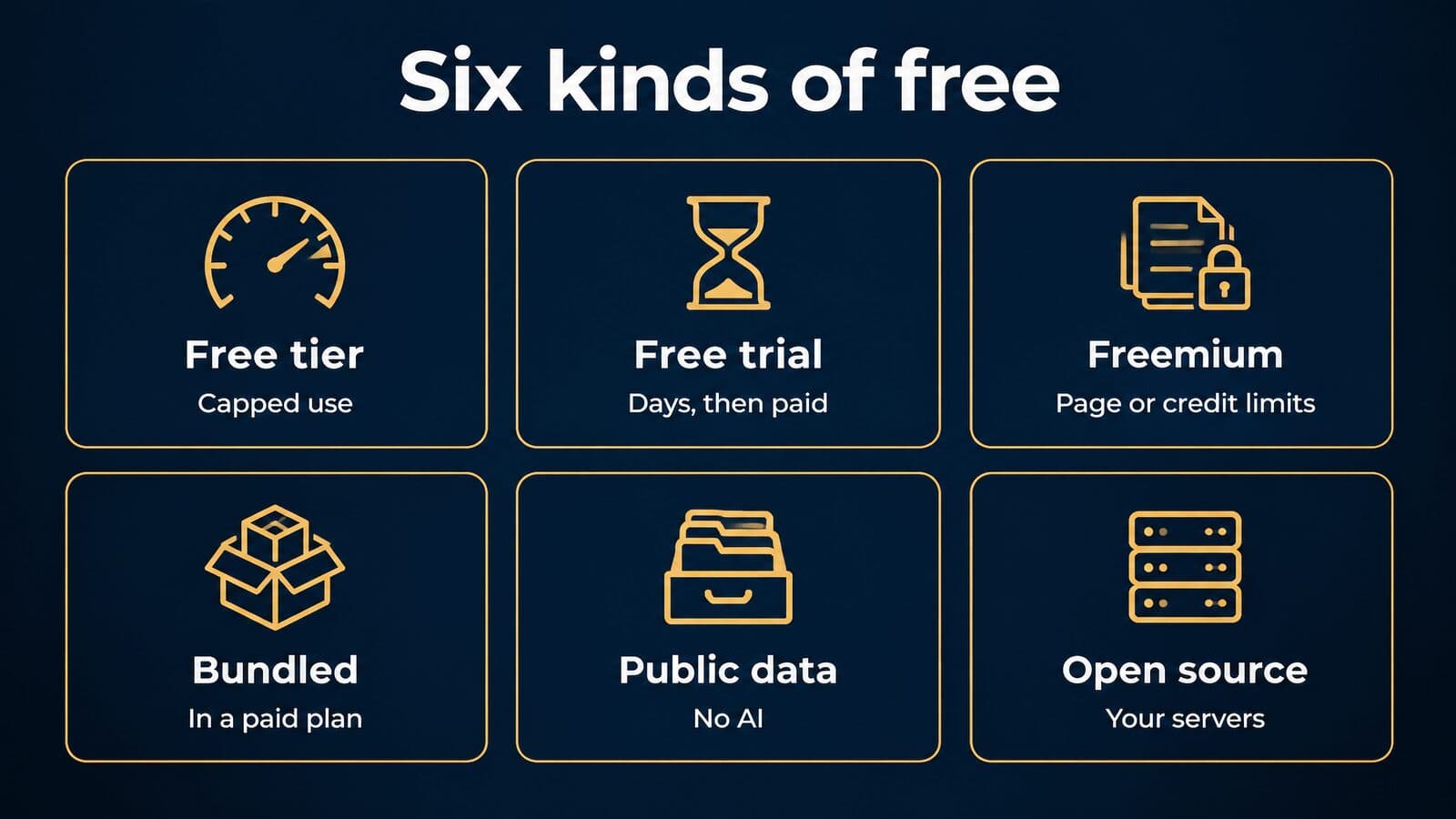
| Kind of free | Examples (Oct 2026) | The catch |
|---|---|---|
| Free tier | ChatGPT, Claude, Gemini | Usage caps and consumer data settings |
| Free trial | Paxton 7 days, Spellbook 7 days, LawDroid 7 days, CoCounsel Legal on request | Ends in a paid plan; often gated by a demo |
| Freemium caps | Humata 60 pages a month, Cetient usage limits, BriefCatch "start free" | Page, question or credit limits |
| Bundled | Copilot Chat in eligible Microsoft 365 licenses, Everlaw single-document actions | Free only if you already pay for the platform |
| Free public data | CourtListener | No AI: you read and verify |
| Open-source models | Models a firm downloads and runs itself | Free to download, not free to run securely |
The trial terms come from Paxton's pricing page, Spellbook's pricing page, LawDroid's pricing page and Thomson Reuters' CoCounsel Legal page, which offers a free trial and demo on request.
Two edge cases matter. Spellbook offers "free access to academic institutions," which helps law students and clinics but not practicing firms. Open-source models are the most misunderstood kind of free: the model costs nothing to download, but the firm then owns hosting, security patches, access controls, logging and retention. In my view that only makes sense for a firm with real in-house IT capacity.
Legal AI glossary in plain English
Vendor pitches lean on a small set of terms. Here they are without the marketing.
| Term | Plain-English meaning |
|---|---|
| Large language model (LLM) | The engine behind AI chat tools, trained to predict the next words in text |
| Prompt | The instruction or question you type into the tool |
| Context window | How much text the tool can consider at once, including your uploads |
| Retrieval-augmented generation (RAG) | The tool fetches real documents first, then writes its answer from them |
| Hallucination or confabulation | Confident output that is false, such as a case that doesn't exist |
| Self-learning tool | The ABA's term for a tool that may learn from what users input |
| Zero data retention | A contract term under which the vendor does not store your prompts or outputs |
| Fine-tuning | Extra training of a model on a specific set of documents |
| Agentic AI | AI that plans and takes multi-step actions, not just answers |
| Business associate agreement (BAA) | A HIPAA contract governing protected health information, covered later |
Two terms deserve a note. "Self-learning" is the ABA's word in Formal Opinion 512, and it is the trigger for the opinion's informed-consent discussion. "Agentic AI" is new enough that California's 2026 Practical Guidance addresses it specifically at the California Supreme Court's request. For plaintiff-marketing terms such as cost per signed case and MDL, see our mass tort marketing glossary.
Free AI tools for lawyers: a tool-by-tool guide
The most useful free options for lawyers in October 2026 are the free tiers of the major assistants for drafting and summarizing public material, plus Cetient and CourtListener for case law. Each entry below gives what is free, the limits, a good first use and the data setting to check before you start.
ChatGPT Free
OpenAI says "ChatGPT is free to use." Free users get "unlimited everyday text chats, subject to abuse-prevention safeguards," while file uploads, image generation, voice and data analysis carry separate usage limits. "Ads may appear in the Free tier in certain countries." Training is on by default for consumer accounts. To turn it off on the web, open the account menu and go to Settings > Data controls > Improve the model for everyone; once off, OpenAI says "your new conversations won't be used to train OpenAI models." Temporary Chat conversations are not used for training but "may be retained for up to 30 days for safety purposes." Paid plans are listed on OpenAI's pricing page; check it directly.
Good first uses, in my view: outlines, plain-English explanations of procedure, and first drafts of non-confidential letters. Firms that build a client-facing tool on OpenAI's models should read its usage policy effective November 20, 2026, which bars tools that imply the AI itself holds professional credentials.
Claude Free
Anthropic's Claude pricing page lists the Free plan at $0, "Free for everyone." Pro costs $20 billed monthly, or $17 a month billed annually, as of October 2026, and usage limits apply on every plan. The same page lists "Model training: Opt-out" for Free, Pro and Max, which means training is on unless you switch it off. Under Anthropic's updated consumer terms announced August 28, 2025, consumer users choose whether chats train models; if they allow it, retention extends to five years, otherwise 30 days.
Good first uses: summarizing long public documents such as appellate opinions, MDL case management orders and agency guidance, then asking follow-up questions against them. Turn training off in settings before you start. For prompts and plan choices, see our Claude for lawyers guide.
Google Gemini
Google's AI plans page lists a Free plan with a Google Account, Google AI Plus at $4.99 a month and Google AI Pro at $19.99 a month, as of October 2026. The data terms deserve a careful read. Google's Gemini Apps Privacy Hub says human reviewers "review some of the data we collect" and asks users, "Please don't enter confidential information that you wouldn't want a reviewer to see or Google to use to improve our services."
Retention varies by setting. With Keep Activity off, chats are kept 72 hours. Gemini Apps Activity auto-deletes after 18 months by default. Chats that a human has reviewed are kept up to 3 years, disconnected from the account, and are not deleted when you delete your activity. Good first uses: rewriting for a lay reader and orienting yourself on public topics.
Microsoft Copilot Chat
Microsoft says "Copilot Chat (Basic) is the standalone baseline experience included with eligible Microsoft 365 licenses." The full Microsoft 365 Copilot inside Word, Excel, PowerPoint and OneNote needs a separate add-on license; check Microsoft for current pricing. Under Microsoft's enterprise data protection, "The prompts, responses, and data accessed through Microsoft Graph aren't used to train foundation models."
In my view this is often the lowest-friction option for a firm already on Microsoft 365, provided staff sign in with their work account rather than a personal one.
Perplexity
Perplexity is an AI search engine that answers questions from web sources and shows the pages it drew on. We could not verify its current plans or prices on the vendor's site this month, so none are listed here.
It is useful for orientation on public topics, such as what an agency announced or how a recall unfolded. Web pages are not legal authority, so treat every link it returns as a lead to verify against a primary source.
Cetient
Cetient says it "has access to over 9 million legal decisions from 2000+ U.S. federal and state courts," and that its "Legal database is provided by CourtListener, a Free Law Project." It describes itself as "free for personal and professional use (with usage limits)." Paid plans start at $20 a month; Pro99 costs $99 a month or $990 a year; Pro costs $200 a month, or $167 a month billed annually, as of October 2026. Cetient states it is "neither affiliated with nor endorsed by OpenAI, LexisNexis, and Thomson Reuters" and uses "the latest OpenAI, Claude, and Gemini AI models."
Good first use: plain-language case-law questions that return real opinions you can then read. Data terms were not stated on the page we read, so treat it as a public tool and keep client information out.
CourtListener and Google Scholar
The Free Law Project describes CourtListener as "a fully-searchable and accessible archive of court data," including opinions, oral arguments, judges' and judicial financial records, and the RECAP Archive of PACER data. Google Scholar has a "Case law" search option and lets you narrow results by court; Google notes its legal opinions are informational and not warranted as complete or accurate.
Neither is an AI tool. That is their value: they are where you verify what free AI tells you. Pull the opinion, read the passage, and check subsequent history in a citator before relying on it. For paid options with citators built in, see legal research platforms compared.
Humata
Humata's pricing page lists a Free plan at $0 with "up to 60 free pages" a month; Expert at $9.99 a month for up to 3 people and 500 pages a month; Team at $49 per user per month; and custom Enterprise pricing. Extra pages cost $0.02 or $0.01 per page, as of October 2026.
Good first use: asking questions of long public PDFs, such as an FDA warning letter, a published study or a lengthy appellate record that is already public. Data terms were not stated on the page we read, so upload no client files.
BriefCatch
BriefCatch says you can "Start free, no credit card needed." Its Individual plan costs $60 per seat per month, billed annually, as of October 2026, and includes the "RealityCheck Citation Checker," a Word add-in, Google Drive and OneDrive integration, and SOC 2 Type II certification.
Good first use: editing a brief you have already written, for clarity, concision and citation form. It is an editing tool, not a drafting engine, which keeps the lawyer's own analysis at the center. Paid tiers and credits are compared in the drafting tools section.
Notion AI and other workspace assistants
Note-taking and workspace apps, Notion among them, now include AI assistants inside the documents teams already keep. For a firm, a sensible use is an internal knowledge base of public materials: intake scripts, template letters, practice guides and checklists that the assistant can search and summarize.
We did not verify these vendors' prices or features this month, so none are listed. Before anyone stores client matters in a workspace app, check that plan's data terms on training, retention and access.
What free AI handles well and where it fails
Free AI is good at language work on material you would be comfortable publishing. It is weak at anything that depends on current law, local practice, client facts or judgment. The line is not between "simple" and "complex" tasks; it runs between tasks where an error is visible on a quick read and tasks where it hides.
Handles well:
- Outlines and first drafts of non-confidential documents, such as engagement letter templates or a firm FAQ page.
- Plain-English explanations for clients, reviewed by a lawyer before sending.
- Summaries of public opinions, statutes, agency guidance and court orders.
- Brainstorming deposition topics or discovery requests from a de-identified fact pattern.
- Reformatting, proofreading and tightening text you wrote.
- First drafts of marketing copy, which still need bar-rule review (covered in the marketing section later).
Fails or needs a lawyer:
- Current law and recent amendments, which may postdate its training.
- Jurisdiction-specific procedure, local rules and deadline calculations.
- Citations, which it can invent with full confidence.
- Enforceability opinions and negotiation strategy.
- Anything that requires client facts in a consumer tier.
- Judgment calls about case value, liability or settlement.
That split also answers the question many people searching "free legal ai" are asking for themselves, which the next section takes up.
Free legal AI for non-lawyers: what it can and can't do
Free AI apps can explain legal terms and help you organize the facts of your situation. They cannot give legal advice, represent you or keep your conversation privileged. For a real legal problem, several free routes to a human lawyer exist.
Consumer AI legal apps
LawConnect says, "Yes, it's completely free to use LawConnect's AI assistant," and describes itself as "a free online platform using AI to help people navigate legal issues." It also connects users with lawyers and sells online wills.
Other consumer apps that appear for "free legal ai" in October 2026 include AI Lawyer, Lawyerz (Libra), Aux.ai and Justee. None of them publishes audited accuracy figures, and we did not verify their paid prices. Their free tiers can be a reasonable place to learn vocabulary or draft a list of questions for a lawyer. They are not a substitute for one, and their answers about deadlines, case value or what to say to an insurer deserve the same skepticism as any unverified source.
Legal information is not legal advice
Lawyers are bound by Model Rule 5.5(a), and each state sets its own unauthorized-practice rules for non-lawyers and the businesses that serve them. Regulators have acted on AI products that blur the line. The FTC finalized its order against DoNotPay, which billed itself as "the world's first robot lawyer," with $193,000 in monetary relief and a requirement to notify consumers who subscribed between 2021 and 2023. According to the FTC, the order also bars the company from claiming its service can substitute for a professional service without evidence.
OpenAI's usage policy effective November 20, 2026 adds that users "may not state or imply that the AI itself holds professional credentials or authorization." In practice, an app can explain what a statute of limitations is. It cannot tell you whether your deadline has already passed.
Free ways to reach a real lawyer
Legal aid organizations provide free civil legal help to people who qualify, usually based on income. The need outstrips supply: the Legal Services Corporation's 2022 Justice Gap Study found that "Low-income Americans do not get any or enough legal help for 92% of their substantial civil legal problems," and that 74% of low-income households had at least one civil legal problem in the past year.
Many state and local bar associations run lawyer referral services; fees and terms vary. Law school clinics take some cases under faculty supervision.
If you were hurt in an accident, personal injury lawyers usually work on contingency, meaning no fee unless the case recovers. Under ABA Model Rule 1.5(c), that agreement must be "in a writing signed by the client" and state how the fee is calculated. Many PI lawyers offer a free consultation, which is a better use of an evening than a chatbot conversation.
Before you type your case into a chatbot
What you type into a public AI tool may not stay private. In United States v. Heppner, a federal court in the Southern District of New York held that one defendant's written exchanges with a generative AI platform, prepared on his own "without any suggestion from counsel," were "not protected … by either the attorney-client privilege or the work product doctrine." The court called it "a question of first impression nationwide," so the ruling turns on its facts and should not be read as a general rule either way. Separately, Google says human reviewers read some Gemini chats.
Before you type:
- Leave out names, dates of birth and medical details.
- Don't upload police reports or medical records.
- Save nothing you would not want an insurance company to read.
- Ask a lawyer before acting on any answer.
For lawyers, the next question is which paid tools justify their price, and the master comparison table that follows answers it.
Legal AI tools compared: master table and prices
Of the 27 tools in the master table below, 11 publish a price or are free to use, 10 sell only by quote, demo or unpublished terms, and 6 have prices we could not confirm on the vendor's own page as of October 22, 2026. The table puts general assistants, research platforms, drafting tools, eDiscovery, analytics, plaintiff platforms and intake tools side by side so you can compare them on one screen.
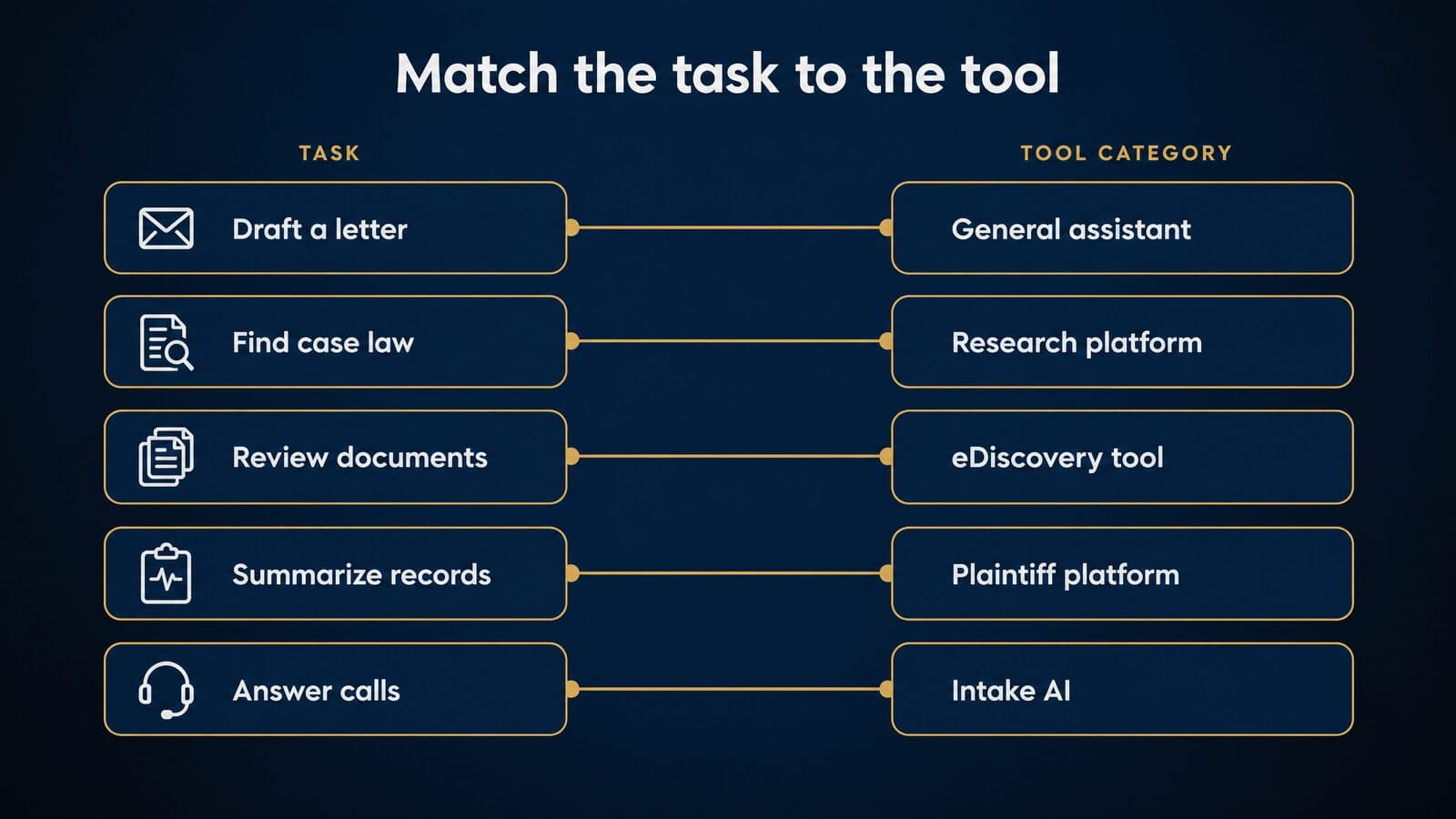
Prices and plan terms last verified October 22, 2026. Confirm with each vendor before you buy.
| Tool (vendor) | Category | Free option | Price from (Oct 2026) | Trains on your data? | Typical use (our view) | Verified |
|---|---|---|---|---|---|---|
| ChatGPT (OpenAI) | General assistant | Free tier | See OpenAI pricing | Consumer: yes unless off; Business: no | Drafting, summaries | 2026-10-22 |
| Claude (Anthropic) | General assistant | Free, $0 | Pro $20/mo; Team $25/seat/mo | Consumer: opt-out; Team: no | Long documents | 2026-10-22 |
| Gemini (Google) | General assistant | Free | AI Plus $4.99/mo; Enterprise $21/seat | Consumer chats may be human-reviewed | Google Workspace firms | 2026-10-22 |
| Microsoft 365 Copilot (Microsoft) | General assistant | Copilot Chat with eligible licenses | Add-on: check Microsoft | Work accounts: no | Microsoft 365 firms | 2026-10-22 |
| Cetient | Legal research | Free with usage limits | $20/mo | Not stated | Low-cost case-law Q&A | 2026-10-22 |
| CourtListener (Free Law Project) | Case-law archive | Free | Free | No AI chat | Pulling opinions and dockets | 2026-10-22 |
| CoCounsel Legal (Thomson Reuters) | Research and drafting | Trial on request | Contact sales | Not stated | Research-heavy litigation | 2026-10-22 |
| Lexis+ with Protégé (LexisNexis) | Research and drafting | Not verified | Not verified | Not stated | Research with Shepard's | 2026-10-22 |
| Vincent AI (vLex, part of Clio) | Legal research | Not verified | Not verified | Not stated | Multi-jurisdiction research | 2026-10-22 |
| Clio Work (Clio) | AI in practice management | Not verified | Not verified | Not stated | Firms on Clio | 2026-10-22 |
| Paxton | Research, drafting, records | 7-day trial | $499/user/mo | Not stated | Litigation, PI chronologies | 2026-10-22 |
| Harvey | Enterprise platform | No free plan shown | Custom quote | Not stated | Large firms, in-house | 2026-10-22 |
| Legora | Enterprise platform | Not stated | Custom quote | Vendor says no | Large firms, in-house | 2026-10-22 |
| Spellbook | Contract drafting | 7-day trial | By team size, via demo | Not stated | Transactional work | 2026-10-22 |
| Lawgeex | Contract review | Demo only | Not published | Not stated | Contract review at volume | 2026-10-22 |
| Clearbrief | Brief writing | Not stated | Solo $300/user/mo | Vendor says no | Litigation briefs | 2026-10-22 |
| BriefCatch | Brief editing | Start free | $60/seat/mo, annual | Not stated | Editing, citation checks | 2026-10-22 |
| Briefpoint | Discovery responses | Not stated | $150/mo per attorney, annual | Not stated | PI discovery | 2026-10-22 |
| Humata | Document Q&A | 60 pages/mo | $9.99/mo | Not stated | Long public PDFs | 2026-10-22 |
| Everlaw | eDiscovery | No-cost single actions for subscribers | Not verified | Not stated | Document review | 2026-10-22 |
| Relativity | eDiscovery | Not stated | Custom quote | Not stated | Large reviews | 2026-10-22 |
| Lex Machina (LexisNexis) | Litigation analytics | Demo | Not published | Not stated | Judge and counsel analytics | 2026-10-22 |
| EvenUp | PI demands and records | Not stated | Custom quote | Not stated | PI demand work | 2026-10-22 |
| Eve | Plaintiff platform | Not stated | Custom quote | Not stated | Plaintiff firms | 2026-10-22 |
| Supio | PI records and case work | Not stated | Custom quote | Vendor says no | PI records review | 2026-10-22 |
| Smith.ai | Intake and reception | No free plan shown | $300/mo for 30 calls | Not stated | After-hours intake | 2026-10-22 |
| LawDroid | Chatbots and AI assistant | 7-day trial | Copilot $25/user/mo | Not stated | Small-firm chatbots | 2026-10-22 |
A few rows need their sources spelled out. ChatGPT's training column comes from OpenAI's data controls FAQ: consumer conversations can be used to improve models unless the user turns off Settings > Data controls > Improve the model for everyone, while Business and Enterprise workspaces are not used for training by default. Gemini's note on human review comes from Google's Gemini Apps privacy hub. Microsoft's training statement for work accounts comes from its enterprise data protection page. Claude's Team and consumer training terms, and its Enterprise terms (a $20 seat price billed annually, plus usage at API rates and a 20-seat minimum), all come from the same Claude pricing page.
How to read the master table
Every cell in the table comes from the vendor's own page, read on October 22, 2026. Nothing was copied from a third-party roundup, and nothing reflects hands-on testing; this guide reports what vendors publish.
Four labels carry specific meanings:
- Not verified means we could not confirm the item on the vendor's page. Usually the page blocks automated reading or does not show the item without a login or a sales call. It does not mean the tool is free or that no price exists.
- Not stated in the training column means the page we read said nothing about whether customer inputs train models. Ask the vendor in writing.
- Vendor says marks a self-description, such as "zero AI training on your data." It is the vendor's claim, not an audit finding.
- Typical use (our view) is our opinion about where each tool fits. It is not a ranking, and no tool here is called the best or the most accurate, because no independent current benchmark exists.
Where a vendor says its prices exclude tax, the figure excludes tax too; Claude's pricing page says so. The table lists the lowest published paid tier; higher tiers usually exist. Before you buy anything, get the price, the seat minimum, the renewal date and the data terms confirmed in writing, because every one of these can change between the day we read the page and the day you sign.
Which legal AI vendors publish prices
Counted from the final table: 11 tools publish a price or are free (Claude, Gemini, Cetient, CourtListener, Paxton, Clearbrief, BriefCatch, Briefpoint, Humata, Smith.ai and LawDroid); 10 sell by quote, demo or unpublished terms (CoCounsel Legal, Harvey, Legora, Spellbook, Lawgeex, Relativity, Lex Machina, EvenUp, Eve and Supio); and 6 could not be verified (ChatGPT paid tiers, the Microsoft 365 Copilot add-on, Lexis+ with Protégé, Vincent AI, Clio Work and Everlaw).
"Contact sales" is not a hidden price you can guess. For legal AI it usually means the quote is built from the number of seats, the volume of matters or cases you run through the tool, and which modules you switch on. Two firms of the same size can get very different numbers. When you request a quote, ask that it state the seat minimum, the contract term, the renewal terms, any usage caps or credit limits, and whether your inputs are used to train models.
Published per-seat prices change the buying decision for a small firm. A solo or five-lawyer PI shop can budget BriefCatch, Briefpoint, Clearbrief or Paxton from the pricing page alone, as of October 2026, and compare those figures against a contingency fee. ChatGPT's paid tiers and the Microsoft 365 Copilot add-on are published by OpenAI and Microsoft, but we could not verify them for this guide, so they are not printed here; check OpenAI's pricing page and Microsoft's own Copilot pages directly.
Tools from older lists we could not confirm
Older "best legal AI" roundups still circulate, and several of their entries no longer hold. They list Casetext as a standalone product with monthly prices, but Thomson Reuters acquired Casetext in 2023 and now sells the technology as CoCounsel Legal with no public price. They describe Harvey as a waitlisted beta; it is a funded enterprise platform with thousands of customers by its own count. They call Everlaw's AI assistant a beta; Everlaw made single AI actions available at no added cost in October 2025. They quote Smith.ai call bundles that no longer match its pricing page, and a "freemium" LexisNexis Context plan whose terms we could not find.
Latch, Law.co and Ghostwriter.Law could not be confirmed on any vendor page, and CaptureNow's pricing was not verified, so none of them is in the table. We would rather leave a tool out than guess its price.
Legal research AI: CoCounsel, Lexis+ with Protégé and more
The main legal research AI platforms in October 2026 are Thomson Reuters' CoCounsel Legal, LexisNexis's Lexis+ with Protégé and vLex's Vincent AI (part of Clio since November 2025), plus Paxton and low-cost tools such as Cetient. The practical difference between them is whether answers are grounded in an editorial database with a citator, or in free public case-law data.
| Platform | Owner | What the vendor says it covers | Public price (Oct 2026) | Free access |
|---|---|---|---|---|
| CoCounsel Legal | Thomson Reuters | Research and drafting product | Contact sales | Free trial on request |
| Lexis+ with Protégé | LexisNexis | Drafting, research and analysis, with Shepard's | Not verified | Not verified |
| Vincent AI | vLex, part of Clio | "More than one billion" documents across 110 jurisdictions | Not verified | Not verified |
| Paxton | Paxton | Research, drafting, medical chronologies | $499/user/mo | 7-day trial |
| Cetient | Cetient | 9 million+ decisions from 2,000+ courts via CourtListener | From $20/mo | Free with limits |
Prices and plan terms last verified October 22, 2026. Confirm with each vendor before you buy.
CoCounsel Legal and what happened to Casetext
Casetext no longer exists as a product you can buy on its own. Thomson Reuters completed its acquisition of Casetext, Inc. on August 17, 2023, "for a purchase price of $650 million in cash." In the same release, Thomson Reuters said it had committed to invest "$100 million-plus annually" in building AI into its products.
The research assistant Casetext built now sits inside Thomson Reuters' line as CoCounsel Legal. The product page offers "Contact sales," "Request free trial" and "Request free demo," and shows no public price as of October 2026. Any monthly figure you see attached to the Casetext name comes from before the acquisition and is not a guide to what CoCounsel Legal costs today.
For a buyer, the practical step is a trial on your own matters. Ask the sales team which content sets your subscription includes, whether the trial uses the same content you would pay for, and how the price changes with seats. If your firm already licenses Westlaw, ask how CoCounsel Legal is packaged with your existing contract before you assume it is a separate line item.
Lexis+ with Protégé
LexisNexis states that "As of February 2026, Lexis+ AI® has been renamed Lexis+® with Protégé™." The naming has two layers. Protégé is the AI assistant built into the platform. Lexis+ with Protégé is the full drafting, research and analysis solution, and it includes Shepard's citation validation.
Many articles, vendor comparisons and even court filings still use the old name, Lexis+ AI. If you search for reviews or bar commentary, search both names, and when you read older material, remember it may describe an earlier version of the product.
We could not verify a price or a free option on the LexisNexis page as of October 2026. Ask your LexisNexis representative for a written quote, and ask specifically whether Protégé features are included in your current Lexis+ subscription or sold as an upgrade. Firms that already pay for Shepard's through an existing contract may find the AI layer is a negotiation over an add-on rather than a new platform.
Vincent AI, vLex and Clio Work
Clio completed its US$1 billion acquisition of vLex on November 10, 2025, and closed a US$500 million Series G at a US$5 billion valuation the same day. According to that company release, vLex's Vincent AI draws on "more than one billion editorially enriched documents across 110 jurisdictions." That figure is the companies' description, not an independent count.
Clio also markets Clio Work as its AI product. Treat the positioning language around it as vendor marketing. We could not verify a price for either Vincent AI or Clio Work on a vendor page as of October 2026.
The practical point is about where research AI now shows up. If your firm runs on a practice management system, research AI may arrive through that vendor rather than through a separate research contract. Before buying a standalone research tool, ask your practice management vendor what is included in your current plan, what costs extra, and whether matter data stored in the practice management system is used by the AI features.
Paxton
Paxton's pricing page lists an Individual plan at $499 per user per month, or $2,999 per user per year (the page says "Save 50% compared to monthly"), with a free 7-day trial, as of October 2026. Enterprise pricing is "Custom Volume-based pricing."
The Individual plan lists "Medical Chronologies and Billing Summaries" among its features, which matters to personal injury firms; that workflow is covered in the PI section. The page footer also carries a disclaimer worth reading before anyone on your team types client facts into it: "We are not a law firm or a substitute for an attorney or law firm. Communications between you and Paxton AI are protected by our Privacy Policy but not by the attorney-client privilege or as work product."
That sentence describes the vendor relationship, not your duties. Your own confidentiality obligations still apply to what you put in. Use the 7-day trial on a closed matter and judge the output against work product you already trust.
Free-data research AI versus citator-backed platforms
Low-cost tools such as Cetient answer questions over public case law. Cetient says it covers 9 million-plus decisions from 2,000-plus courts through CourtListener data, and states that it is not affiliated with OpenAI, LexisNexis or Thomson Reuters. CourtListener itself is Free Law Project's searchable archive of court data, including the RECAP Archive of PACER documents.
What these tools lack is a citator. A citator such as Shepard's, built into Lexis+ with Protégé, tracks how later courts have treated a case: whether it has been reversed, overruled, questioned or distinguished. A free-data tool can find a case that sounds right and summarize it accurately while missing that an appellate court gutted it two years later.
My recommended workflow: draft, brainstorm and orient with low-cost tools; then run every authority through a citator-backed platform before anything is filed or sent to opposing counsel. The cheap tool saves time at the start. The citator protects you at the end.
How accurate legal research AI is
The only peer-reviewed accuracy figures come from a preregistered Stanford study. Magesh and colleagues, in "Hallucination-Free? Assessing the Reliability of Leading AI Legal Research Tools," published in the Journal of Empirical Legal Studies in 2025, found that Lexis+ AI and Thomson Reuters' Westlaw AI-Assisted Research and Ask Practical Law AI "each hallucinate between 17% and 33% of the time." The legal tools hallucinated less than GPT-4, but they did not reach zero.
The study's weight goes beyond academia: ABA Formal Opinion 512 cites the same 17% to 33% finding.
Two caveats matter. The researchers tested 2024 versions; products have since been updated and renamed, Lexis+ AI among them. And no independent, current benchmark of today's tools exists, so any vendor claim of being "most accurate" is unsupported. Accuracy is a workflow problem, not a purchasing decision. The citation verification checklist appears in the sanctions section later in this guide.
Harvey, Legora and enterprise legal AI platforms
Harvey and Legora are enterprise legal AI platforms built for large law firms and in-house legal teams. Neither shows a public price on the pages we checked, and each announced a $550 million funding round in September or October 2026.
| Harvey | Legora | |
|---|---|---|
| Latest round (as announced) | $550M at $15.5B, Sept. 9, 2026 | $550M Series E at $8.8B, Oct. 21, 2026 |
| Customers (vendor-reported) | 3,500+ organizations; 80+ AmLaw 100 firms | More than half of the AmLaw 50 |
| Security claims (vendor) | SAML SSO, audit logs, SOC2 II | SOC 2 Type II, ISO 27001, zero AI training |
| Public price | None; no free plan shown | None found |
Both rows of customer and security data are what the vendors publish about themselves. They are useful for understanding who each platform is built for, not as proof of fit for your firm.
Harvey
On September 9, 2026, Harvey announced "a $550M funding round at a $15.5B valuation, co-led by Diffusion and Lightspeed Venture Partners." Earlier in the year, Bloomberg Law reported a Harvey raise at an $11 billion valuation in March 2026.
Harvey's homepage says it serves "3,500+" law firms and in-house teams, "200,000+" professionals in "85+" countries, and "80+" AmLaw 100 firms, and it claims "25+" average hours saved per month. Those are Harvey's own figures. The page lists SAML SSO, audit logs, IP allow-listing and data lifecycle management, and links to SOC2 II, CCPA, GDPR and AIUC-1 details. It shows no public pricing and no free plan.
Two corrections to older articles follow from that. Harvey is not a beta and does not run a public waitlist. And it is not a free legal AI tool, despite appearing on some free-tool lists.
Legora
On October 21, 2026, Legora announced a $550 million Series E at an $8.8 billion post-money valuation, led by Atreides Management. Its previous round valued the company at $5.6 billion.
Legora says its annual recurring revenue is "more than $200 million," that "more than half of the AmLaw 50 are customers," and that in-house teams made up "more than 40% of new customers in the third quarter." Its homepage lists "SOC 2 Type II. ISO 27001. GDPR. HIPAA. Zero AI training on your data." Those are vendor claims; if they matter to your decision, ask for the audit reports and the contract language that backs them.
Who uses enterprise legal AI
By the vendors' own counts, enterprise legal AI is concentrated at the top of the market: Harvey reports more than 80 AmLaw 100 firms, and Legora says more than half of the AmLaw 50 are customers. In-house legal departments are a growing share, by Legora's account.
Older articles name "Allen & Overy" as an early Harvey adopter. That firm has been A&O Shearman since 2024, when Allen & Overy merged with Shearman & Sterling; the combined firm says it has "nearly 4,000 lawyers globally." This guide makes no adoption claim about any named firm, because none could be verified beyond vendor marketing.
When an enterprise platform makes sense for a plaintiff firm
In my view, rarely, and only after the math works. Enterprise platforms are priced and built for large seat counts and broad practice coverage: transactional work, regulatory analysis, cross-border research. A contingency-fee firm earns money per signed and resolved case, not per billable hour, so the right yardstick is cost per case and the tool's effect on cycle time from intake to settlement.
Run the numbers the way you would for marketing spend. If you already track cost per signed retainer benchmarks, add the tool's annual cost divided by cases handled, and ask whether faster demand letters or discovery responses move settlements sooner. Then compare that figure against plaintiff-specific platforms, covered later in this guide, which are built around medical records and demand packages rather than general legal work. A large plaintiff firm with complex commercial litigation alongside its PI docket is the likeliest exception.
Drafting, contract, eDiscovery and analytics AI tools
Beyond research, legal AI splits into contract drafting and review, brief writing and citation checking, discovery responses, eDiscovery review, and litigation analytics. Plaintiff firms mostly need the last four; contract tools matter mainly to transactional practices.
The sections below take each tool in turn, with what the vendor publishes about price, trial terms and data handling as of October 2026, and my view on where it fits for a plaintiff practice. Prices and plan terms last verified October 22, 2026. Confirm with each vendor before you buy.
Spellbook
Spellbook offers a 7-day free trial. Its pricing page says "Pricing is determined by the number of team members on a license," with a personalized price given through a demo, so there is no list price to compare. It offers "free access to academic institutions," lists "SOC 2 (Type II), GDPR and CCPA," and describes itself as "Trusted by 5,000 legal teams worldwide." That last figure is Spellbook's own.
In my view Spellbook is built for transactional work: drafting and redlining commercial agreements inside a word processor. A personal injury firm's contract needs are narrow by comparison. Settlement agreements, releases, lien resolution letters, co-counsel and referral agreements, and fee agreements cover most of it.
If you want to test it, use the trial on those documents specifically. Take a release you have negotiated before, with its edits, and see whether the tool flags the clauses you care about: indemnity, confidentiality, Medicare and lien language, and tax characterization. If it does not save time on your real documents in a week, it will not justify a team license.
Lawgeex and other contract review tools
Lawgeex offers only "Request a demo" and publishes no pricing as of October 2026. Its positioning is automated contract review against a company's own policies, a workflow aimed mainly at in-house legal teams processing high volumes of similar agreements.
Other contract tools that appear in 2026 search results include Luminance, Genie AI, Ironclad and Diligen. We did not verify their pricing or terms on their own pages, so they are not in the master table and no features are claimed for them here. If one of them is on your shortlist, read its current pricing and data terms directly.
My view: contract review AI pays off at volume. A legal department reviewing hundreds of vendor contracts a month against the same playbook gets real use from it. A plaintiff firm that reviews a handful of settlement agreements and referral contracts a month usually gets more value from a general assistant on a business plan, used with a careful checklist, than from a dedicated contract platform. Treat any vendor claim that its tool reviews contracts better than lawyers as marketing.
Clearbrief and BriefCatch for briefs
Clearbrief lists a Solo plan at $300 per user per month, and an Enterprise Unlimited plan with custom pricing, as of October 2026. Its pricing page says "Your data is never used for training large language models" and lists SOC 2 Type 2. Clearbrief says "more than 3.2 million pleadings have been drafted with Clearbrief" since its 2021 launch; that count is the vendor's. Some older articles say Clearbrief does not publish prices; its pricing page now does.
Clearbrief's use case is checking a brief against its record: linking each factual assertion to the exhibit or deposition page that supports it, so you and the court can see the support. For a plaintiff firm writing summary judgment oppositions, that is a meaningful check on overstated facts.
BriefCatch focuses on editing and citations. As of October 2026, its Individual plan is $60 per seat per month billed annually for one seat with 650 AI credits; Pro is $75 per seat per month billed annually with a minimum of 5 seats and 700 credits; Enterprise is custom pricing for 20 or more seats. Features listed include the RealityCheck Citation Checker, a Word add-in, Google Drive and OneDrive integration, and SOC 2 Type II.
Credits are a metered allowance of AI actions. Heavy users, such as a brief writer running every draft through multiple checks, can run out before the period ends, so ask what happens then: a hard stop, an overage charge, or a top-up.
The two tools do different jobs. Clearbrief checks facts against the record; BriefCatch checks writing and citations. A litigation team may want both, but most small firms should start with whichever addresses the errors they actually make.
Briefpoint for discovery responses
Briefpoint lists one plan, the "Rainmaker Plan," at $150 per month per attorney, billed annually ($1,800 per year), with "No per-case fees," as of October 2026. Older articles that quote a lower starting price per user are out of date.
Briefpoint says it covers "All 50 states + 98 federal district courts," and it offers English and Spanish client translations, which matters for firms with Spanish-speaking clients answering interrogatories. The pricing page describes "SOC 2 Type II & HIPAA-compliant security." That is the vendor's own description. HIPAA compliance is a set of obligations, not a certification, so if medical information will pass through the tool, ask for the audit report and whatever contract terms cover health information.
Briefpoint also markets a "Plaintiff" solution "Built for contingency economics," and says more than "1,000+ law firms" use it; both are vendor statements. The flat per-attorney price with no per-case fees is the relevant economics for a PI firm: cost does not rise with the number of cases in discovery. Where it fits in a PI case, alongside medical records and demand work, is covered in the PI section.
Everlaw
Everlaw changed how its AI is charged. On October 29, 2025, Everlaw announced that "individual Everlaw AI Assistant actions are now available at no additional cost." That covers single-document Review Assistant actions and the Writing Assistant. "Batch AI actions will continue to use credits." Everlaw said there would be "no increase in cost to your per gigabyte rate," and that administrators can enable the no-cost actions without a contract change.
Read that carefully. The AI actions are free inside an Everlaw subscription, not free as a standalone product. You still pay Everlaw's hosting and platform costs, and we could not verify those prices on Everlaw's pages as of October 2026. Batch work, such as running a question across thousands of documents at once, still consumes credits.
The Everlaw AI Assistant product page lists document analysis, coding suggestions, natural-language question-and-answer over documents, predictive coding, clustering, AI-assisted writing and multilingual translation. The assistant is not a beta product; it is a generally available feature.
For a plaintiff firm, the most common Everlaw scenario is a large defense production in a products case. Single-document AI actions help a reviewer understand a dense engineering memo or a foreign-language email. Before running batch actions across a production, ask Everlaw for a credit estimate in writing.
Relativity
Relativity is a long-established eDiscovery platform, widely used for large document reviews in complex litigation and often run through litigation-support vendors that host matters on it. It publishes no prices; costs are quoted and typically depend on data volume, hosting arrangements and the features a matter uses.
We did not verify Relativity's current AI features on its own pages for this guide, so none are described here and Relativity's row in the master table carries no feature claims. If a defendant's production or an MDL document depository runs on Relativity, ask the hosting vendor or the depository administrator which AI review features are available on your matter, how they are charged, and whether your work product inside the platform is visible to anyone else on the depository.
Lex Machina and litigation analytics
Lex Machina, a LexisNexis company, offers legal analytics "on judges, courts, counsel, and parties." Its site offers "Request a demo" and shows no public pricing as of October 2026. We could not confirm a free tier for LexisNexis Context, which some older lists describe as freemium, so it is not in the table.
Litigation analytics answers questions such as how often a judge grants summary judgment in a given case type, how long cases take to reach trial in a district, and how a defense firm's cases tend to resolve. For a PI or mass tort practice, that history informs venue choice where you have one, case valuation, and settlement posture. Knowing that opposing counsel rarely tries cases changes how you negotiate.
If an analytics subscription is out of budget, free docket data exists. CourtListener's RECAP Archive holds PACER documents that users have contributed, and you can read dockets for a judge or a defense firm manually. That is slower and incomplete, but it costs nothing.
Directories stop at features; the next section maps these tools onto the stages of a personal injury case.
AI for personal injury firms: the case-lifecycle stack
In a personal injury firm, AI is most useful in the document-heavy middle of a case: screening inquiries, organizing records and bills, drafting chronologies and demand packages, and answering discovery. Negotiation and advice stay with the lawyer, as Florida Bar Ethics Opinion 24-1 makes clear, and every AI output is a draft that needs the independent review ABA Formal Opinion 512 describes.
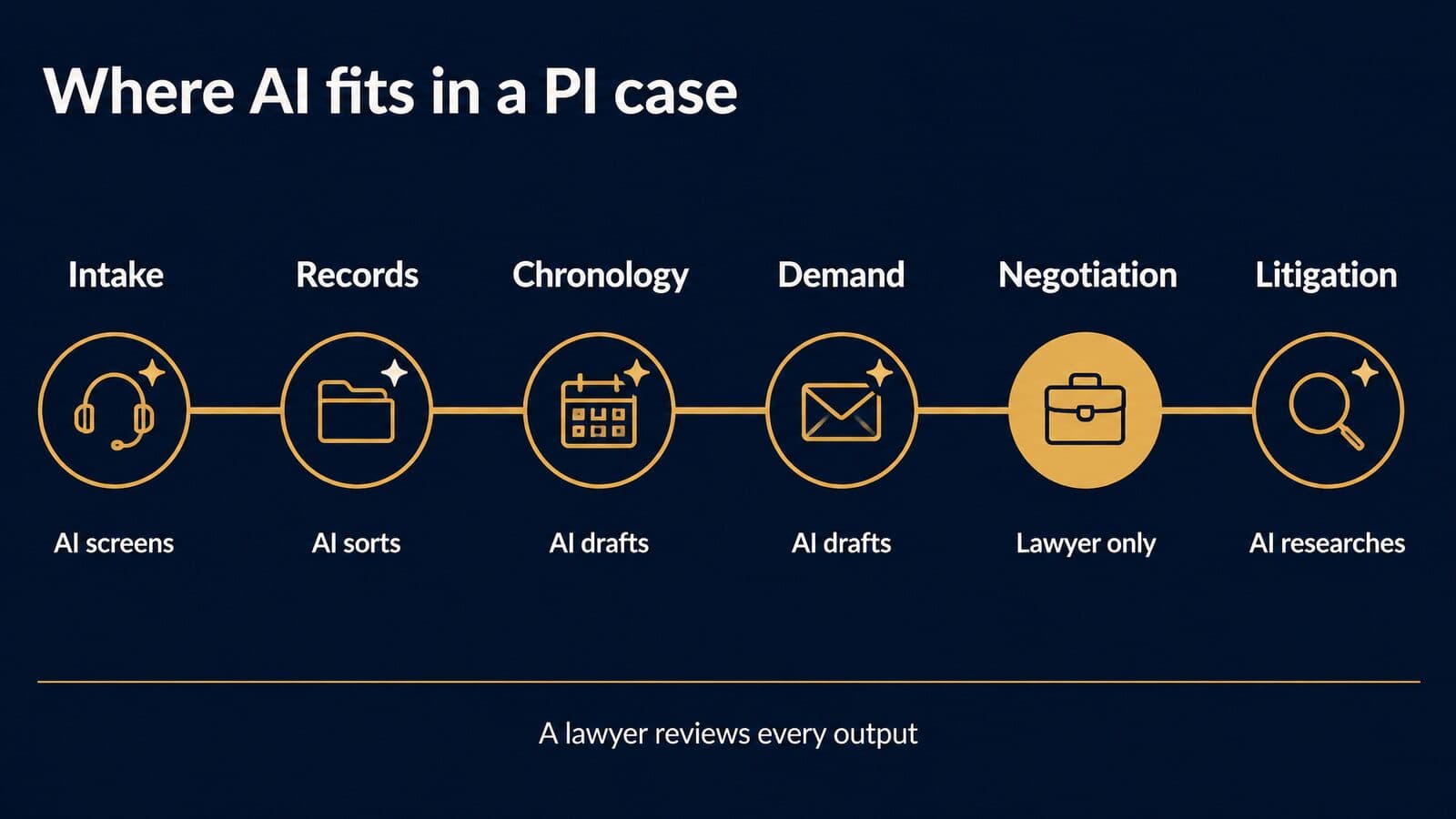
The map below follows a PI matter from first call to trial preparation. Tool names are examples as of October 2026, not endorsements; the human checkpoint is the column I would not skip.
| Case stage | Where AI helps | Example tools (Oct 2026) | Human checkpoint |
|---|---|---|---|
| Inquiry and intake | After-hours answering, first-pass screening | Smith.ai, LawDroid | Live specialist signs the client |
| Records and bills | Sorting records, billing summaries | Paxton, Supio, EvenUp | Paralegal checks completeness |
| Medical chronology | Drafting a dated treatment timeline | Paxton, plaintiff platforms | Reviewer checks each entry against the page |
| Demand | Drafting a demand package | EvenUp, Eve | Lawyer approves every figure |
| Discovery | Drafting responses and client translations | Briefpoint | Lawyer reviews and signs |
| Negotiation | None (lawyer only) | n/a | Lawyer negotiates |
| Litigation | Research, drafting, citation checks | CoCounsel Legal, Lexis+ with Protégé, BriefCatch | Citator check before filing |
Intake and case screening
At the front of the case, AI can ask the same screening questions in the same order every time. The useful set for a PI inquiry is short: the date and place of the incident, what the injury is, whether the person has had treatment and where, the basic liability facts (who hit whom, who was cited, whether there were witnesses or photos), what insurance is involved on both sides, and whether the person already has a lawyer. That last question matters for ethics as well as efficiency. Florida's opinion says a lawyer "should consider including screening questions that limit the chatbot's communications if a person is already represented by another lawyer."
What AI should not decide alone is whether the firm takes the case. The acceptance decision weighs things a script cannot see well: credibility, a disputed liability story, a client's expectations. The full intake design, including where AI loses cases and when to escalate, is covered in the intake section below.
Medical records, chronologies and billing summaries
Records work is where most PI-specific AI products concentrate. Paxton's pricing page lists "Medical Chronologies and Billing Summaries" in its Individual plan, markets "Medical Chronologies" and "Medical Billing Summaries" as features, and lists "Personal Injury" as a practice area; the Individual plan is $499 per user per month as of October 2026, so confirm with the vendor. Supio states that it is "SOC 2 Type II certified, HIPAA, PHIPA, and GDPR compliant," that client information "never trains foundation models," and that it "partners with Thomson Reuters and leading Trial Lawyer Associations." Those are the vendor's descriptions of itself; ask for the audit report and the contract terms rather than relying on the homepage. EvenUp's CEO has said its "Piai" model is trained "on hundreds of thousands of injury cases and millions of medical records," according to EvenUp's own funding announcement.
Chronology errors are expensive because they travel. A wrong date of service can make treatment look delayed. A missed reference to a prior injury hands the adjuster a causation argument the firm never saw coming. A bill counted twice inflates the specials, and an adjuster who finds one duplicate starts doubting every number in the package.
A workable QA routine looks like this, in my view. For the first files a team runs through any new tool, a reviewer checks every chronology entry against the source page the tool cites. Once the error pattern is understood, switch to sampling on a fixed schedule, for example a set number of entries per file, chosen before the review starts. Billing summaries get a separate check: reconcile the summary total to the bills themselves, provider by provider, never to another summary. Data handling, business associate agreements and HIPAA questions are covered in the ethics section later. Firms comparing all-in-one systems should also look at case management software with built-in AI, since some records features now ship inside the practice platform.
Demand letters and demand packages
The demand package is the plaintiff-side task with the most venture money behind it. On October 7, 2025, EvenUp announced a $150 million Series E led by Bessemer Venture Partners, bringing total capital raised to $385 million at a valuation of "over $2 billion." Participants included REV, which the announcement describes as "the venture capital arm of RELX, which owns LexisNexis Legal & Professional." In the same announcement, EvenUp's CEO said case volume had "nearly doubled to 10,000 cases per week" over six months. EvenUp's homepage carries the headline "Why 2,000+ Personal Injury Firms Choose EvenUp," a vendor figure, and a banner saying "Authoritative legal content from Lexis+® with Protégé™ is now built into Companion." Taken together, it is a platform built for PI firms with a research tie-in to LexisNexis content.
Eve is the other well-funded name. Eve's press page lists coverage of a $103 million raise at a $1 billion valuation, with a Reuters item dated September 30, 2025, and an earlier $47 million Series A led by Andreessen Horowitz in January 2025. We are not repeating either company's customer-count or settlement-outcome marketing claims here; none of them are independently verified.
Funding tells you the category is serious, not that any given demand is right. Before a demand goes out, the lawyer verifies every medical special against the bill, every bill total against the ledger, and every statement about liability against the evidence. ABA 512 says reliance on GAI output "without an appropriate degree of independent verification or review of its output" could violate Model Rule 1.1. A demand letter is exactly that kind of output.
Discovery responses and litigation support
Discovery is the most templated writing in a PI case, which makes it a natural fit for drafting tools. Briefpoint's pricing page lists one plan at $150 per month per attorney, billed annually, as of October 2026; confirm with the vendor. It markets a "Plaintiff" solution "Built for contingency economics" and offers English and Spanish client translations, which matters for firms that send interrogatories to Spanish-speaking clients for review.
The pattern: the tool drafts, a paralegal adds client facts, the client confirms them in their own language, and the lawyer reviews and signs. For research memos, brief drafting and citation checks later in the case, the research and brief tools are covered in the directory above.
Negotiation stays with the lawyer
Florida's opinion is direct on this: a lawyer "may not delegate to generative AI any act that could constitute the practice of law such as the negotiation of claims." The same opinion notes that an advisory opinion "is not binding," and other states have their own rules, but we would treat this line as a sound default anywhere. Florida also says the lawyer "will be ultimately responsible" if a chatbot gives misleading information.
AI still has a role before the call. It can assemble a negotiation fact memo: the treatment summary, the specials as verified, the policy limits on file, prior offers with dates. It does not make offers, accept offers, or speak to the adjuster. In my view, any workflow that lets an AI tool send settlement language without a lawyer's sign-off is a workflow to shut down.
Five prompt templates for PI work
Use these only in a business or enterprise workspace where training is off by default, or on text you have already de-identified. OpenAI says that "by default, OpenAI does not use content from ChatGPT Business, Enterprise, Edu, or ChatGPT for Healthcare workspaces to train its models," per its data controls FAQ, and Anthropic's Claude pricing page lists "No model training on your content by default" for Claude Team. Replace names, dates of birth, claim numbers and policy numbers with placeholders before you paste. A lawyer reviews every output. These are starting points written for this guide, not tested outputs.
Using only the de-identified records I paste below, build a table of treatment events with columns for date, provider type, complaint, findings, treatment and source page. Do not infer anything not in the records. Flag gaps in treatment longer than [NUMBER] days and any mention of prior injury.
Check: compare every row to its cited source page before the chronology leaves the file.
Draft an outline for a personal injury demand letter about [INJURY TYPE] from a [INCIDENT TYPE]. Use these headings only: liability summary, injuries, treatment, [SPECIALS PLACEHOLDER], damages narrative, [DEMAND PLACEHOLDER]. Write one or two neutral sentences under each heading from the facts below. Do not add any dollar figures or predictions.
Check: the lawyer inserts every figure from verified bills, never from the model.
From the de-identified fact summary below, draft a deposition topic outline for a [WITNESS ROLE]. Group topics by subject, list three to five questions under each, and mark any topic where the summary is silent or contradictory with [GAP]. Do not state conclusions about credibility or liability.
Check: the trial lawyer cuts and reorders topics against the actual file and case theory.
Write a plain-English status update for a client in a personal injury case at a [GRADE]-level reading level. Explain that [CASE STAGE] is underway, what usually happens next, and what the client should do: [CLIENT ACTION]. Do not give legal advice, predict an outcome or mention any amount.
Check: the lawyer or case manager edits the draft for accuracy and tone before it is sent.
Draft a short, polite follow-up letter to [PROVIDER TYPE] requesting the records and itemized bills for [DATES OF SERVICE]. Refer to the signed authorization dated [AUTHORIZATION DATE] as enclosed. Ask for delivery by [DEADLINE] and give [FIRM CONTACT PLACEHOLDER] for questions. Do not include diagnoses or other medical details.
Check: staff add the real client identifiers only in the firm's own letter template, outside the AI tool.
AI for mass tort firms: claimants, records and dockets
Mass tort work multiplies every PI task across hundreds or thousands of claimants, so AI's value is consistency at volume: screening claimants against each tort's criteria, summarizing records across a docket, pre-filling fact sheets and watching dockets for new litigation. Each of those jobs needs sampling QA, because one bad rule repeats across every file it touches.
Qualifying claimants at volume
Every mass tort has its own qualification criteria: proof of product use or exposure, a qualifying diagnosis, dates that fall inside the relevant window, and a claim that is still inside the statute of limitations for the claimant's state. AI is well suited to the first pass of matching intake answers and records against those criteria, because the rules are written down and the volume is high. Firms building those rule sets can start from mass tort qualification criteria for the common torts.
AI can also raise signals people miss across hundreds of files: two intakes with one phone number and different names, a diagnosis dated before the claimed exposure, or answers copied word for word across claimants. Consent matters too. Every claimant record should carry the consent language the person agreed to and when, so the firm can show how the contact happened.
The rule we would hold to: AI flags, people decide. A flagged duplicate might be a fraud attempt or a family sharing a phone. A diagnosis outside the window might be a records error. Someone who understands the tort reviews every flag before a claimant is rejected or accepted. Firms that buy leads should expect the same discipline from their vendor, including claimant screening and TCPA consent verification before any record is delivered.
Records review across a docket
Plaintiff platforms now process injury files at real scale; EvenUp's CEO, in the company's funding announcement, put its volume at "nearly doubled to 10,000 cases per week." For a mass tort docket, the risk changes shape at that scale. In a single PI case, an AI error affects one file. In a docket, a bad extraction rule produces the same error in hundreds of files at once, and nobody notices until a defense expert does.
Three habits reduce that risk, in my view. First, use one summary template per tort, so every claimant's records are summarized against the same fields: exposure evidence, diagnosis, date of diagnosis, treating providers, and anything that cuts against causation. Second, audit a fixed sample from every batch the tool processes, chosen at random before the review begins, and widen the sample when it finds errors. Third, keep a record of which source pages support each finding, so a reviewer can trace any summary line back to the document in seconds. The broader system these steps plug into is described in the mass tort intake technology stack.
Plaintiff fact sheets and profile forms
Plaintiff fact sheets and profile forms are a good use of AI pre-fill. The tool can pull names of providers, dates of treatment, product use and prior medical history from intake data and records into the form, which saves staff from retyping the same facts for every claimant.
Every pre-filled answer is confirmed with the client, who reviews and signs the form. Fact sheets are sworn or certified in many dockets, and ABA 512 reminds lawyers that they "cannot knowingly make any false statement of law or fact to a tribunal." The candor duty is covered in the ethics section later. In my view, the safe workflow marks each AI-filled field as unconfirmed until a staff member has walked through it with the client, and keeps that confirmation in the file.
Finding new torts and cases
AI and data tools also help firms watch for litigation before it becomes crowded. CourtListener, run by the Free Law Project, includes the RECAP Archive of PACER data, which gives free access to many federal dockets and filings for monitoring new complaints, consolidation motions and MDL activity. Lex Machina offers analytics "on judges, courts, counsel, and parties," which helps a firm understand a forum and see who else is filing. Darrow is a company that describes its business as using AI to find potential plaintiff cases; firms evaluating it should read its own materials and ask how it sources and validates leads.
None of these tools predicts which torts will succeed, and I make no claims about any vendor's hit rate. The decision to invest in a new tort still rests on the science, the defendants, the case law and the firm's capacity to handle the volume.
AI intake, chatbots and voice agents for law firms
AI intake can answer every call and chat, screen basic criteria and book follow-ups, but it can't build trust with an injured caller or judge a hard case, and it carries bar-advertising and TCPA obligations. The safest design uses AI for coverage and triage, with fast escalation to a live intake specialist who signs the case.
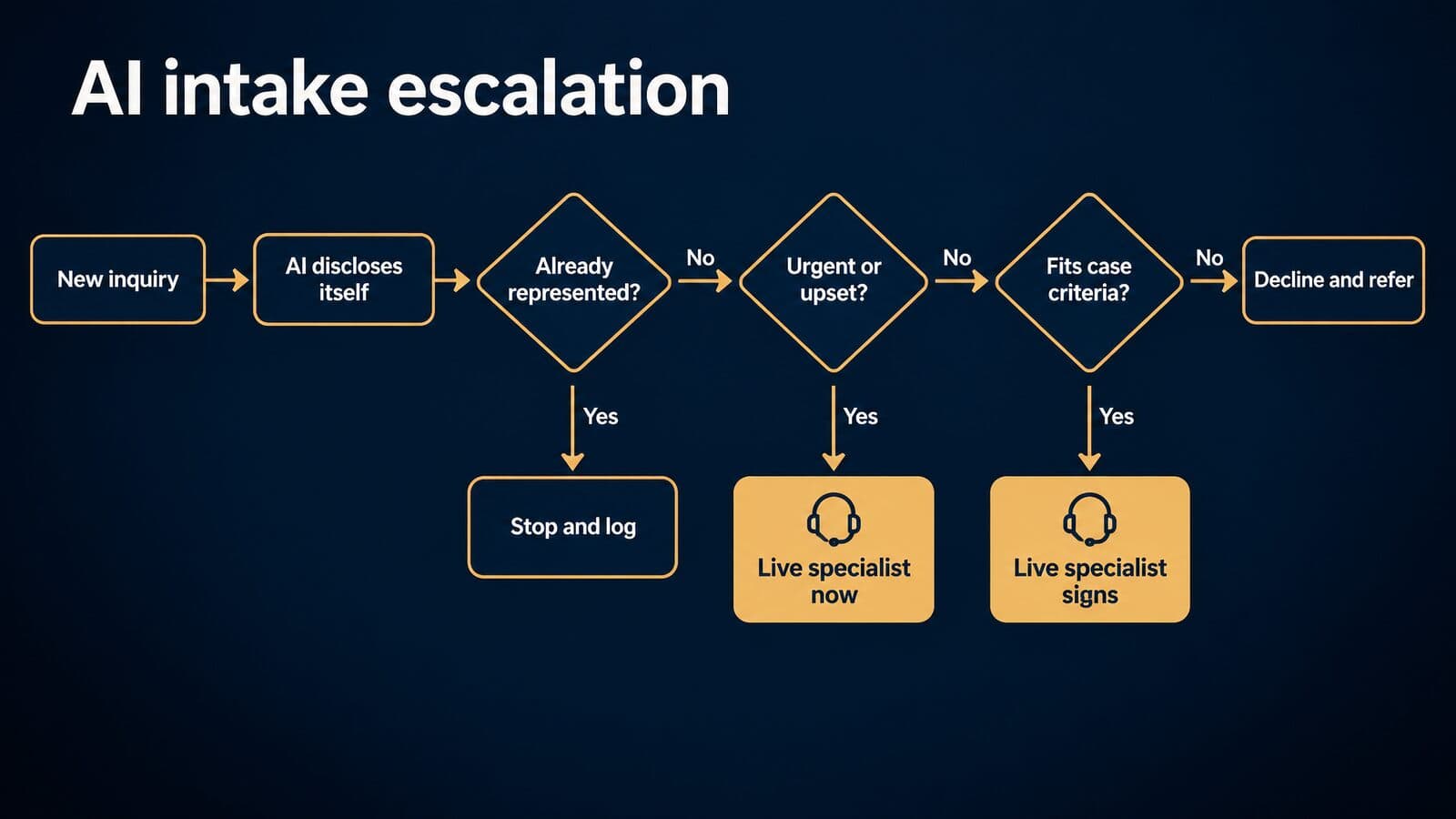
Where AI intake helps
The case for AI at the front door is coverage. Injury inquiries come in at night, on weekends and during the hours after a crash, when a small firm's phones go to voicemail. An AI agent answers every call and chat at once, gives a first response in seconds and does not put callers on hold during a spike in volume.
It also brings consistency: the same questions in the same order, answers captured into structured fields, and records pushed into the CRM without retyping. It can produce a call summary for the specialist who picks up the lead and book a callback or consultation on the firm's calendar.
The market has moved toward mixed models. Receptionist services now sell AI-first, hybrid and human-first plans; Smith.ai's pricing page has tabs for all three. Firms that want to build their own website bot can use tools such as LawDroid, which sells a chatbot builder. I am not quoting performance numbers for any of these, because no neutral data on AI intake results was found.
Where AI intake loses signed cases
This is reasoning and opinion, not measured data. An injured caller is often in pain, frightened or angry, and many want to talk to a person. A scripted agent that misreads distress as a routine inquiry can lose the caller in the first minute. Complex cases need judgment: disputed liability, several injured people in one car, a commercial vehicle, an injury that showed up days later. Those are the calls where a good intake specialist asks the follow-up question that changes the case value.
Fee questions are a second weak point. Callers ask how the contingency fee works and what they will owe. Under ABA Model Rule 1.5(c), a contingent fee agreement must be in a writing signed by the client, and Model Rule 7.1 bars false or misleading statements about the lawyer's services. An improvised AI answer about fees risks both. Callers who already have a lawyer must be screened out. And consent capture or required disclosures can fail silently inside an automated flow, with nobody noticing until a complaint arrives.
Do not assume either way. Measure it: compare lead-to-retainer conversion rates for AI-handled and live-handled inquiries from the same sources over the same period.
| Intake task | AI agent | Live intake specialist | Rule to apply |
|---|---|---|---|
| Answer at 2 a.m. | Yes | If staffed | Disclose it is AI (Florida 24-1) |
| Take contact and incident basics | Yes | Yes | Log consent for follow-up (FCC 24-17) |
| Screen case criteria | First pass | Final call | Criteria in writing |
| Spot already-represented callers | Asks | Confirms | Stop if represented (Florida 24-1) |
| Explain fees and contingency | No | Yes, from an approved script | Written fee agreement (Rule 1.5(c)) |
| Calm a distressed caller | No | Yes | Escalate at once |
| Sign the retainer | No | Yes | Lawyer supervision (Rule 5.3) |
| Give legal advice | Never | Lawyer only | No delegation (Florida 24-1) |
AI receptionists and answering services
Smith.ai is the receptionist service most often listed for law firms. These are the figures shown in the default view of its pricing page as of October 2026; confirm with the vendor.
| Smith.ai plan (default view) | Price per month | Calls included | Extra call |
|---|---|---|---|
| Starter | $300 | 30 | $11.50 |
| Basic | $810 | 90 | $10.50 |
| Pro | $2,100 | 300 | $8.50 |
| Enterprise | Custom | Custom | Custom |
Prices and plan terms last verified October 22, 2026. Confirm with each vendor before you buy.
One caution on the table: the pricing page has AI-first, hybrid and human-first tabs, and we could not identify which tab these default-view prices belong to, so AI-first pricing is unverified. The page also shows a 30-day money-back guarantee and 10% off 12-month terms, and no free plan. Older roundups still quote lower call bundles; those figures are out of date.
LawDroid publishes simpler software pricing as of October 2026: Copilot at $25 per user per month with no contract, Builder (the chatbot builder) at $99 per user per month with no contract, Ultra at $99 per user per month on an annual contract, an Enterprise flat-fee annual plan, and a 7-day free trial. Confirm with the vendor.
CaptureNow, Ruby and Gideon also appear in older lists of legal answering and intake tools. Their current pricing and AI features were not verified for this guide, so we are not describing them beyond the category.
Website chatbots and bar advertising rules
A chatbot on a law firm website is a communication from the firm, and bar rules treat it that way. Florida's Opinion 24-1 is the clearest statement so far: "Generative AI chatbots that communicate with clients or third parties must comply with restrictions on lawyer advertising and must include a disclaimer indicating that the chatbot is an AI program and not a lawyer or employee of the law firm."
The same opinion puts responsibility on the lawyer, who "will be ultimately responsible in the event the chatbot provides misleading information to prospective clients or communicates in a manner that is inappropriately intrusive or coercive," and suggests screening questions for people already represented. It also says lawyers "may advertise their use of generative AI but cannot claim their generative AI is superior to those used by other lawyers or law firms unless the lawyer's claims are objectively verifiable." That rules out chatbot copy like "the smartest AI intake in the state."
Under Model Rule 7.1, everything the bot says is a communication about the lawyer's services. If it says a case "sounds strong" or that the firm "always wins," the firm said it. Keep chat transcripts under the firm's written retention policy, so a supervisor can review them and the firm can show what was said if a complaint arrives.
Florida is one state, and its advisory opinion "is not binding." Other states have their own advertising rules and guidance, so check yours. For the wider plaintiff-marketing rule set, see TCPA and state bar compliance for plaintiff marketing. This is general information, not legal advice.
AI voice calls and the TCPA
The FCC settled the main question in early 2024. In Declaratory Ruling FCC 24-17 (CG Docket No. 23-362), adopted February 2 and released February 8, 2024, the Commission said the TCPA's restrictions on "artificial or prerecorded voice" "encompass current AI technologies that generate human voices." Such calls "require the prior express consent of the called party … absent an emergency purpose or exemption." The statute is 47 U.S.C. § 227 and the rules are at 47 CFR § 64.1200.
Lead-generation content still sometimes describes a one-to-one consent rule as a current requirement. It is not. In Insurance Marketing Coalition Ltd. v. FCC, No. 24-10277, the Eleventh Circuit on January 24, 2025 vacated Part III.D of the FCC's 2023 Order, the "one-to-one-consent" restriction.
The practical steps are narrow. Before any AI voice callback, confirm that the consent language the person agreed to covers calls using an artificial or AI-generated voice. Log that consent, with the form version and timestamp, on the lead record. If the consent is missing or unclear, a human calls instead. For how AI-routed calls fit into the wider acquisition model, see AI-routed intake and the future of plaintiff acquisition. States add their own telemarketing rules, so check those too. This is general information, not legal advice.
Escalation rules for AI intake
These eight rules are my recommended starting set for any AI intake flow at a plaintiff firm. Each one maps to a rule or opinion cited above.
- Disclose in the first message that the caller or visitor is talking to an AI program, not a lawyer or employee.
- If the person says they already have a lawyer, stop the intake and log it.
- Send urgent or distressed callers to a live person at once.
- Route any fee question or legal question to a live specialist.
- Warm-transfer qualified callers to a live specialist within the firm's own target time.
- Make no AI voice callback without logged prior express consent.
- Make no statement about case value or likely outcome.
- Have a supervisor review transcripts weekly under Model Rule 5.3.
That live-escalation layer is the work Mass Tort Marketing Agency does for PI and mass tort campaigns, through 24/7 live intake in English and Spanish and mass tort intake services.
AI in law firm marketing: content, ads and AI search
AI now shapes PI marketing from both sides: firms use it to draft content and ads, and prospective clients increasingly ask AI tools before they call a firm. Both uses fall under Google's quality rules and the bar's advertising rules.
Consumers now ask AI before they call a firm
Many consumers now consider asking an AI tool about a legal problem before they contact a lawyer. Clio's 2025 Legal Trends Report press release, which reports vendor research, says "More than half of consumers have used or would consider using AI to answer a legal question," and that of those who used AI, "28% were directed to contact a lawyer." The same release says "A growing majority of consumers say they would look for their next lawyer online."
Free consumer apps sit in that path too. LawConnect, for example, offers a free AI assistant and also connects users with lawyers. For many people, that kind of tool is now the first stop after an accident.
For a PI firm, the AI answer is the new first impression. If ChatGPT, Gemini or an AI Overview summarizes what to do after a truck crash, the firm wants its own pages to be the clear, citable source behind that answer, and wants its name, address, practice areas and attorney details to be consistent everywhere the models read. That is the problem Mass Tort Marketing Agency's AI search optimization for law firms addresses. For the tactics, see how PI firms get cited in AI Overviews and ChatGPT.
AI-written content and Google's rules
Google does not ban AI content. Its February 2023 guidance on AI content says "Appropriate use of AI or automation is not against our guidelines," as long as it is not used "to generate content primarily to manipulate search rankings." Its spam policies define scaled content abuse as "when many pages are generated for the primary purpose of manipulating search rankings and not helping users," and the first example given is "Using generative AI tools or other similar tools to generate many pages without adding value for users."
Google's generative AI content guidance, updated October 1, 2026, warns that outputs "may contain inaccuracies (also known as hallucinations)" and says "It is critical to manually factcheck and review all AI-generated content for accuracy and trustworthiness before publishing," including title elements, meta descriptions, structured data and alt text.
Legal pages also sit in Google's highest-scrutiny category. Its search quality rater guidelines define YMYL topics as those that "could significantly impact the health, financial stability, or safety of people, or the welfare or well-being of society." In my view, the right split is that AI drafts and an attorney reviews. For the wider program, see SEO for lawyers and SEO for personal injury firms.
AI ads, images and bar rules
Model Rule 7.1 does not care who wrote the ad. AI-written ad copy and AI-generated images are communications about the lawyer's services, so they must not be false or misleading. Florida adds that a firm cannot claim its AI is superior to other firms' AI unless the claim is objectively verifiable.
Many states also have specific rules on dramatizations, testimonials, actor portrayals and depictions of clients. AI imagery can trigger several of them at once, so check your state's advertising rules before an AI-generated person appears in an ad.
There is also a new placement to watch. OpenAI's free-tier FAQ says "Ads may appear in the Free tier in certain countries." Firms considering it should read advertising inside ChatGPT and ChatGPT ads for personal injury firms. OpenAI's usage policies, effective November 20, 2026, also prohibit "building or offering AI tools that provide others with tailored advice that requires a license, without appropriate involvement by a licensed professional," and stating or implying "that the AI itself holds professional credentials or authorization." This is general information, not legal advice.
SEO copilots and other marketing AI
Most SEO platforms and ad tools now include AI assistants that suggest keywords, run site audits, draft meta descriptions and write ad variations. Treat their output as suggestions to verify, not decisions: check keyword ideas against real search data, confirm audit findings on the page, and run every ad variation past the advertising rules above. No prices or features are listed here; none were verified for this guide. Never paste client names, case facts or intake data into a marketing tool. Every one of these uses runs through the same ethics rules, which come next.
Legal AI ethics: ABA Formal Opinion 512 explained
ABA Formal Opinion 512, dated July 29, 2024, says lawyers may use generative AI as long as they meet duties they already have: competence, protecting client information, communicating with clients, supervising staff and vendors, advancing only meritorious claims, candor toward the tribunal and charging reasonable fees. It is guidance, not binding law. Your state's rules control, and this is general information, not legal advice.
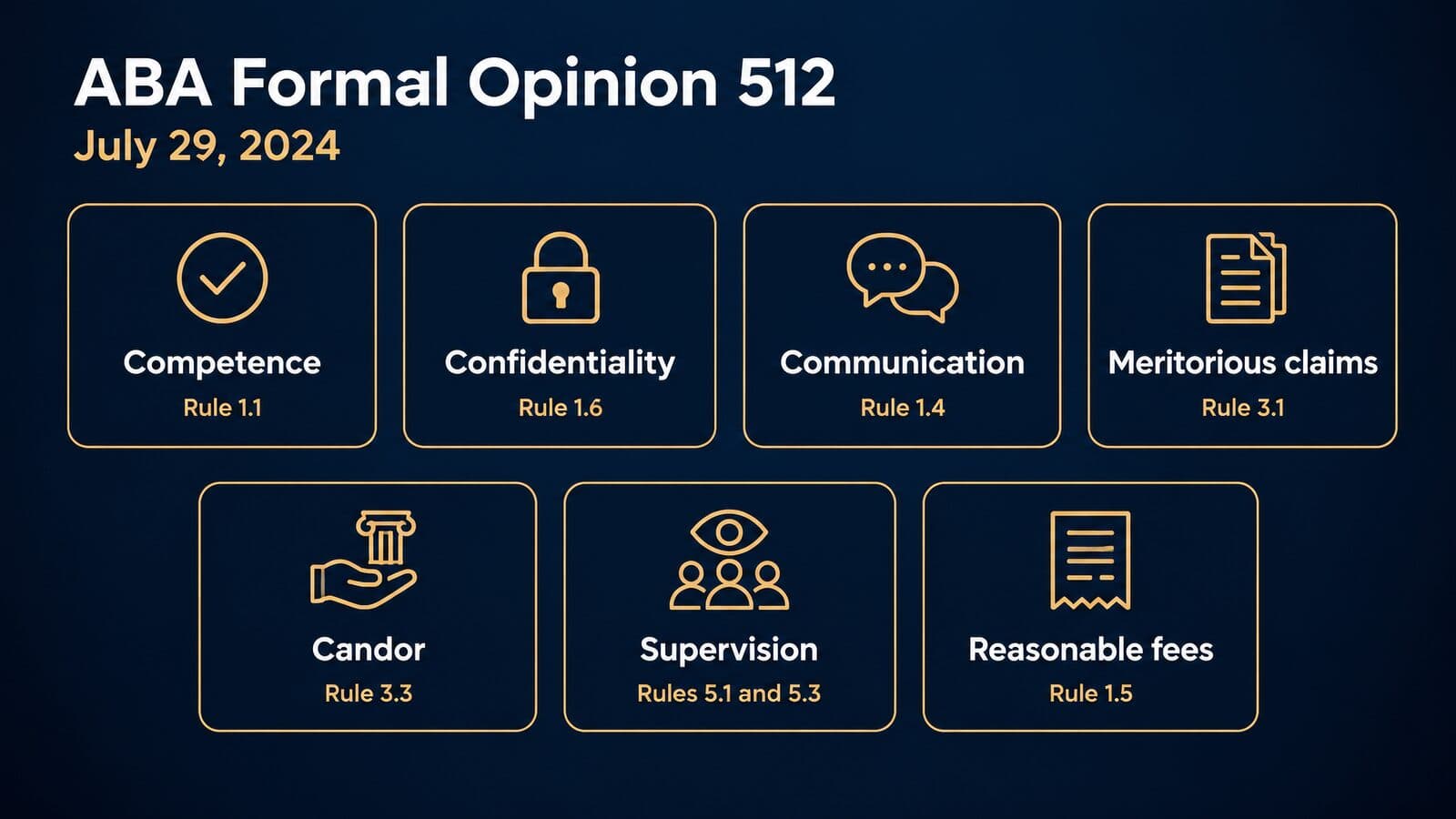
The opinion comes from the ABA Standing Committee on Ethics and Professional Responsibility. It does not create a new AI rule. It walks through the Model Rules one by one and asks how each applies when a lawyer uses a tool that, in the opinion's words, is a prediction tool that generates "a statistically probable output." That framing matters. A tool that predicts likely text can produce a fluent paragraph that is wrong, and the opinion treats that risk as something the lawyer manages, not the vendor.
The opinion also separates tools by how they handle what you type. Some generative AI tools are "self-learning," meaning what you put in can shape what the tool later produces for other users. Most of the confidentiality analysis turns on that distinction, so it pays to know which kind of tool your staff is using before you write any policy.
| Duty | Model Rule | What Opinion 512 says | What to do |
|---|---|---|---|
| Competence | 1.1 | Output needs "independent verification or review" | Verify before use |
| Confidentiality | 1.6 | Informed consent before inputting client information into self-learning tools | Use non-training tiers; get consent |
| Communication | 1.4 | Consider whether to disclose AI use | Tell clients when it matters |
| Meritorious claims and candor | 3.1, 3.3 | No false statements of law or fact to a tribunal | Citator-check every cite |
| Supervision | 5.1, 5.3 | Managers must set firm-wide measures | Written policy and training |
| Fees | 1.5 | Bill actual time; test flat and contingent fees for reasonableness | No billing for learning time |
Competence means independent verification
Opinion 512 says that relying on or submitting generative AI output "without an appropriate degree of independent verification or review of its output" could violate Model Rule 1.1. The word "appropriate" carries the weight. Verification scales with the risk of the task.
The rule itself already pointed here. Comment 8 to Model Rule 1.1 says a lawyer "should keep abreast of changes in the law and its practice, including the benefits and risks associated with relevant technology." The ABA approved that technology language in 2012, and according to LawSites' tracker, 40 states, the District of Columbia and Puerto Rico have adopted it in some form.
In practice, a brief headed for filing needs every authority pulled and read. A first-draft client email needs a careful read for accuracy and tone. A brainstormed list of deposition topics needs a lawyer's judgment about which ones are worth asking. Texas takes a view on whether competence requires using AI at all; that comes up in the state section below.
Confidentiality and informed consent
The most quoted line in Opinion 512 is about consent. For self-learning tools, where output could reveal client information to others, the opinion says "a client's informed consent is required prior to inputting information relating to the representation into such a GAI tool."
That sits on top of Model Rule 1.6(c), which says: "A lawyer shall make reasonable efforts to prevent the inadvertent or unauthorized disclosure of, or unauthorized access to, information relating to the representation of a client." Reasonable efforts include knowing what a tool does with your inputs before anyone types.
Informed consent is a conversation, not a checkbox. In my view it should cover four things:
- Which tool the firm wants to use, and whether it is a consumer or business plan.
- What client information would go into it, and what would stay out.
- The specific risks: training on inputs, human review, retention, and the chance of wrong output.
- The client's right to say no, and what the firm will do instead if they do.
Most firms can avoid the consent question for routine work by choosing tools that do not train on inputs and keeping client data out of consumer plans. The data-settings section later in this guide shows which plans fall on which side of that line.
Telling clients you use AI
Even when Rule 1.6 does not require consent, Opinion 512 says lawyers must "separately consider whether other Model Rules, particularly Model Rule 1.4, require disclosing the use of a GAI tool." The opinion does not demand disclosure for every use. Running a spell check through an AI feature is different from letting a model shape case strategy.
In our view, disclosure is the wise course in at least four situations: the client asks whether you use AI; AI materially shaped the advice or a filing; AI costs will appear on the bill; or the client's own contract with you, common with corporate and insurance clients, requires notice.
Candor and meritorious claims
Opinion 512 applies Model Rule 3.3 directly: "lawyers cannot knowingly make any false statement of law or fact to a tribunal." It also cites Rule 3.1, which bars frivolous claims and contentions, and Rule 8.4(c), which bars dishonesty and misrepresentation.
An invented case citation is a false statement of law. A made-up quotation from a real opinion is one too. Neither becomes acceptable because a tool produced it, and a lawyer who signs without checking has not met the duty. The sanctions cases below show how courts have applied this, and the verification workflow at the end of that section turns the duty into a filing-day routine.
Supervising lawyers, staff and vendors
Opinion 512 notes that "Model Rules 5.1 and 5.3 address the ethical duties of lawyers charged with managerial and supervisory responsibilities," and it applies both to generative AI. Managers must put effective measures in place for how the firm uses these tools.
Model Rule 5.3 requires partners and managers to make "reasonable efforts to ensure that the firm has in effect measures giving reasonable assurance that the person's conduct is compatible with the professional obligations of the lawyer." It covers nonlawyers "employed or retained by or associated with a lawyer." That reaches paralegals summarizing records, intake staff drafting follow-up messages and outside vendors whose software touches client files. Choosing an AI vendor is itself a supervisory decision. The rollout section later in this guide includes a one-page AI-use policy that puts these measures in writing.
Fees: hourly, flat and contingent
Opinion 512 is direct about hourly work: "lawyers who bill clients an hourly rate for time spent on a matter must bill for their actual time." If a tool turns a three-hour task into a forty-minute one, the bill reflects forty minutes.
The opinion also addresses "evaluating the reasonableness of charges for GAI tools when the lawyer and client agree on a flat or contingent fee." It warns that "it may be unreasonable under Rule 1.5 for the lawyer to charge the same flat fee when using the GAI tool as when not using it." The opinion names contingent fees explicitly, so plaintiff firms should not assume the analysis skips them.
Two more lines apply to every fee model. "A lawyer may not charge a client to learn about how to use a GAI tool or service that the lawyer will regularly use for clients," and lawyers "may not bill clients for general office overhead expenses."
For a contingency-fee personal injury firm, the practical reading is that AI subscriptions look like overhead, absorbed in the fee. A matter-specific AI cost, such as a per-case charge for a records summary, needs to be disclosed before it is passed through as a case expense. California spells this out in detail, covered in the next section.
Engagement letters and client consent
Opinion 512 closes off the easy answer: "merely adding general, boiler-plate provisions to engagement letters purporting to authorize the lawyer to use GAI is not sufficient." A sentence buried in a fee agreement does not give informed consent.
Where consent or disclosure is needed, these are the topics to discuss with the client, not a clause to paste:
- Which tools the firm uses for the matter, by category and plan type.
- What kinds of client information go into them and what stays out.
- The risks, including wrong output and data handling.
- How a lawyer checks the output before it is relied on or filed.
- Any AI costs that could appear as case expenses.
- The client's right to opt out of AI use on their matter.
State rules vary on what consent must look like and whether it must be in writing. Check your jurisdiction before you draft the language.
State bar AI opinions and court disclosure rules
Several state bars have issued AI guidance that tracks ABA 512 with local emphasis: Florida on chatbots, advertising and billing; California on agentic AI and costs; North Carolina on public AI tools; Texas on competence. Individual judges add their own orders. Check your own state's rules; this is general information, not legal advice.
| Jurisdiction | Guidance | Date | Key point |
|---|---|---|---|
| ABA | Formal Opinion 512 | July 29, 2024 | Existing duties apply |
| Florida | Ethics Opinion 24-1 | Jan. 19, 2024 | Protect confidentiality, bill properly, follow ad rules |
| California | Practical Guidance | 2026 (replaces Nov. 2023) | No client data without consent; AI subscriptions are overhead |
| North Carolina | 2024 FEO 1 | Nov. 1, 2024 | Avoid client-specific information in public AI |
| Texas | Opinion 705 | Feb. 2025 | "A reasonable and current understanding" |
Florida Bar Ethics Opinion 24-1
Florida Bar Ethics Opinion 24-1, issued January 19, 2024, summarizes its position in one sentence: "Lawyers may use generative artificial intelligence ('AI') in the practice of law but must protect the confidentiality of client information, provide accurate and competent services, avoid improper billing practices, and comply with applicable restrictions on lawyer advertising."
On billing, Florida is specific. "A lawyer may only ethically charge a client for the actual costs incurred on the individual client's behalf and must not duplicate charges that are already accounted for in the lawyer's overhead." AI also "does not permit a lawyer to engage in improper billing practices such as double-billing."
The opinion is advisory and states that it is not binding. Its chatbot and advertising points were covered in the intake section of this guide, and they connect to plaintiff-side advertising compliance more broadly.
California's 2026 practical guidance
The State Bar of California's Committee on Professional Responsibility and Conduct issued its original Practical Guidance in November 2023. The 2026 Practical Guidance replaces that version and, at the California Supreme Court's request, addresses agentic AI: tools that take actions, not just produce text.
On confidentiality it says: "As a general matter, a lawyer must not input any confidential information of the client into a generative AI solution that may present material risks to confidentiality or security, absent informed client consent." It adds a line every vendor review should start from: "Reasonable efforts require more than reliance on generalized marketing assurances."
On money, "Hourly billing must reflect the time actually spent." Subscription fees for general-purpose AI tools "typically constitute overhead expenses … and thus should be absorbed within the lawyer's fee." Matter-specific AI costs may be charged only if the fee agreement discloses them, at actual cost, with "no markup … without the client's informed written consent."
North Carolina 2024 Formal Ethics Opinion 1
The North Carolina State Bar adopted 2024 Formal Ethics Opinion 1 on November 1, 2024. It permits AI use "provided the lawyer uses any AI program, tool, or resource competently, securely to protect client confidentiality, and with proper supervision."
Its most practical line is about public tools: "Generally, and as of the date of this opinion, lawyers should avoid inputting client-specific information into publicly available AI resources." The opinion also declines to answer the privilege question, calling it "a legal question and outside the scope of the Rules." That leaves privilege to courts, which matters for the privilege discussion later in this part.
Texas Opinion 705
The Texas Professional Ethics Committee issued Opinion 705 in February 2025, responding to a request from the State Bar of Texas Taskforce on Responsible AI in the Law. It says Rule 1.01 "almost certainly does not require the use of generative AI for any particular purpose." But a lawyer who chooses to use it "must have a reasonable and current understanding of the technology."
In my view that is the right split. Adopting AI is a business choice. Using it without understanding how it fails is an ethics problem. A firm that skips AI entirely has not violated anything; a firm that deploys it carelessly may have.
Judges' standing orders and AI certifications
Bar opinions are only half the picture. Individual judges set their own requirements. In 2023, Judge Brantley Starr of the Northern District of Texas adopted a "Mandatory Certification Regarding Generative Artificial Intelligence," requiring filers to certify that no generative AI drafted the filing or that a human checked any AI-drafted language, according to a 2023 McGuireWoods alert. Its current status was not verified for this guide.
Orders like this vary by judge and change often. Before filing, check the court's local rules and the assigned judge's individual practices, every time, and note any certification language in your filing checklist. A proposed Federal Rule of Evidence 707 on machine-generated evidence has also been under consideration; check its status before relying on it.
Hallucinated citations: sanctions and how to verify
Courts sanction lawyers who file AI-invented citations, and the duty to check sits with the signing lawyer, not with the tool. The fix is a written verification step for every authority before anything is filed. This is general information, not legal advice, and sanctions practice varies by court and state.
| Case | Court and date | What happened | Sanction |
|---|---|---|---|
| Mata v. Avianca, Inc. | S.D.N.Y., June 22, 2023 | "non-existent judicial opinions with fake quotes and citations" from ChatGPT | $5,000 penalty plus letters |
| Wadsworth v. Walmart Inc. | D. Wyo., Feb. 24, 2025 | Motions in limine cited nine cases; eight did not exist | Pro hac vice revoked and $3,000 for the drafter; $1,000 each for two others |
Mata v. Avianca
Mata v. Avianca, No. 22-cv-1461, 2023 WL 4114965 (S.D.N.Y. June 22, 2023), is the case most lawyers know, and plaintiff firms should know it best because it was a personal injury claim. The plaintiff alleged that "he was injured when a metal serving cart struck his left knee during a flight from El Salvador to John F. Kennedy Airport."
In the Opinion and Order on Sanctions, Judge P. Kevin Castel found that the respondents submitted "non-existent judicial opinions with fake quotes and citations created by the artificial intelligence tool ChatGPT." The court imposed "a penalty of $5,000 paid into the Registry of the Court," under Rule 11 or, alternatively, its inherent authority. The respondents also had to mail their client a letter within 14 days attaching the opinion, the hearing transcript and an affirmation.
The court's framing is worth quoting in full: "there is nothing inherently improper about using a reliable artificial intelligence tool for assistance. But existing rules impose a gatekeeping role on attorneys to ensure the accuracy of their filings."
Wadsworth v. Walmart
Wadsworth v. Walmart Inc., No. 2:23-cv-00118 (D. Wyo.), produced an Order on Sanctions entered February 24, 2025 by Judge Kelly H. Rankin. The court found that plaintiffs' attorneys "filed Motions in Limine that cited nine cases, but eight did not exist."
The drafting attorney's pro hac vice admission was revoked and he was fined $3,000. Two other attorneys who signed the motions were fined $1,000 each. According to the order, the drafter used the firm's "in-house database," referred to as "MX2.law," to add case law.
The lesson for plaintiff firms is narrow and practical. A tool built or licensed by your own firm does not change the signing lawyer's duty. Every lawyer whose name is on the filing carries responsibility for what it cites.
How often AI-invented citations reach courts
These are not two isolated cases. Damien Charlotin's AI Hallucination Cases Database tracks court decisions worldwide that address AI-fabricated content, and it listed more than 2,200 decisions as of October 2026, per the Charlotin database. The count changes daily.
Legal-specific tools help but are not a cure. A Stanford and Yale study found that the 2024 versions of Lexis+ AI and Westlaw's AI tools "each hallucinate between 17% and 33% of the time," a finding ABA Opinion 512 itself cites. Those numbers describe 2024 versions; no peer-reviewed study of the current versions was found. The safe reading is that retrieval-based legal tools reduce the risk and do not remove it.
A citation verification workflow
This routine works with any AI tool, general or legal-specific. Put it in writing and make it part of the filing checklist.
- List every authority in the draft: cases, statutes, rules, regulations and secondary sources.
- Pull each one from a primary source: the court's own site, CourtListener, or your research platform. Never verify a citation by asking the same AI tool.
- Confirm the case exists and the citation matches: reporter, volume, page, year and court.
- Read the cited passage and match every quotation word for word. AI tools often attach a real citation to a sentence the court never wrote.
- Check subsequent history with a citator: Shepard's in Lexis+ with Protégé, or KeyCite in Westlaw.
- Confirm the authority is binding or persuasive in your court, and that it says what you are using it to say.
- Check pin cites and parentheticals against the pages you read.
- Log who verified each authority and when, in the matter file.
- The signing lawyer reviews the log before filing, because the gatekeeping duty is theirs.
Use the same checks for statutes in demand letters and for medical facts drawn from records summaries. A wrong ICD code or a misdated surgery in a demand package is the plaintiff-side version of a fake citation.
Confidentiality, HIPAA and privilege: data settings by tool
Consumer AI plans may use your chats for training or human review unless you change settings, while business and enterprise plans generally exclude your data from training by default. For client files, use a business-tier tool with training off by default, a signed BAA where protected health information is involved, and nothing privileged in public tools. This is general information, not legal advice, and state confidentiality rules differ.
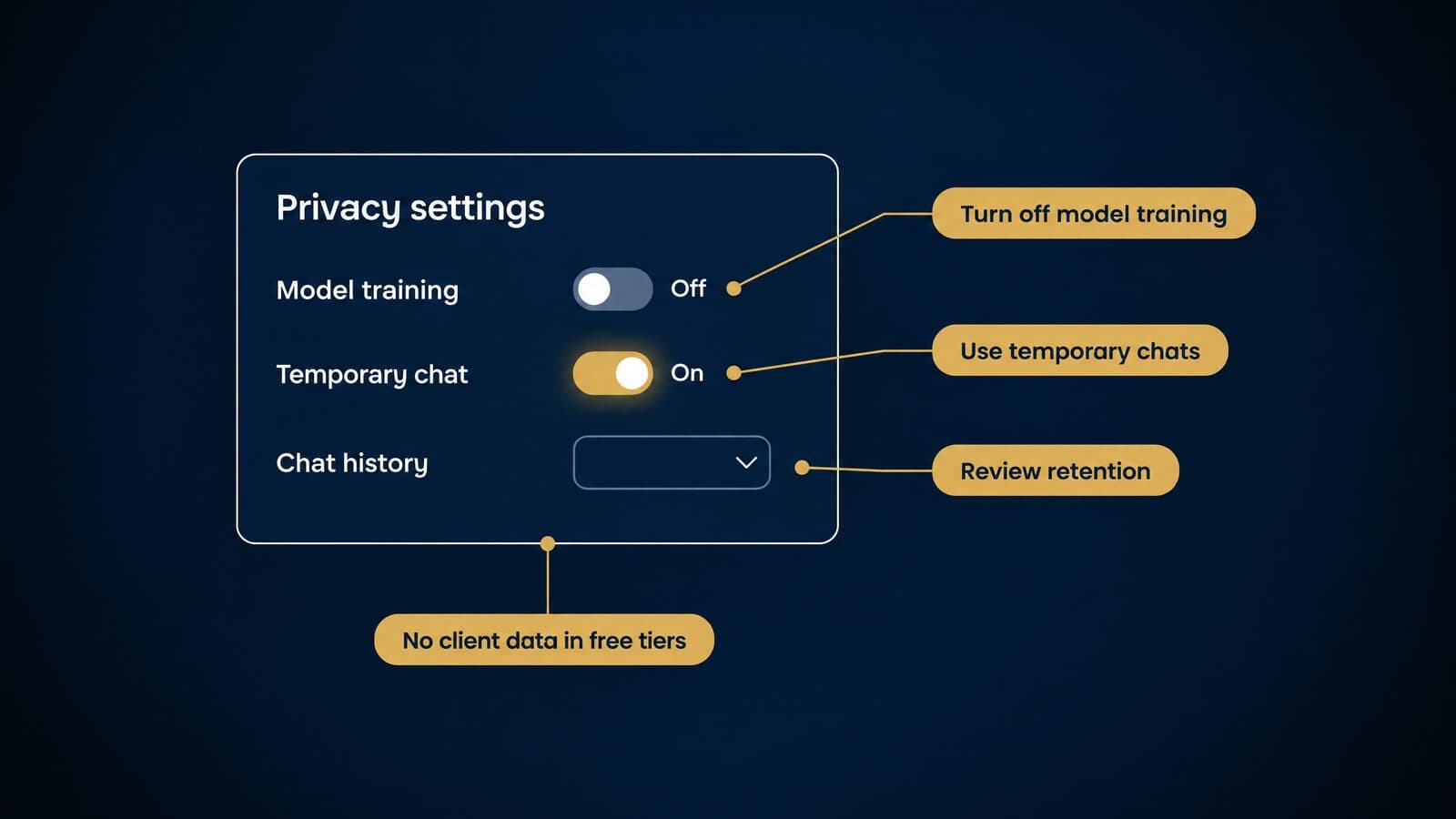
Plan terms last verified October 22, 2026. Confirm with each vendor.
| Plan (Oct 2026) | Trains on your data by default? | How to limit it | Retention notes | BAA? |
|---|---|---|---|---|
| ChatGPT Free and personal plans | Yes, unless the setting is off | Turn off "Improve the model for everyone"; use Temporary Chat | Temporary chats kept up to 30 days | Not for consumer plans |
| ChatGPT Business, Enterprise, Edu, for Healthcare | No | Admin controls | Customer-controlled for Enterprise, Healthcare, Edu | Healthcare workspace exists; BAA terms unconfirmed |
| Claude Free, Pro, Max | You choose; opt-out | Turn training off in privacy settings | 5 years if training allowed, else 30 days | No |
| Claude Team | No | Not needed | Not stated | Not covered (BAA is for API, Foundry, Enterprise) |
| Claude Enterprise | Consumer training terms don't apply | Custom retention controls | Covered models need 30-day retention | Yes, once a Primary Owner activates it |
| Gemini, personal Google Account | Some chats human-reviewed | Keep Activity off; temporary chats | 72 hours off; 18 months default; reviewed up to 3 years | Not verified |
| Microsoft 365 Copilot Chat, work account | No foundation-model training | Sign in with the work account | Covered by Microsoft's DPA and Product Terms | Not verified |
Sources for the table: OpenAI's data controls FAQ and enterprise privacy page; Anthropic's Claude pricing page, consumer terms update and BAA article; Google's Gemini privacy hub; and Microsoft's enterprise data protection documentation.
Which plans train on your inputs
The short answer from the table: consumer plans either train by default or let you choose, and business plans generally do not train by default. ChatGPT's free and personal plans train unless you switch the setting off. Claude's Free, Pro and Max plans list "Model training: Opt-out." Gemini on a personal account may send some chats to human reviewers, and Google's own help page says, "Please don't enter confidential information" you would not want a reviewer to see.
The bar opinions point the same way. North Carolina advises lawyers to "avoid inputting client-specific information into publicly available AI resources." California says reasonable efforts "require more than reliance on generalized marketing assurances."
In my view, turning off training in a consumer plan is a good habit, but it does not by itself make that plan a place for client files. Retention, human review and the lack of a business contract all remain. Training settings are one control, not the whole analysis.
How to turn off training in ChatGPT, Claude and Gemini
If staff use consumer plans for non-client work, set these controls on day one.
ChatGPT
- On the web, open the account menu and go to
Settings > Data controls > Improve the model for everyone, then turn it off. With it off, OpenAI says "your new conversations won't be used to train OpenAI models." - On iOS or Android, open the sidebar, tap the profile icon, then
Settings > Data controls, and turn off the same setting. - For one-off sensitive questions, use Temporary Chat. Those chats do not appear in history, are not used to improve models and are kept for up to 30 days.
Claude
- Under Anthropic's August 28, 2025 consumer terms, Free, Pro and Max users choose whether their chats can be used for training.
- Make that choice in your account's privacy settings and set it to not allow training.
- Know the retention trade: five years if you allow training, 30 days if you don't.
Gemini
- Turn Keep Activity off for your Google Account's Gemini activity.
- Use temporary chats for anything you would not want stored. With Keep Activity off, and for temporary chats, Google keeps chats for 72 hours.
- Remember that chats already selected for human review can be kept up to three years, disconnected from your account, and are not deleted when you delete your activity. The default auto-delete for stored activity is 18 months, adjustable to 3 or 36 months or indefinite.
Business and enterprise tiers
Business plans change the default. OpenAI says ChatGPT Business, Enterprise, Edu and for Healthcare workspaces are not used for training by default. Its enterprise privacy page, updated January 8, 2026, states "We do not train our models on your data by default," and lists a completed SOC 2 audit, AES-256 encryption at rest, TLS 1.2 or higher in transit, and customer-controlled retention for Enterprise, for Healthcare and Edu.
Claude Team states "No model training on your content by default," and Claude Enterprise adds "Custom data retention controls" and a "HIPAA-ready offering available." Microsoft says that for organizational Copilot use, "The prompts, responses, and data accessed through Microsoft Graph aren't used to train foundation models," with Microsoft acting as processor under its Data Protection Addendum and Product Terms.
Legal vendors make their own statements. Harvey lists SAML SSO, audit logs, IP allow-listing, data lifecycle management and SOC 2 Type II, among others. Legora states "SOC 2 Type II. ISO 27001. GDPR. HIPAA. Zero AI training on your data." Clearbrief says "Your data is never used for training large language models." Supio makes SOC 2 Type II, HIPAA and no-training statements. These are vendor claims. Following California's advice, ask for the contract terms, not the marketing page.
HIPAA, BAAs and medical records
Personal injury and mass tort files are full of medical records, so the HIPAA question comes up early. Start with the definition. Under 45 CFR § 160.103, a "business associate" includes a person who provides "legal, actuarial, accounting, consulting … services to or for such covered entity … where the provision of the service involves the disclosure of protected health information." A covered entity is a health plan, a health care clearinghouse, or a health care provider that transmits health information electronically in a covered transaction.
A plaintiff firm that holds records through its own client's authorization may be differently situated from a firm doing legal work for a hospital. Whether HIPAA applies to your firm's handling is a legal question for your own counsel. Rule 1.6 confidentiality duties apply either way, and so do any BAA or contract terms you sign.
The accurate statement about general AI tools is narrower than what you often read. Consumer and free tiers are not covered by a BAA and may train on inputs. Business offerings differ:
- Anthropic provides a BAA for "HIPAA-ready services, such as use of our first-party API, Claude in Microsoft Foundry, or Enterprise plans." A Primary Owner must activate HIPAA compliance and accept the BAA; "Standard Claude Enterprise plans do not include BAA coverage without action from a Primary Owner." Beta features such as Claude Design, Slides and Docs are excluded. Covered models require 30-day retention and are not available with zero data retention unless Anthropic expressly authorizes it. Anthropic signs no BAAs for consumer plans.
- OpenAI lists a ChatGPT for Healthcare workspace product. Whether and on what plans OpenAI signs BAAs could not be confirmed for this guide; ask OpenAI directly.
When a legal vendor calls itself "HIPAA compliant," treat that as the vendor's own description. HIPAA compliance is a set of obligations, not a government certificate. Ask for the signed BAA and the latest audit reports. For the intake side of the same problem, see our guide to HIPAA-compliant intake and records handling.
AI chats and attorney-client privilege
Only one primary ruling on AI chats and privilege was found. In United States v. Heppner, 25 Cr. 503 (JSR) (S.D.N.Y.), a criminal securities-fraud case with no finding of guilt, the court ruled from the bench on February 10, 2026 and filed a memorandum on February 17, 2026. It held that "certain written exchanges that defendant … had with a generative artificial intelligence ('AI') platform were not protected … by either the attorney-client privilege or the work product doctrine." The roughly 31 documents memorialized his communications "with the generative AI platform 'Claude,'" prepared on his own "without any suggestion from counsel." The court called it "a question of first impression nationwide."
That ruling is narrow. It does not say lawyer-directed AI use waives privilege. Harvey's chief legal officer argued on September 25, 2026 that "Using technology to handle client information does not waive privilege, so long as lawyers take reasonable steps to keep that information confidential"; that is a vendor's opinion. North Carolina leaves privilege to the courts. Some vendors say it themselves: Paxton's footer states that communications with it are "not by the attorney-client privilege or as work product."
The practical step is simple. Tell clients in writing not to paste case facts, medical details or their own notes into public AI tools.
A security due-diligence checklist
Model Rule 1.6(c)'s "reasonable efforts" standard is the reason to ask these questions before a tool touches client data.
- A current SOC 2 Type II report, not just the claim. Vendors stating one include Harvey, Legora and BriefCatch.
- ISO 27001 certification where the vendor claims it, as Legora does.
- Encryption at rest and in transit, stated specifically, the way OpenAI names AES-256 and TLS 1.2 or higher.
- A contractual no-training term, in the agreement, not only on the website.
- Retention and deletion terms, including how long prompts, outputs and uploaded files are kept.
- A current list of subprocessors, including which model providers handle your data.
- Where data is stored and processed.
- SSO, audit logs and IP allow-listing, the controls Harvey lists.
- A signed BAA if protected health information is involved, with any activation steps completed, as Anthropic requires.
- Breach notice timelines and data return or deletion when the contract ends.
With the rules, the verification routine and the data checks in place, the remaining work is choosing a tool that fits the firm and rolling it out without disrupting cases already in motion.
How to choose and roll out legal AI in your firm
Choose legal AI by task first, then by the data at risk, the accuracy controls and the price, and roll it out with a written policy and a pilot on a closed matter. Many firms skip the policy step: in 8am's 2026 Legal Industry Report, 43% of respondents said their firm had "no formal AI policy and no plans to create one," in a vendor-run survey of more than 1,300 legal professionals.
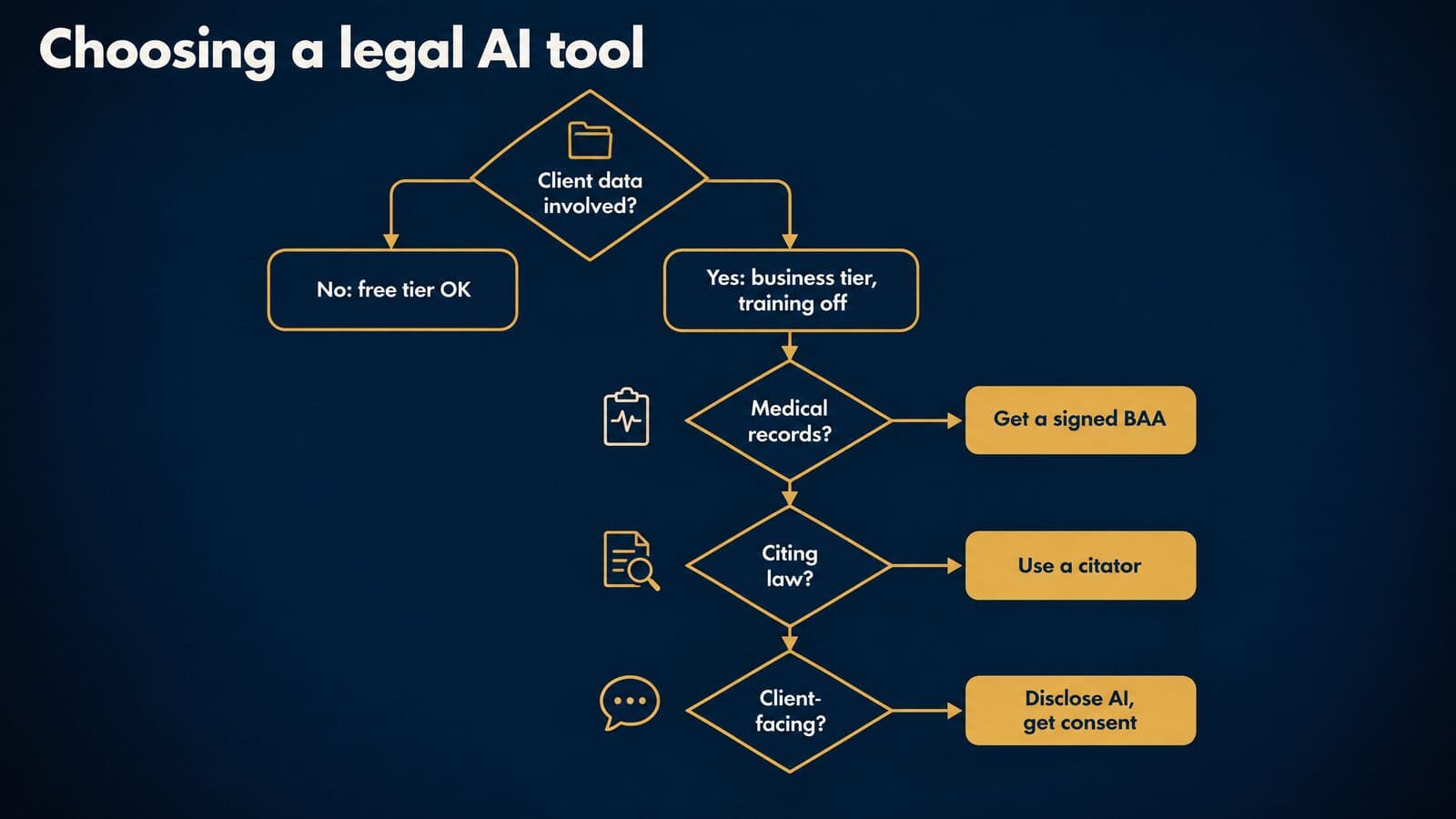
The same 8am survey found that only 9% of respondents work at a firm that has an AI policy and actively enforces it, while 24% said one is being developed. The top concerns respondents named were data security (46%), ethical issues (42%) and privilege (39%). Those three concerns map directly onto the decisions below. A firm that answers them in writing before buying anything avoids most of the problems described in the ethics and sanctions sections of this guide.
A decision tree for choosing a legal AI tool
Work through these six decisions in order. Each answer narrows the field before you look at features or demos.
- Will client or case information go into the tool? If no, a free tier is fine for public material such as statutes, published opinions and marketing drafts. If yes, use a business or enterprise plan that doesn't train on your data by default: OpenAI says it does not train on ChatGPT Business, Enterprise, Edu or Healthcare workspaces by default, Claude Team lists no model training on your content by default, and Microsoft's enterprise data protection keeps prompts out of foundation-model training.
- Will medical records or other protected health information go in? Use a vendor that will sign a business associate agreement, such as Anthropic's BAA for HIPAA-ready commercial services, and run your own Rule 1.6 confidentiality analysis on top of it.
- Will the output cite law? Use a platform backed by a citator, such as Lexis+ with Protégé, which includes Shepard's, and keep the citation verification workflow from the sanctions section no matter which tool you use.
- Will the tool talk to clients or prospects through chat or voice? Plan the AI disclosure that Florida Bar Ethics Opinion 24-1 describes and the prior express consent the FCC's 2024 ruling requires for AI-voice calls.
- Must it live inside Word, Microsoft 365 or your case management system? Check the integration before the price: BriefCatch runs as a Word add-in, Copilot Chat comes with eligible Microsoft 365 licenses, and Clio now owns vLex after closing the acquisition on November 10, 2025.
- Is the price published or by custom quote? Published prices let you budget this quarter. Custom quotes need a seat count, a matter or case volume estimate and a list of modules before the first call.
In my view, question 1 settles more buying decisions than any feature comparison, because it decides which tier you are even allowed to consider.
20 questions to ask a legal AI vendor
Send these questions in writing before a demo, and ask for written answers. A vendor that can't answer the data questions in writing is not ready for client files.
Data questions come first, because they decide whether the tool can touch client information at all.
- Does the contract say you don't train on our inputs and outputs by default?
- How long do you retain prompts, files and outputs, and how do we delete them?
- Which subprocessors handle our data?
- In which countries is our data stored and processed?
- Will you sign a business associate agreement, and on which plans?
Security questions confirm the controls behind the promises.
- Can we see your current SOC 2 Type II report?
- Do you hold ISO 27001 certification?
- Do you support single sign-on and keep audit logs we can export?
- How quickly will you notify us of a breach, and what does the notice include?
Accuracy questions tell you how much verification your staff must do.
- Which sources ground the answers: your own database, the open web or only our documents?
- Does the tool check citations against a citator before showing them?
- Do you publish any testing results, and who ran the tests?
- How often does the underlying legal content update?
Workflow questions cover the ease-of-use and integration problems that sink adoption.
- Does it work inside Word and Microsoft 365?
- Does it connect to our case or practice management system?
- Can we export outputs, prompts and logs in a usable format?
Commercial questions protect the budget after year one.
- Is there a seat minimum? Claude Enterprise lists a 20-seat minimum, for example.
- How do overages and credits work? Smith.ai charges per call over the plan, BriefCatch plans include a credit allotment, and Everlaw batch AI actions use credits.
- Will you cap renewal price increases in the contract?
- Will you run a trial on one of our real closed matters, and what are the exit terms and data-return steps if we leave?
A 30/60/90-day pilot on a closed matter
A pilot on a closed matter tests the tool on real documents without putting an open case at risk. Pick a matter where the work product already exists, so you can compare the tool's output to a known answer.
Days 1 to 30 set the baseline. Pick two tasks, for example a medical chronology and a set of discovery responses. Record how long each task took the last time it was done by hand and how many errors review caught. Confirm that the plan you are testing meets your data rules before any file is uploaded.
Days 31 to 60 run the tool in parallel with the normal process. The same staff do the work both ways. Log every error the reviewing lawyer finds in the AI output, by type: wrong date, missed record, invented citation, wrong party.
Days 61 to 90 compare and decide. Write the approved-use rule for each task that passed, and list the tasks that failed.
Track four metrics throughout: hours per task, errors caught in review, cycle time (records-to-demand turnaround is a good one for PI firms) and user adoption, meaning how many of the people given access actually used the tool each week. For an intake pilot, track lead-to-retainer rates with the same discipline you would use for intake conversion tracking. One billing rule applies during the pilot: ABA Formal Opinion 512 says a lawyer "may not charge a client to learn about how to use a GAI tool or service that the lawyer will regularly use for clients."
A one-page firm AI-use policy
A firm AI-use policy fits on one page if it covers these 12 sections. ABA 512 says lawyers with managerial authority must put effective measures in place so the firm conforms to the Rules when generative AI is used, so this is a partner-level document. This is general information, not legal advice, and state rules differ.
- Purpose and scope: which people, devices and accounts the policy covers, including personal accounts used for firm work.
- Approved tools by tier: a short list for public material, a short list for client work, and a rule that anything else needs approval.
- Red-line data: no client-specific information in public AI tools, following North Carolina 2024 Formal Ethics Opinion 1, and no protected health information without a signed BAA.
- Verification before use: every output is reviewed by a lawyer, since ABA 512 warns that relying on output without independent verification could violate Rule 1.1.
- Citations: every cited authority is pulled, read and checked in a citator before filing.
- Client communication and consent: informed consent before client information goes into a self-learning tool, no reliance on boilerplate engagement-letter language, and a Rule 1.4 check on disclosure.
- Billing: actual time for hourly work, reasonable flat and contingent fees, no billing for learning time, and general AI subscriptions treated as overhead, as the California State Bar's practical guidance describes.
- Supervision and training: who supervises staff and vendor use under Model Rule 5.3, and how often training happens.
- Recording and transcription tools: consent laws for recording calls and meetings vary by state, so check yours before turning on any AI notetaker.
- Client-facing AI: an AI disclaimer on chatbots and prior express consent for AI-voice calls.
- Incident reporting: who to tell, within what time, when client data goes into the wrong tool or a bad output reaches a client or court.
- Review date: a fixed date, at least every six months, because plans, prices and terms change that often.
Training and an internal AI champion
Training is part of competence. Comment 8 to Model Rule 1.1 says a lawyer should keep abreast of "the benefits and risks associated with relevant technology," and ABA 512 bars billing clients for the time spent learning a tool the lawyer will use regularly. Treat training as a firm cost.
Name one internal AI champion. That person maintains the approved-tool list, the shared prompt library and the error log from the pilot, and is the first call when someone isn't sure whether a task is allowed. In my view, short recurring sessions built around real errors from the log teach more than one launch training. Firms can host the material on whatever general learning platform they already use; the platform matters less than the error log behind it.
When to move from free to paid tools
Move from a free tool to a paid business tier when any one of these triggers applies.
- You need to put client information into the tool. North Carolina's opinion advises against client-specific information in public AI, and ABA 512 requires informed consent before client information goes into a self-learning tool.
- You hit usage, page or upload caps. ChatGPT Free carries separate limits on uploads, images and voice, and Humata's free plan covers 60 pages a month.
- You need team administration, audit logs or single sign-on. Harvey's homepage lists SAML SSO and audit logs as examples of the controls enterprise platforms sell.
- You need answers grounded in an authoritative database with a citator.
- You need a signed BAA for medical records.
- You want a contract with a no-training term rather than a setting a user can switch back on.
Free tools are for exploration and public material. Paid business tiers are for client work.
Legal AI costs, ROI and adoption data
As of October 2026, most personal AI plans run from free to about $20 a month (heavy-use tiers start near $100), standard team seats cost about $20 to $30, legal-specific tools with published prices run $20 to $499 a month, AI receptionist plans cost $300 to $2,100 a month, and enterprise legal platforms are priced by custom quote.
What legal AI costs in October 2026
Prices and plan terms last verified October 22, 2026. Confirm with each vendor before you buy.
| Tier | Examples | Published price (Oct 2026) |
|---|---|---|
| Free tiers | ChatGPT, Claude, Gemini, Cetient, CourtListener | $0 with caps |
| Personal paid | Google AI Plus, Claude Pro, Google AI Pro | $4.99 to $20 a month |
| Heavy personal | Claude Max, Google AI Ultra | From $99.99 a month |
| Team and business seats | Claude Team, Gemini Enterprise | $20 to $30 per seat a month |
| Legal-specific, published | Cetient, LawDroid, BriefCatch, Briefpoint, Clearbrief, Paxton | $20 to $499 per user a month |
| AI receptionist | Smith.ai | $300 to $2,100 a month |
| Enterprise legal platforms | Harvey, Legora, CoCounsel Legal, EvenUp | Custom quote |
The sources for these ranges, as of October 2026: Claude pricing, Google's AI subscriptions page, Cetient, CourtListener, LawDroid, BriefCatch, Briefpoint, Clearbrief, Paxton, Smith.ai and CoCounsel Legal. ChatGPT's paid prices are on OpenAI's pricing page and Microsoft 365 Copilot add-on prices are on Microsoft's site; neither was verified for this guide, so check both directly.
Hidden costs to budget for
The sticker price is rarely the full cost. Budget for these as well, as of October 2026:
- Usage limits on plans that look unlimited. Claude's pricing page says "Usage limits apply," and ChatGPT Free caps uploads and images separately.
- Per-page overages: Humata charges for pages beyond the plan allowance.
- AI credits: BriefCatch's Individual plan includes 650 credits and its Pro plan 700, and Everlaw batch actions draw on credits.
- Per-call overages: Smith.ai charges $8.50 to $11.50 per call over the plan.
- Seat minimums: Claude Enterprise requires 20 seats and BriefCatch Pro requires 5.
- Annual prepayment: Briefpoint bills $1,800 a year per attorney and Paxton's annual plan is $2,999 per user.
- Tax: Claude's prices "don't include applicable tax."
- Staff time to learn the tool, which ABA 512 says you can't bill to clients.
ROI math for a contingency-fee firm
Billable-hour ROI doesn't fit a contingency practice, because saved hours don't show up as a smaller invoice. Measure cost per case and capacity instead.
The formula in plain words: take the monthly tool cost and divide it by the number of cases worked that month. Then compare that per-case cost with the paralegal or attorney hours the tool frees on each case, and with what those hours produce: more cases handled per person, faster demand packages, earlier settlements. Fold the result into your cost per signed retainer, since tool spend is part of what each signed case costs to work.
A worked example, with hypothetical inputs; replace them with your own. Five Claude Team standard seats billed monthly cost 5 × $25 = $125 a month as of October 2026. If the firm works [N] files a month, the tool costs $125 ÷ [N] per file. If your pilot showed the tool saving [H] hours per file, set that against the loaded hourly cost of the staff involved. Use a tool such as the MVA case value estimator to sanity-check what extra capacity is worth on the cases you actually take.
Survey numbers are context, not a forecast. In 8am's report, 38% of respondents said AI saves them 1 to 5 hours a week, a self-reported figure from a vendor survey. Clio's 2025 Legal Trends release says firms with wide AI adoption are "nearly 3x more likely to report revenue growth," which is a vendor-reported correlation, not proof that AI caused the growth. No neutral public dataset measures AI ROI for contingency-fee firms, so your own pilot numbers are the best evidence you will have.
How many lawyers use AI
Adoption numbers depend on who was surveyed, so read the population column before quoting any figure.
| Finding | Population | Source |
|---|---|---|
| 79% use AI in some capacity; 25% widely or universally | 1,028 U.S. legal professionals, June 2024 | Clio 2024 |
| 19% using AI in 2023 | Law firms (a different population) | Clio 2024 |
| Nearly 70% use general-purpose AI, up from 31% | 1,300+ legal professionals, Sept. to Oct. 2025 | 8am 2026 |
| 42% use legal-specific AI, up from 21% | Same | 8am 2026 |
| Firm-wide adoption 34%, up from 21% | Same | 8am 2026 |
| Research 58%, drafting 49%, summarization 47%, correspondence 43% | Legal-specific AI users | 8am 2026 |
| Nearly 50% expect billing to change; 6% see client price-cut requests | Same | 8am 2026 |
Sources: Clio's 2024 Legal Trends highlights and the 8am 2026 Legal Industry Report. Both publishers sell legal software, so treat these as vendor research.
Three misreadings are common. Clio's 79% describes surveyed legal professionals, including support staff, using AI "in some capacity"; it is not 79% of law firms and it is not daily use. Comparing it with the 19% figure for 2023 mixes two populations, firms and individuals, so a "19% to 79%" jump overstates the change. The 8am report also found that 94% of respondents reported measurable benefits while 6% saw no productivity gains, which tells you about perception among people already using the tools.
Legal AI market timeline, 2023 to 2026
The market moved fast between 2023 and 2026: sanctions opinions and bar guidance arrived alongside acquisitions and large funding rounds.
| Date | Event |
|---|---|
| Jun. 22, 2023 | Mata v. Avianca sanctions opinion |
| Aug. 17, 2023 | Thomson Reuters closes Casetext acquisition |
| Jan. 19, 2024 | Florida Bar Ethics Opinion 24-1 |
| Feb. 8, 2024 | FCC: AI voices are "artificial" under the TCPA |
| Jul. 29, 2024 | ABA Formal Opinion 512 |
| Nov. 1, 2024 | North Carolina 2024 FEO 1 |
| Jan. 24, 2025 | 11th Circuit vacates one-to-one consent provision |
| Feb. 11, 2025 | FTC finalizes DoNotPay order |
| Feb. 24, 2025 | Wadsworth v. Walmart sanctions order |
| Aug. 28, 2025 | Anthropic consumer training terms |
| Sept. 30, 2025 | Eve at $1 billion valuation, per Reuters |
| Oct. 7, 2025 | EvenUp $150 million Series E |
| Oct. 29, 2025 | Everlaw no-cost single AI actions |
| Nov. 10, 2025 | Clio closes vLex acquisition |
| Feb. 2026 | Lexis+ AI renamed Lexis+ with Protégé |
| Feb. 17, 2026 | Heppner privilege memorandum |
| Mar. 5, 2026 | 8am 2026 Legal Industry Report |
| Sept. 9, 2026 | Harvey $550 million at $15.5 billion |
| Oct. 21, 2026 | Legora $550 million at $8.8 billion |
| Nov. 20, 2026 | Revised OpenAI usage policies take effect |
Primary sources for the timeline: the Mata sanctions opinion, Thomson Reuters' Casetext release, the 11th Circuit opinion, the FTC's DoNotPay release, the Wadsworth order, Anthropic's consumer terms update, Eve's press page, EvenUp's announcement, the Heppner memorandum, Harvey's funding post, Legora's announcement and OpenAI's usage policies. Consolidation and funding move this quickly, so dated prices and product names go stale within months.
Sources and methodology
This page was researched from primary sources, and every fact on it was checked on October 22, 2026. Prices, plan names and data terms change often, so treat each figure as a dated snapshot.
Every price, plan term, rule and statistic was read on its primary source on October 22, 2026, and Google US results for the five target queries were reviewed the same day. Some publishers, including the ABA, the Florida Bar and Clio, block automated reading; their pages were read from Wayback Machine captures of the publisher's own URLs, and readers should spot-check the live pages.
The sources fall into six groups:
- ABA Formal Opinion 512 and the ABA Model Rules of Professional Conduct.
- State bar opinions and guidance from Florida, California, North Carolina and Texas.
- Court records (Mata, Wadsworth and Heppner) read through CourtListener.
- Federal sources: the FCC, the 11th Circuit, the FTC, the Legal Services Corporation, NIST and the eCFR.
- Vendor pricing, privacy and press pages, cited with attribution.
- Vendor-run surveys from Clio and 8am, labeled as vendor research with their populations.
For context we also read the two rankings.io posts this page replaces and the leading guides from Clio, Thomson Reuters, Spellbook, Darrow, Eve and Justee. We did no hands-on benchmark testing, no accuracy scoring and no vendor briefings, and every vendor number is attributed to the vendor.
Mass Tort Marketing Agency sells personal injury and mass tort lead generation, intake and marketing. It sells no AI software and received nothing for any listing on this page. Prices and plans are re-checked quarterly, OpenAI's usage policy will be re-checked after it takes effect on November 20, 2026, and any "Not verified" cell is filled only after confirmation on the vendor's own page.